Image Extender API - AI Expand, Outpaint & Uncrop Photos: Pricing, Documentation
by Pixazo
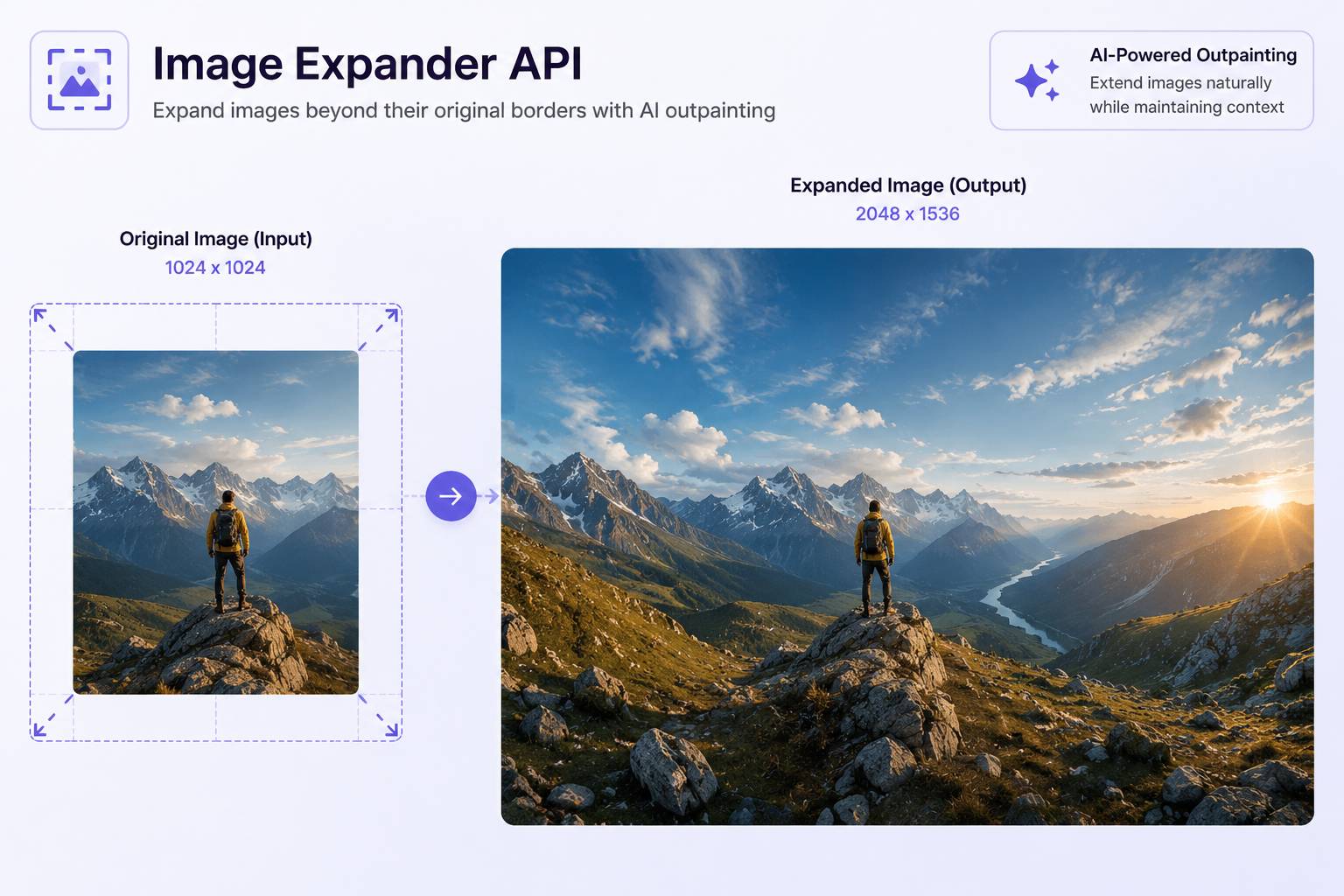
Extend any image past its original borders through a single API call. Expand directionally with expand_left, expand_right, expand_top and expand_bottom (0-700 pixels each), or uniformly with zoom_out_percentage (default 20). An optional prompt guides what the model fills into the new area — continuing sky, landscape, background or subject rather than mirroring or stretching pixels. Output arrives as PNG (default), JPEG, JPG or WEBP with the original detail, lighting and composition preserved and the extended area seamlessly matched to it.
Models Version
Get $5 Free Credit on First Payment
No strings attached — add funds and get $5 bonus instantly
Image Extender 1.0 API Documentation
https://gateway.pixazo.ai/image-outpaint/v1Authentication
All requests require an API key passed via header.
| Header | Type | Required | Description |
|---|---|---|---|
| Ocp-Apim-Subscription-Key | string | Yes | Your API subscription key |
Image Outpaint generate request
Request Code
POST https://gateway.pixazo.ai/image-outpaint/v1/image-outpaint-request
Content-Type: application/json
Cache-Control: no-cache
Ocp-Apim-Subscription-Key: YOUR_API_KEY

{
  "image_url": "https://pub-582b7213209642b9b995c96c95a30381.r2.dev/doc-assets/images/input.jpg",
  "zoom_out_percentage": 20,
  "num_images": 1,
  "enable_safety_checker": true,
  "output_format": "png"
}
import requests
url = "https://gateway.pixazo.ai/image-outpaint/v1/image-outpaint-request"
headers = {
"Content-Type": "application/json",
"Cache-Control": "no-cache",
"Ocp-Apim-Subscription-Key": "YOUR_API_KEY"
}
data = {
"image_url": "https://pub-582b7213209642b9b995c96c95a30381.r2.dev/doc-assets/images/input.jpg",
"zoom_out_percentage": 20,
"num_images": 1,
"enable_safety_checker": true,
"output_format": "png"
}
response = requests.post(url, json=data, headers=headers)
print(response.json())const url = "https://gateway.pixazo.ai/image-outpaint/v1/image-outpaint-request";
const headers = {
"Content-Type": "application/json",
"Cache-Control": "no-cache",
"Ocp-Apim-Subscription-Key": "YOUR_API_KEY"
};
const data = {
"image_url": "https://pub-582b7213209642b9b995c96c95a30381.r2.dev/doc-assets/images/input.jpg",
"zoom_out_percentage": 20,
"num_images": 1,
"enable_safety_checker": true,
"output_format": "png"
};
fetch(url, {
method: "POST",
headers: headers,
body: JSON.stringify(data)
})
.then(response => response.json())
.then(data => console.log(data));curl -X POST "https://gateway.pixazo.ai/image-outpaint/v1/image-outpaint-request" \
-H "Content-Type: application/json" \
-H "Cache-Control: no-cache" \
-H "Ocp-Apim-Subscription-Key: YOUR_API_KEY" \
--data-raw '{
"image_url": "https://pub-582b7213209642b9b995c96c95a30381.r2.dev/doc-assets/images/input.jpg",
"zoom_out_percentage": 20,
"num_images": 1,
"enable_safety_checker": true,
"output_format": "png"
}'Output
{
  "request_id": "image-outpaint_019dxxxx-xxxx-xxxx-xxxx-xxxxxxxxxxxx",
  "status": "QUEUED",
  "polling_url": "https://gateway.pixazo.ai/v2/requests/status/image-outpaint_019dxxxx-xxxx-xxxx-xxxx-xxxxxxxxxxxx"
}Webhook (Optional)
Add the X-Webhook-URL header to your generate request to receive a POST callback instead of polling.
X-Webhook-URL: https://your-server.com/webhook/callbackRequest Parameters - Image Outpaint generate request
| Parameter | Required | Type | Default | Allowed values / range | Description |
|---|---|---|---|---|---|
| image_url | Yes | string | — | — | URL of the input image to outpaint. Must be publicly accessible. |
| expand_left | No | integer | 0 | 0–700 | Number of pixels to add as a black margin on the left side before outpainting. |
| expand_right | No | integer | 0 | 0–700 | Number of pixels to add as a black margin on the right side before outpainting. |
| expand_top | No | integer | 0 | 0–700 | Number of pixels to add as a black margin on the top side before outpainting. |
| expand_bottom | No | integer | 0 | 0–700 | Number of pixels to add as a black margin on the bottom side before outpainting. |
| zoom_out_percentage | No | float | 20 | ≥ 0 | Percentage to scale down the image (e.g., 50 = image becomes 50% of original size). Black margins fill the remaining space. |
| prompt | No | string | "" | — | Optional text prompt to guide content generation in the expanded areas (e.g., "a forest extending to the left"). |
| seed | No | integer | — | — | Random seed for reproducible results. If omitted, a random seed is used. |
| num_images | No | integer | 1 | ≥ 1 | Number of output images to generate. |
| enable_safety_checker | No | boolean | true | — | Enable or disable the NSFW content safety filter. |
| sync_mode | No | boolean | false | — | If true, the request blocks until generation is complete. If false (default), returns immediately with a request_id. |
| output_format | No | string | "png" | "png", "jpeg", "jpg", "webp" | Output image format. |
Example Request
{
  "image_url": "https://pub-582b7213209642b9b995c96c95a30381.r2.dev/doc-assets/images/input.jpg",
  "zoom_out_percentage": 20,
  "num_images": 1,
  "enable_safety_checker": true,
  "output_format": "png"
}
Response
{
  "request_id": "image-outpaint_019dxxxx-xxxx-xxxx-xxxx-xxxxxxxxxxxx",
  "status": "QUEUED",
  "polling_url": "https://gateway.pixazo.ai/v2/requests/status/image-outpaint_019dxxxx-xxxx-xxxx-xxxx-xxxxxxxxxxxx"
}
Request Headers
| Header | Value |
|---|---|
| Content-Type | application/json |
| Cache-Control | no-cache |
| Ocp-Apim-Subscription-Key | YOUR_API_KEY |
Response Handling
Common status codes.
| Code | Meaning |
|---|---|
| 202 | Accepted — Request queued |
| 400 | Bad Request |
| 401 | Unauthorized |
| 402 | Insufficient Balance |
| 403 | Forbidden |
| 429 | Too Many Requests |
| 500 | Internal Server Error |
Error Responses
Queue system errors and model validation errors.
Queue System Errors
// 402 — Insufficient balance
{
  "error": "Insufficient Balance",
  "message": "Your wallet does not have enough balance."
}
// 400 — Model not found
{
"error": "Model not found",
"message": "Model 'image-outpaint' not found or is disabled"
}Error via Status/Webhook
{
  "request_id": "image-outpaint_019dxxxx-xxxx-xxxx-xxxx-xxxxxxxxxxxx",
  "status": "ERROR",
  "model_id": "image-outpaint",
  "error": "Description of the error",
  "output": null
}
Retrieving Results
Poll the universal status endpoint to check progress and retrieve results.
Endpoint
GET https://gateway.pixazo.ai/v2/requests/status/{request_id}
Ocp-Apim-Subscription-Key: YOUR_API_KEY
cURL Example
curl -H "Ocp-Apim-Subscription-Key: YOUR_API_KEY" \
  "https://gateway.pixazo.ai/v2/requests/status/image-outpaint_019dxxxx-xxxx-xxxx-xxxx-xxxxxxxxxxxx"
Response (Completed)
{
  "request_id": "image-outpaint_019dxxxx-xxxx-xxxx-xxxx-xxxxxxxxxxxx",
  "status": "COMPLETED",
  "model_id": "image-outpaint",
  "error": null,
  "output": {
    "media_url": ["https://pub-582b7213209642b9b995c96c95a30381.r2.dev/v1/image-outpaint_019dxxxx/output.png"],
    "media_type": "image/png"
  },
  "created_at": "2026-03-31T10:00:00.000Z",
  "updated_at": "2026-03-31T10:00:15.000Z",
  "completed_at": "2026-03-31T10:00:15.000Z"
}
Response Fields
| Field | Type | Description |
|---|---|---|
| request_id | string | Unique request identifier |
| status | string | QUEUED, PROCESSING, COMPLETED, FAILED, or ERROR |
| model_id | string | Model that processed the request |
| error | string|null | Error message if failed |
| output.media_url | array | URLs to generated media (R2 CDN) |
| output.media_type | string | MIME type of the output |
| created_at | string | When request was created |
| completed_at | string | When request completed |
| polling_url | string | Status URL (initial response only) |
Status Values
| Status | Description |
|---|---|
| QUEUED | Request accepted, waiting to be processed |
| PROCESSING | Being processed by the model |
| COMPLETED | Done — output contains the result |
| FAILED | Failed — check error field |
| ERROR | System error — not charged |
Status Flow
QUEUED → PROCESSING → COMPLETED
                    → FAILED
                    → ERROR
Typical Workflow
- Send a generate request to the API endpoint
- Save the
request_idfrom the response - Poll every 5-10 seconds:
GET /v2/requests/status/{request_id} - When
statusis"COMPLETED", download fromoutput.media_url
Tip: Use X-Webhook-URL header to get a callback instead of polling.
Image Extender 1.0 API Pricing
| Resolution | Price (USD) |
|---|---|
| Per extended image | $0.12 |
⚡ Performance
Live usage measured on Pixazo's gateway, split by model version. Generation time is how long a generation takes end-to-end (lower is better). Success rate is the percent of generations that complete (higher is better).
〰 Uptime
Percent of generations that succeeded over the selected period, per model version.