AI Image Editor - Edit photos and images with AI
Easily Edit, Enhance, and Retouch Photos Online with Pixazo’s Free AI Image Editor. Try for Free!
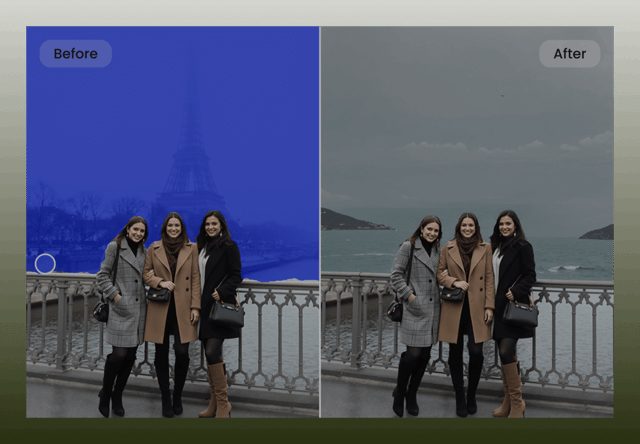
AI Image Editor for Intelligent Visual Editing
Modern images rarely come ready for use straight out of the camera or design tool. Background distractions, unwanted objects, lighting inconsistencies, and minor visual flaws can significantly reduce the effectiveness of an image—especially in marketing, ecommerce, social media, and professional design workflows. Traditional image editing tools require manual effort, advanced skills, and time-consuming workflows that slow down production and limit scalability.
Pixazo’s AI Image Editor simplifies image editing by using artificial intelligence to understand the content of an image, not just its pixels. Instead of relying on manual selection tools or complex layers, the editor intelligently detects subjects, backgrounds, objects, lighting, and textures. This allows users to edit images through simple actions—such as removing objects, changing backgrounds, refining details, or adjusting visual elements—while maintaining realism, consistency, and visual balance. The result is clean, professional-quality edits without the overhead of traditional design software.
Why Pixazo AI Image Editor Works Differently?
Most image editors depend heavily on manual tools like brushes, masks, and layers, which require precision and design expertise. Even AI-assisted tools often produce inconsistent results, leaving visible artifacts, unnatural edges, or mismatched lighting. Pixazo takes a more advanced approach by combining computer vision with generative AI models trained to understand context, depth, and visual relationships within an image.
Pixazo’s AI Image Editor focuses on preserving realism while making edits feel seamless. Every change is applied with awareness of lighting, perspective, textures, and surrounding elements, ensuring the final image looks naturally edited rather than artificially modified. This makes Pixazo suitable for professional workflows where image authenticity is critical, including ecommerce listings, brand assets, marketing creatives, and visual content at scale.
1. Context-Aware Object Removal
Pixazo intelligently removes unwanted objects, people, or distractions from images by analyzing the surrounding environment. Instead of leaving blurred patches or repeating textures, the AI reconstructs the background naturally, ensuring the removed area blends seamlessly with the rest of the image.
2. Intelligent Background Editing and Replacement
The editor can isolate subjects accurately and modify or replace backgrounds without harsh edges or cutout artifacts. Lighting, shadows, and depth are preserved so the subject remains visually grounded in the new environment.
3. Natural Detail Enhancement and Refinement
Pixazo enhances image details selectively, refining edges, textures, and focal areas without introducing noise or over-processing. This ensures improvements feel subtle and realistic rather than exaggerated.
4. Seamless Image Expansion and Reframing
Images can be expanded beyond their original boundaries using AI-powered content generation. Pixazo fills in missing areas intelligently, maintaining consistent textures, perspective, and visual flow—ideal for resizing images for different layouts or formats.
5. Lighting and Visual Balance Adjustments
The AI editor can correct uneven lighting, improve contrast, and balance tones across an image while preserving natural color relationships. This avoids the flat or overly dramatic look often caused by aggressive filters.
6. Browser-Based Editing With No Design Software
Pixazo’s AI Image Editor runs entirely in the browser. Users can upload, edit, and export images instantly without installing heavy software or managing complex editing environments.
Professional Image Editing Without Visual Artifacts
Pixazo’s AI Image Editor is designed to modify images while protecting visual integrity. Instead of applying generic filters or destructive edits, the AI evaluates image structure, depth, and texture before making changes. This approach ensures edits remain consistent with the original image style and purpose.
Whether adjusting product photos, cleaning up portraits, or refining marketing visuals, Pixazo maintains realistic textures, accurate lighting, and natural proportions—making edited images suitable for both digital and print use.
Use Cases of AI Image Editor
Pixazo AI Image Editor is built for teams and individuals who need fast, reliable image editing without sacrificing quality. It adapts to a wide range of industries and creative workflows, enabling scalable image refinement with minimal effort.
How do you edit a photo with AI?
Upload your image, tell Pixazo’s AI what to change in plain language, and download the edited result — no layers, masks or manual selections required. Here is the full process:
- Upload your imageOpen the AI image editor and add the photo you want to edit.
- Describe your editTell the AI what to change — remove objects, retouch, enhance colours, swap the background or restyle — in plain words.
- Download the resultReview the edited image and download it in high quality, ready to use.
Last updated: June 2026

