
MOSS Image API: Pricing, Documentation
by OpenMOSS
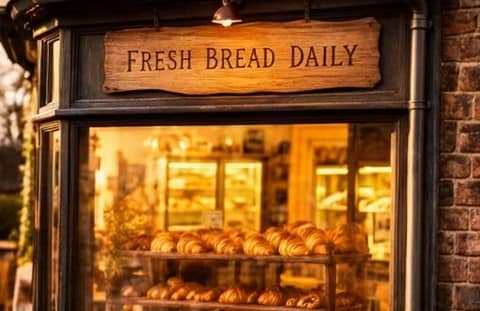
Moss Image API is an asynchronous text-to-image interface designed to programmatically generate high-quality still graphics from natural language text prompts. The platform stands out for its specialized ability to accurately render written text directly within the generated images in both English and Chinese, making it ideal for creating posters, storefront visuals, and signed graphics. Users can customize outputs by selecting from multiple preset dimensions up to a clean high-definition resolution, while fine-tuning creative control through negative prompting, guidance scaling, and optional layout-expanding features.
Models Version
Get 10% Cashback on Your First Payment (up to $500)
Add funds and get 10% cashback on your first payment (up to $500).
MOSS Image API Documentation
Generate an image from text with MOSS Image: describe it in prompt, including any words you want written in the image, and, optionally, choose one of six preset sizes in image_size. Asynchronous: submit returns a request_id; poll the status endpoint until the request is COMPLETED, then download the image from output.media_url.
POST https://gateway.pixazo.ai/moss-image/v1/text-to-imageAuthentication
All requests require an API key passed via header.
| Header | Type | Required | Description |
|---|---|---|---|
| Ocp-Apim-Subscription-Key | string | Yes | Your API subscription key |
Text to Image - MOSS Image
Request Code
POST https://gateway.pixazo.ai/moss-image/v1/text-to-image
Content-Type: application/json
Ocp-Apim-Subscription-Key: YOUR_SUBSCRIPTION_KEY

{
  "prompt": "A bakery storefront at dawn with a hand-painted sign that reads FRESH BREAD DAILY",
  "image_size": "square_hd"
}
import requests
url = "https://gateway.pixazo.ai/moss-image/v1/text-to-image"
headers = {
"Content-Type": "application/json",
"Ocp-Apim-Subscription-Key": "YOUR_SUBSCRIPTION_KEY"
}
data = {
"prompt": "A bakery storefront at dawn with a hand-painted sign that reads FRESH BREAD DAILY",
"image_size": "square_hd"
}
resp = requests.post(url, json=data, headers=headers)
print(resp.json())const res = await fetch("https://gateway.pixazo.ai/moss-image/v1/text-to-image", {
method: "POST",
headers: {
"Content-Type": "application/json",
"Ocp-Apim-Subscription-Key": "YOUR_SUBSCRIPTION_KEY"
},
body: JSON.stringify({
"prompt": "A bakery storefront at dawn with a hand-painted sign that reads FRESH BREAD DAILY",
"image_size": "square_hd"
})
});
console.log(await res.json());curl -X POST 'https://gateway.pixazo.ai/moss-image/v1/text-to-image' \
-H 'Content-Type: application/json' \
-H 'Ocp-Apim-Subscription-Key: YOUR_SUBSCRIPTION_KEY' \
--data-raw '{"prompt": "A bakery storefront at dawn with a hand-painted sign that reads FRESH BREAD DAILY", "image_size": "square_hd"}'Output
{
  "request_id": "moss-image_019dxxxx-xxxx-xxxx-xxxx-xxxxxxxxxxxx",
  "status": "QUEUED",
  "polling_url": "https://gateway.pixazo.ai/v2/requests/status/moss-image_019dxxxx-xxxx-xxxx-xxxx-xxxxxxxxxxxx"
}Webhook (Optional)
Instead of polling, you can receive a Webhook callback when the request reaches a terminal state. Provide a Webhook URL via header on the submit request.
| Header | Required | Description |
|---|---|---|
| X-Webhook-URL | To enable | HTTPS URL to receive the Webhook callback. |
| X-Webhook-Mode | No | terminal (default, one callback on COMPLETED/ERROR) or sync (per-poll callbacks). |
Example: enable Webhook
curl -X POST 'https://gateway.pixazo.ai/moss-image/v1/text-to-image' \
  -H 'Content-Type: application/json' \
  -H 'Ocp-Apim-Subscription-Key: YOUR_SUBSCRIPTION_KEY' \
  -H 'X-Webhook-URL: https://your-server.com/webhook' \
  --data-raw '{"prompt": "A bakery storefront at dawn with a hand-painted sign that reads FRESH BREAD DAILY", "image_size": "square_hd"}'
Callback Payload (success)
{
  "request_id": "moss-image_019dxxxx-xxxx-xxxx-xxxx-xxxxxxxxxxxx",
  "status": "COMPLETED",
  "model_id": "moss-image",
  "error": null,
  "output": {
    "media_url": [
      "https://pub-582b7213209642b9b995c96c95a30381.r2.dev/v1/{request_id}/output.jpg"
    ],
    "media_type": "image/jpeg"
  },
  "created_at": "2026-10-09T10:04:54.387Z",
  "completed_at": "2026-10-09 10:06:21"
}
Failure callback shape
{
  "request_id": "moss-image_019dxxxx-xxxx-xxxx-xxxx-xxxxxxxxxxxx",
  "status": "ERROR",
  "model_id": "moss-image",
  "error": "Description of the failure"
}
Delivery semantics
- terminal mode: one Webhook callback when the request is COMPLETED or ERROR.
- sync mode: a Webhook callback on every poll while the request is processing (status
PROCESSING), plus the final COMPLETED/ERROR callback. - Callbacks are idempotent on
request_id— de-duplicate on it. - Respond
200within a few seconds; the Webhook endpoint must be HTTPS.
Request Parameters
| Parameter | Required | Type | Default | Allowed values / range | Description |
|---|---|---|---|---|---|
prompt | Yes | string | — | Non-empty text, up to 16384 characters | A description of the image, including any words you want written in it. |
negative_prompt | No | string | Empty | Text, up to 16384 characters | What to keep out of the image. |
enable_prompt_expansion | No | boolean | true | true, false | Plan a layout from your prompt before the image is made, keeping the words you ask for. |
image_size | No | string | "square_hd" | square_hd, square, portrait_4_3, portrait_16_9, landscape_4_3, landscape_16_9 | The output size, one of six presets. The size sets the amount billed (How Billing Is Measured lists the megapixels of each preset). |
num_inference_steps | No | integer | 50 | Whole number from 1 to 100 | Number of denoising steps. It does not change the amount billed. |
guidance_scale | No | number | 3 | Number from 0 to 10 | How closely the image follows the prompt. |
seed | No | integer | — | Whole number from 0 to 2147483647 | The same seed and the same request give the same image again; a new seed gives a new variation. |
output_format | No | string | "jpeg" | jpeg, png, webp | The file format of the image. |
enable_safety_checker | No | boolean | true | true | The safety check of the output. It is always on: send true or leave it out. |
Good to know
- Each request returns one image.
batch_size,num_images,number_of_images,nandcountare rejected — send one request per image. - This API makes still images and has no length setting.
duration,seconds,num_frames,frames_per_secondandmusic_length_msare rejected. - Send every field at the top level of the JSON body;
parameters,input,contentandtextare rejected. image_urls,image_urlandimageare rejected: this API makes images from a text prompt only.- Leave
image_sizeout forsquare_hd, or choose another of the six preset names. Custom widths and heights are not available on this API. enable_safety_checkeris always on: sendtrueor leave it out.- Use the JSON types shown:
prompt,negative_prompt,image_sizeandoutput_formatare strings,num_inference_stepsandseedare whole numbers,guidance_scaleis a number, andenable_prompt_expansionandenable_safety_checkeraretrueorfalse. - Omit a field instead of sending
null. - Results are always returned as a URL in
output.media_url;sync_modeis accepted only asfalse. - Webhooks are set with the
X-Webhook-URL/X-Webhook-Modeheaders;webhook_url,webhook_modeandcallback_urlin the JSON body are rejected. streamis not supported: the result is delivered when the job completes.
Output Size and Text
- Choose one of six preset names in
image_size; leave it out forsquare_hd. Custom widths and heights are not available on this API. - The size sets the amount billed: see How Billing Is Measured below.
- To write words in the image, put them in the prompt, for example
a sign that reads OPEN LATE.
Example: a portrait poster with a negative prompt
{
  "prompt": "A travel poster for a mountain lake at sunrise with the title LAKE DAYS in large letters",
  "negative_prompt": "blurry, low quality",
  "image_size": "portrait_4_3",
  "output_format": "png"
}
Example: repeat an image with a seed
{
  "prompt": "A neon sign that reads OPEN LATE above a small noodle shop at night",
  "image_size": "landscape_4_3",
  "seed": 42
}
Example Request
{
  "prompt": "A bakery storefront at dawn with a hand-painted sign that reads FRESH BREAD DAILY",
  "image_size": "square_hd"
}
Example Response
{
  "request_id": "moss-image_019dxxxx-xxxx-xxxx-xxxx-xxxxxxxxxxxx",
  "status": "QUEUED",
  "polling_url": "https://gateway.pixazo.ai/v2/requests/status/moss-image_019dxxxx-xxxx-xxxx-xxxx-xxxxxxxxxxxx"
}
Request Headers
| Header | Required | Description |
|---|---|---|
| Content-Type | Yes | application/json |
| Ocp-Apim-Subscription-Key | Yes | Your API subscription key. |
| X-Webhook-URL | No | Enable Webhook callbacks (see Webhook section). |
| X-Webhook-Mode | No | terminal (default) or sync (see Webhook section). |
Response Handling
| Status Code | Meaning |
|---|---|
| 202 | Accepted — request queued; returns request_id and polling_url. |
| 400 | Invalid request — a required field is missing, a value has the wrong type, is too long, out of range or not one of the allowed values, or a field this operation does not accept was sent. The message says what to fix. |
| 401 | Unauthorized — missing or invalid subscription key. |
| 402 | Insufficient balance for the hold this request needs. |
| 429 | Too many requests. |
| 500 | Internal server error. |
Parameter problems are caught when you submit and returned as a 400, before any hold is placed on your balance. Problems that need the model to run are reported through the status endpoint as status: "ERROR", with a message in error saying what went wrong. Failed requests are not billed — the hold is released in full.
| Condition | How it surfaces |
|---|---|
| Missing or invalid subscription key | synchronous 401 |
| Balance too low for the hold | synchronous 402 |
Missing or empty prompt, prompt not a string, or longer than 16384 characters | synchronous 400 |
negative_prompt not a string, or longer than 16384 characters | synchronous 400 |
enable_safety_checker must be true or left out: the safety check cannot be turned off on this API | synchronous 400 |
image_size must be one of: square_hd (the default), square, portrait_4_3, portrait_16_9, landscape_4_3 or landscape_16_9. Custom sizes are not available on this API | synchronous 400 |
image_size not one of the allowed values (written exactly as listed) | synchronous 400 |
output_format not one of the allowed values (written exactly as listed) | synchronous 400 |
enable_safety_checker not one of the allowed values (written exactly as listed) | synchronous 400 |
enable_prompt_expansion not true or false — for example the string "true" | synchronous 400 |
num_inference_steps not a whole number from 1 to 100 — for example 0, 101 or the string "1" | synchronous 400 |
guidance_scale not a number — for example the string "5" | synchronous 400 |
seed not a whole number from 0 to 2147483647 — for example -1, 2147483648 or the string "0" | synchronous 400 |
sync_mode set to anything other than false (results are always returned as a URL in output.media_url) | synchronous 400 |
image_urls, image_url, image (this API makes images from a text prompt only) | synchronous 400 |
batch_size, num_images, number_of_images, n, count (one image per request) | synchronous 400 |
duration, seconds, num_frames, frames_per_second, music_length_ms (this API makes still images) | synchronous 400 |
parameters, input, content, text (send the fields at the top level of the JSON body) | synchronous 400 |
webhook_url, webhook_mode, callback_url in the JSON body (use the X-Webhook-URL / X-Webhook-Mode headers) | synchronous 400 |
stream (the result is delivered when the job completes) | synchronous 400 |
| A request the model refuses, for example under its content policy | status: "ERROR" |
Example error responses
A refused request returns error, a message that joins every problem found, and the same problems one by one in violations.
Missing prompt (synchronous 400)
{
  "error": "Invalid request parameters",
  "message": "'prompt' is required",
  "violations": [
    "'prompt' is required"
  ]
}
A size this API does not offer (synchronous 400)
{
  "error": "Invalid request parameters",
  "message": "'image_size' must be string (got object); 'image_size' must be one of: square_hd (the default), square, portrait_4_3, portrait_16_9, landscape_4_3 or landscape_16_9. Custom sizes are not available on this API.",
  "violations": [
    "'image_size' must be string (got object)",
    "'image_size' must be one of: square_hd (the default), square, portrait_4_3, portrait_16_9, landscape_4_3 or landscape_16_9. Custom sizes are not available on this API."
  ]
}
An image sent to text to image (synchronous 400)
{
  "error": "Invalid request parameters",
  "message": "'image_urls' must be one of:  (got [\"https://pub-582b7213209642b9b995c96c95a30381.r2.dev/doc-assets/images/input.jpg\"]); 'image_urls' is not accepted: this API makes images from a text prompt only.",
  "violations": [
    "'image_urls' must be one of:  (got [\"https://pub-582b7213209642b9b995c96c95a30381.r2.dev/doc-assets/images/input.jpg\"])",
    "'image_urls' is not accepted: this API makes images from a text prompt only."
  ]
}
More than one image per request (synchronous 400)
{
  "error": "Invalid request parameters",
  "message": "'num_images' must be one of:  (got 2); 'num_images' is not supported: each request returns one image. Send one request per image.",
  "violations": [
    "'num_images' must be one of:  (got 2)",
    "'num_images' is not supported: each request returns one image. Send one request per image."
  ]
}
An output format this API does not offer (synchronous 400)
{
  "error": "Invalid request parameters",
  "message": "'output_format' must be one of: \"jpeg\", \"png\", \"webp\" (got \"gif\")",
  "violations": [
    "'output_format' must be one of: \"jpeg\", \"png\", \"webp\" (got \"gif\")"
  ]
}
Retrieving Results
Poll the status endpoint with the request_id from the submit response until status is COMPLETED or ERROR, then download the image from output.media_url. Treat any status other than QUEUED, PROCESSING or COMPLETED as a failure.
Endpoint
GET https://gateway.pixazo.ai/v2/requests/status/{request_id}
Ocp-Apim-Subscription-Key: YOUR_SUBSCRIPTION_KEY
cURL example
curl 'https://gateway.pixazo.ai/v2/requests/status/moss-image_019dxxxx-xxxx-xxxx-xxxx-xxxxxxxxxxxx' \
  -H 'Ocp-Apim-Subscription-Key: YOUR_SUBSCRIPTION_KEY'
Completed response
{
  "request_id": "moss-image_019dxxxx-xxxx-xxxx-xxxx-xxxxxxxxxxxx",
  "status": "COMPLETED",
  "model_id": "moss-image",
  "error": null,
  "output": {
    "media_url": [
      "https://pub-582b7213209642b9b995c96c95a30381.r2.dev/v1/{request_id}/output.jpg"
    ],
    "media_type": "image/jpeg"
  },
  "created_at": "2026-10-09T10:04:54.387Z",
  "completed_at": "2026-10-09 10:06:21"
}
Response Fields
| Field | Type | Description |
|---|---|---|
| request_id | string | Unique request identifier. |
| status | string | QUEUED, PROCESSING, COMPLETED or ERROR. |
| model_id | string | The model that handled the request — moss-image for this endpoint. |
| output.media_url | array of strings | URL of the image (one JPEG file per request), or a PNG or WebP file when you send output_format "png" or "webp". |
| output.media_type | string | image/jpeg, or image/png / image/webp for those formats. |
| created_at | string | Request creation timestamp. |
| completed_at | string | Completion timestamp. |
| error | string | Error message when status is ERROR. |
| polling_url | string | Status URL for this request (submit response only). |
Status Values & Flow
QUEUED → PROCESSING → COMPLETED (success) or ERROR (failure).
Typical workflow
- Send the request to
POST https://gateway.pixazo.ai/moss-image/v1/text-to-image. - Save the
request_idfrom the202response. - Poll
GET /v2/requests/status/{request_id}every 10 seconds or so, or use a Webhook instead. - When
statusisCOMPLETED, download the image fromoutput.media_url.
How Billing Is Measured
Billing is measured per megapixel of the output image (1 megapixel = 1,048,576 pixels). Each preset counts as its standard size: square_hd 1 megapixel, square 0.25, portrait_4_3 and landscape_4_3 0.75, portrait_16_9 and landscape_16_9 0.5625. Without image_size, square_hd applies. The prompt and the other settings do not change the amount. The amount is placed as a hold when the request is submitted and released in full if the request fails. The current rate is shown in the pricing panel on this page.
MOSS Image API Pricing
⚡ Performance
Live usage measured on Pixazo's gateway, split by model version. Generation time is how long a generation takes end-to-end (lower is better). Success rate is the percent of generations that complete (higher is better).
〰 Uptime
Percent of generations that succeeded over the selected period, per model version.