How to Create Consistent AI Characters in 2026: The Complete Guide


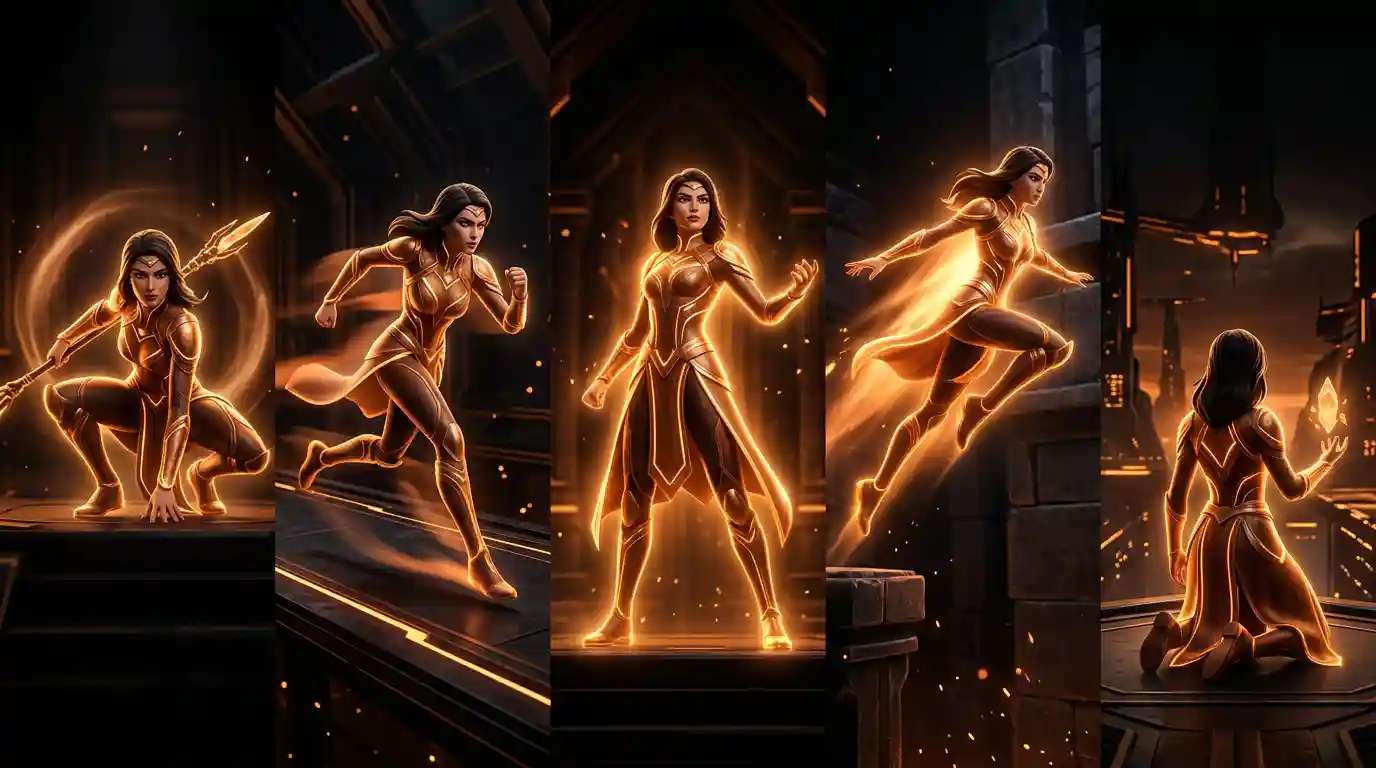
If you have ever generated an AI character, loved the result, and then struggled to recreate that same character in a different pose, scene, or style — you already understand the core problem that an AI consistent character generator solves. Character consistency is one of the hardest challenges in AI-assisted design, and for creators working on animated series, graphic novels, video games, or brand mascots, inconsistency can completely derail a project. This guide walks you through exactly how to use an AI consistent character generator, what to look for in a consistent character AI tool, and how Pixazo’s purpose-built feature makes the entire process faster and more reliable. If you want to try it, use AI Image Generator.
Why Character Consistency Is the Hardest Problem in AI Character Design
Standard AI image generators are designed to produce variety and novelty. Every generation is statistically unique. That is the feature — except when you need the same character to appear across dozens of scenes, marketing assets, or animation frames. Then variety becomes your enemy.
The challenge compounds when you factor in:
- Pose variation: A character running, sitting, and waving needs the same face, proportions, and color palette across all three.
- Scene lighting: Different environments shift perceived colors and shadows, making the same character look subtly different.
- Style drift: Prompt wording changes between sessions can cause the AI to interpret your character differently each time.
- Cross-platform use: A character designed for a social media post needs to translate faithfully into video, print, and web formats.
Traditional workarounds — manual editing, reference sheets, iterative prompting — eat hours of time and rarely produce pixel-perfect consistency. That is exactly the gap a dedicated AI character creator built for consistency is designed to fill.
What Makes a Good Consistent Character AI Tool
Not every AI image tool handles character consistency equally. When evaluating any consistent character AI tool, these are the capabilities that separate genuinely useful tools from generic generators:
- Reference image anchoring: The ability to upload an existing character image and lock core features — face shape, hair color, clothing — as a visual anchor for all subsequent generations.
- Feature-level analysis: The AI should parse distinct attributes (eye shape, skin tone, accessory details) rather than treating the reference as a blurry style cue.
- Prompt layering: Personality and behavioral traits fed via text prompts should influence expressions and poses without overriding the physical anchor.
- Cross-tool integration: A character defined in the image generator should carry over into video generation, logo assets, and other formats without manual re-prompting.
- Output resolution and format flexibility: Consistent characters need to scale from social thumbnails to print-quality art without degradation.
Pixazo’s AI consistent character generator was built with all of these requirements in mind. The sections below walk through exactly how it works in practice.
How to Create Consistent AI Characters with Pixazo: Step-by-Step
Here is a complete walkthrough of the process using Pixazo’s consistent character feature. You can access the tool directly through the Pixazo AI Image Generator.
Step 1: Upload Your Character Reference Image
Start by uploading a base image of your character. This can be an AI-generated image you already like, a hand-drawn sketch, or a previous design asset. The image becomes the visual anchor for everything that follows. The AI analyzes facial features, body proportions, clothing details, color palette, and accessories at this stage — so use the clearest, most detailed reference you have.
Tip: A front-facing, well-lit image produces the most reliable analysis. Avoid images with heavy filters, extreme angles, or cluttered backgrounds in your reference.
Step 2: Write a Detailed Character Prompt
Once your reference is uploaded, write a character prompt that describes both physical appearance and personality traits. This is where many users underinvest — a thin prompt produces thin results. Cover:
- Hair color, length, and style
- Eye color and shape
- Skin tone
- Clothing style and key garments
- Accessories or signature items (glasses, a specific bag, a piece of jewelry)
- Personality notes that should show in expressions (confident, warm, mischievous)
- Art style if relevant (anime, realistic, flat illustration, pixel art)
Clear and comprehensive prompts are essential for accurate and consistent character generation. The more specific you are, the less interpretive leeway the AI takes — and the more consistent your outputs become across different scenes and poses.
Step 3: Specify the Scene or Pose Variation
With your character anchor and base prompt established, you now describe the specific scene or pose you need. This is where the consistency feature pays off: you can generate your character running through a city, sitting at a desk, or waving goodbye — and the core visual identity stays locked across all three.
You can also specify lighting conditions, background environments, and secondary characters at this stage. The AI applies these scene-level changes without drifting the character’s established features.
Step 4: Generate and Iterate
Generate your first outputs and review them against your reference. Minor tweaks to your scene description (not the character description) are usually all that is needed to refine the result. If a specific feature keeps drifting — a hair color shifting slightly, for example — reinforce that attribute in your character prompt with stronger specificity.
Step 5: Export and Use Across Platforms
Once you have your consistent character assets, export them in your required format and resolution. Pixazo supports direct integration with its video tools, so a character created in the image generator can move directly into the Pixazo AI Video Generator for animation, short-form content, or scene-based storytelling — all with the same visual identity intact.
Key Features of Pixazo’s AI Consistent Character Generator
Pixazo’s consistent character feature is purpose-built for creators who need repeatable results. Here is a breakdown of what is included:
| Feature | What It Does | Best For |
|---|---|---|
| Visual Consistency Lock | Maintains uniform color schemes, facial features, and clothing across all generations based on your uploaded reference | Animators, game developers, comic creators |
| Thematic Alignment | Character expressions and body language reflect personality traits fed through the text prompt | Brand mascot design, storytelling, character arcs |
| Cross-Tool Integration | Consistent characters carry over into Pixazo’s AI Video Generator, AI Image Generator, and other playground tools | Multi-format campaigns, content series |
| User-Friendly Interface | No technical background required — the feature is accessible to beginners while powerful enough for professional workflows | Small business owners, indie creators, marketers |
| High-Resolution Output | Export in print and web-ready resolutions for flexible downstream use | Print design, merchandise, large-format assets |
Who Should Use an AI Character Design Tool for Consistency
The use cases for a consistent character AI tool span a wide range of creative and commercial contexts. Here are the primary audiences and how each one benefits:
Animators and Storyboard Artists
Building a cast of characters for an animated series requires every frame to maintain visual fidelity. With a traditional workflow, this means hours of reference-sheet management and manual correction. An AI character design tool with consistency features replaces most of that manual work with a single reference upload and a locked prompt set.
Game Developers and Concept Artists
Character concept iterations are a core part of early game development. Being able to generate the same character in dozens of poses — combat stance, idle animation, defeated state — without rebuilding the design from scratch each time accelerates the concept phase dramatically.
Graphic Novel and Webcomic Creators
Long-form sequential art requires absolute consistency across hundreds of panels. An AI character creator that anchors to a reference image means creators can focus on storytelling and composition rather than policing character drift across chapters.
Brand and Marketing Teams
Brand mascots need to appear consistently across social media posts, video ads, packaging, and merchandise. A consistent character AI tool eliminates the costly revision cycles that happen when a mascot looks slightly different across different assets or campaigns.
Suggested Read: How to Create Custom Cards With AI: Greeting Cards, Invitations, ID Badges & More
Independent Content Creators
YouTubers, TikTok creators, and newsletter writers who use recurring character personas benefit from having a reliable way to create consistent AI characters for thumbnails, banners, and episode art — all without a design team.
Pro Tips for Getting the Best Results from an AI Consistent Character Generator
After working with Pixazo’s consistent character tools extensively, here are the techniques that make the biggest difference in output quality:
- Lock your canonical reference early. Once you have a character image you love, save it immediately as your permanent reference. Do not continue iterating on the base design after you start generating scenes — every change to the reference risks visual drift across your existing assets.
- Use absolute descriptors, not relative ones. “Bright cobalt blue jacket” outperforms “blue jacket.” Absolute descriptors give the AI less room to interpret, which means tighter consistency.
- Keep character prompts and scene prompts separate. Write a core character prompt block (physical + personality) that stays constant, and add scene-specific details as a second layer. Mixing them creates ambiguity.
- Test consistency across extremes first. Generate your character in a dramatically lit scene and a flat-lit scene early in the process. If the character holds across those two extremes, it will hold across most other variations.
- Use the avatar generator for portrait-level consistency. For close-up or headshot assets, Pixazo’s Avatar Generator is optimized for facial consistency and works alongside the main character tool.
Suggested Read: The Definitive Guide to the Right TikTok Video Size
Creating Consistent Characters for Video: Extending Your Design Into Motion
One of the most powerful workflows available with Pixazo’s toolset is taking a consistently designed character from still images into motion. Once your character’s visual identity is locked in the image generator, you can bring that same character into the AI Video Generator to produce short animations, explainer segments, or social video content.
This matters because character consistency across formats — the same face and outfit appearing in a static social post, a blog illustration, and a promotional video — is what builds recognizable brand or story identity over time. Pixazo’s integration across its image and video tools makes that multi-format consistency achievable without a professional production team.
For anime-style characters specifically, the Pixazo Anime Art Generator provides style-specific tuning that enhances consistency within that visual language — useful for webcomic creators and anime-adjacent brand identities.
Frequently Asked Questions About AI Consistent Character Generators
Suggested Read: Ultimate Guide to Next-Gen Face Swap: How It Works & Top Use Cases
What is an AI consistent character generator?
An AI consistent character generator is a specialized AI tool that allows you to define a character’s visual identity — including facial features, clothing, color palette, and proportions — and then generate that same character across multiple scenes, poses, and formats without the character’s appearance drifting between generations. Unlike standard AI image generators that produce novel outputs each time, a consistent character tool anchors to a reference image and a locked prompt set to maintain visual fidelity.
Suggested Read: How to Create Viral AI Cat Videos with Pixazo?
How is a consistent character AI tool different from a regular AI image generator?
A regular AI image generator treats every prompt as an independent request and produces variable outputs even from nearly identical prompts. A consistent character AI tool adds a reference-anchoring layer that preserves core visual attributes across generations. The practical difference is dramatic: a standard generator might produce the “same” character five different ways across five generations, while a consistent character tool produces recognizably identical characters across dozens of outputs, even with different scenes and poses.
Can I use the AI character design tool to create characters for commercial projects?
Yes. Characters created with Pixazo’s AI character design tools can be used for commercial purposes including brand mascots, marketing campaigns, game development, and published graphic novels. As with any AI-generated content, it is good practice to review Pixazo’s current terms of service for the most up-to-date guidance on commercial usage rights. You can find more tools and usage information at pixazo.ai/ai-tools.
Suggested Read: How to Remove Watermarks With AI Watermark Remover?
How do I create consistent AI characters across both images and videos?
The most reliable workflow is to establish your character in the image generator first — upload a reference image, write a detailed character prompt, and generate a set of static assets that confirm consistency across multiple poses and lighting conditions. Once you have your locked character design, bring it into the Pixazo AI Video Generator using the same reference and prompt. Pixazo’s cross-tool integration is designed to carry character identity across both formats without requiring you to rebuild the design from scratch.
What details should I include in my character prompt for the best consistency?
For the strongest consistency results, your character prompt should include: hair color and style, eye color and shape, skin tone, clothing description (specific garments and colors), any signature accessories, body type and proportions, and personality notes that should influence expressions. The more specific and absolute your descriptors, the less interpretive latitude the AI takes between generations. Vague prompts like “casual outfit” produce more drift than specific ones like “oversized dark green hoodie with a small chest logo.”
Suggested Read: Flux Schnell API Pricing: Complete Cost Breakdown & The Cheapest Way to Generate Images at Scale
Deepak Joshi
Author · Pixazo
Deepak writes about generative AI models, APIs, and the workflows teams use to ship them. Reviewed by Abhinav Girdhar.