Introducing the Magi 2.0 API on Pixazo API: Image to Video and Video Editing



A single still image holds one frozen moment. Magi 2.0, the new video model from Sand AI, takes that moment and gives it time, weight, and motion. It is now live on Pixazo as the Magi 2.0 API, exposing both image to video generation and video to video editing behind one key and one gateway. This is the developer introduction: what it does, the exact parameters, the async workflow, and what it costs. You can do this in AI Image To Video Generator.
What Magi 2.0 actually is
Magi 2.0 is a high-performance video generation model built by Sand AI and served on Pixazo as the Magi 2.0 API. It turns a text prompt plus a reference into high-fidelity, cinematically detailed motion. Two things set it apart for real production work. First, spatial awareness: it renders physical interactions and fluid camera movement with unusual consistency, so objects hold together as they move. Second, control: you get direct handles on duration, resolution, frame rate, and sampling, instead of a single opaque button. On Pixazo the model exposes two operations, and you switch between them by changing the endpoint, not the key.
- Image to Video animates a single still into a clip that follows your prompt.
- Video to Video takes an existing clip and restyles it, with named artistic presets.
Image to Video, end to end
You send a prompt and an image_url, Magi animates the frame, and you poll a single status endpoint until the clip is ready. The whole path is asynchronous and built for servers, not for a browser tab waiting on a spinner.
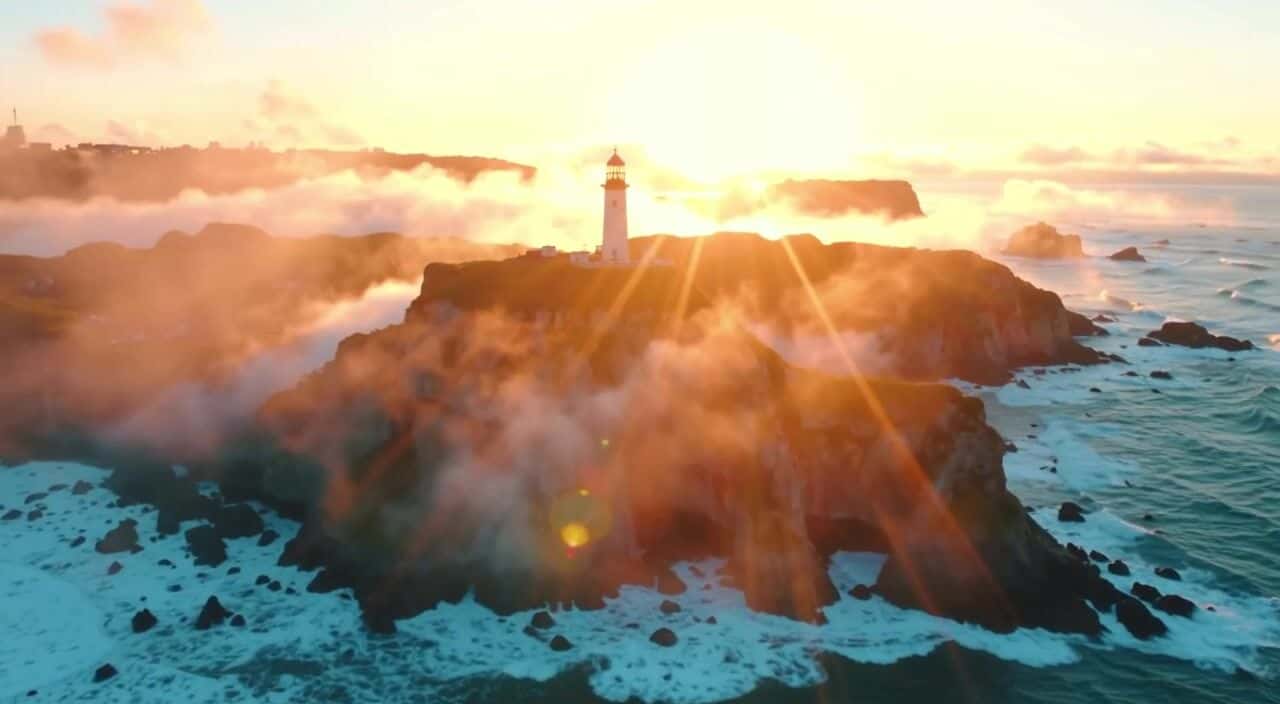
WE ACTUALLY RAN THIS
We sent the still on the left to the live /v1/image-to-video endpoint with the prompt “a lone lighthouse on a storm-battered cliff at dawn, slow cinematic drone push-in.” Magi 2.0 returned the clip on the right in about two minutes and forty seconds. This is the real, unedited output.
Every parameter you can set
Image to Video takes seven fields. Only the prompt and the image are required; everything else has a sane default, so you can start simple and tighten later.
prompt *string · n/a · up to 5000 charsimage_url *string · n/a · HTTP(S) URLdurationinteger · 5 · 3 to 15 secondsaspect_ratiostring · 16:9 · 1:1, 9:16, 16:9, 4:3, 3:4fpsinteger · 24 · 15 to 30guidance_scalenumber · 7.5 · 1 to 20seedinteger · 42 · 0 to 2147483647* required. A higher guidance_scale pushes the model to follow your prompt more literally. A fixed seed makes a result reproducible, which matters when you are iterating on a shot and want to change one thing at a time.
Video to Video: restyle an existing clip
The second operation takes a video_url instead of an image and rewrites it toward your prompt. It accepts longer clips (up to 30 seconds), a wider frame rate range (15 to 60 fps), and a style preset that steers the whole look in one word.
The async workflow
Both operations return immediately with a request_id and a status of QUEUED. You then poll one universal status endpoint, or register a webhook and skip polling entirely. A generation that ends in ERROR is a system error and is not charged.
202 with a request_id and polling_url.QUEUED.GET /v2/requests/status/{request_id} every 5 to 10 seconds, or wait on your X-Webhook-URL.COMPLETED and output.media_url holds your MP4.Suggested Read: Best Image To Video APIs in 2026
Code: from image to finished clip
Authentication is a single header, Ocp-Apim-Subscription-Key. Here is the full round trip: submit, then poll until the status flips to COMPLETED.
# 1. Submit an image-to-video job
curl -X POST "https://gateway.pixazo.ai/magi/v1/v1/image-to-video" \
  -H "Content-Type: application/json" \
  -H "Ocp-Apim-Subscription-Key: YOUR_API_KEY" \
  -d '{
    "prompt": "A paper boat drifting down a rain-soaked street, slow dolly-in, cinematic",
    "image_url": "https://example.com/boat.jpg",
    "duration": 6,
    "aspect_ratio": "16:9",
    "fps": 24,
    "guidance_scale": 7.5
  }'

# Response: { "request_id": "magi_01a01a89-615d-746c-ae38-37d9f40759e2c", "status": "QUEUED", "polling_url": "..." }

# 2. Poll until COMPLETED
curl -H "Ocp-Apim-Subscription-Key: YOUR_API_KEY" \
  "https://gateway.pixazo.ai/v2/requests/status/magi_01a01a89-615d-746c-ae38-37d9f40759e2c"

# COMPLETED in ~2m40s: output.media_url -> ["https://pub-582b...r2.dev/v1/magi_01a01a89-.../output.mp4"]Pricing is a flat per-second rate
There is no token math to reason about. Magi bills by output length at a single 720p rate, so cost scales linearly with how long your clip is.
Where a video generation API earns its place
Suggested Read: 30+ Prompts to Create Amazing Videos using AI
Why run Magi on Pixazo
Magi does not live alone on Pixazo. It sits behind the same gateway, the same key, and the same async contract as every other model, so adding it to an app that already calls another video model is a change of endpoint, not an integration project. The universal status endpoint, the webhook option, and the standard error codes are identical across the catalog.
That makes it easy to route by job: reach for Magi when a shot needs physical plausibility and camera motion, and swap to a sibling when you need something else. A few neighbours worth knowing:
Wan → Text and image driven generation.Kling → Fast, expressive short-form motion.Seedance → Stylised, character-led clips.
If you would rather try prompts by hand before writing a line of code, the AI image-to-video generator runs these models from one prompt box.
Field notes for good results
- Feed a clean, well-lit input image. Magi animates what is there, so a sharp subject on an uncluttered background moves more convincingly than a busy frame.
- Write motion into the prompt. Name the camera move (dolly, pan, orbit) and the action, not just the scene, since spatial awareness is where this model earns its keep.
- Start at the default
durationof 5 seconds while you dial in the look, then extend once the shot is right. You pay by the second. - Lock the
seedwhen iterating so you can change one variable at a time and actually see its effect. - For Video to Video, let the
stylepreset do the heavy lifting and keep the prompt focused on the subject rather than the aesthetic.
Suggested Read: The Ultimate Pixazo Comparison: Veo 3.1 vs Sora 2 Pro vs Kling 2.6 vs Wan 2.5 vs Hailuo 2.3 vs LTX-2 Pro vs Seedance Pro
Get started
Create a key, send one image, and read back a clip. That is the entire first run.
- Sign up and create a free key at the Pixazo API console.
- POST a
promptand animage_urltohttps://gateway.pixazo.ai/magi/v1/v1/image-to-videowith your key in theOcp-Apim-Subscription-Keyheader. - Poll the returned
polling_urluntil the status readsCOMPLETED, then downloadoutput.media_url.
The takeaway
Magi 2.0 brings Sand AI’s physics-aware motion to Pixazo with two clean operations, honest per-second pricing, and the same production plumbing as the rest of the catalog. Point it at a still to bring a moment to life, or point it at a clip to change its whole look. Either way it is one key away.
Frequently Asked Questions
1. What is the Magi 2.0 API?
Magi 2.0 is a video generation model from Sand AI, available on Pixazo. It converts a still image into a motion clip (image to video) and can restyle an existing clip (video to video), with strong spatial awareness for physical interactions and camera movement.
Suggested Read: Best Reference to Video API Providers Compared in 2026
2. What can Magi 2.0 do on Pixazo?
Two operations. Image to Video animates a single image from a text prompt, and Video to Video transforms an existing clip toward a prompt using a style preset such as realistic, cartoon, anime, cyberpunk, or oil-painting.
3. How much does Magi 2.0 cost?
It is billed at a flat rate of $0.10 per second of 720p output. A 5 second clip costs $0.50 and a 15 second clip costs $1.50. Generations that end in a system ERROR are not charged.
4. How do I authenticate a request?
Every request carries a single header, Ocp-Apim-Subscription-Key, set to your Pixazo API key. The base URL is https://gateway.pixazo.ai/magi/v1.
Suggested Read: Introducing WAN 2.6 API on Pixazo: High-Fidelity Image-to-Video and Text-to-Video Generation
5. Is the API synchronous?
No. Requests return a request_id with status QUEUED, and you poll GET /v2/requests/status/{request_id} every 5 to 10 seconds until it reads COMPLETED. You can also pass an X-Webhook-URL header to receive a callback instead of polling.
6. What video lengths and frame rates are supported?
Image to Video supports 3 to 15 seconds at 15 to 30 fps. Video to Video supports 3 to 30 seconds at 15 to 60 fps. Both default to 5 seconds at 24 fps.
7. Can I reproduce a result?
Yes. Pass a fixed seed value (0 to 2147483647, default 42) and keep the other parameters the same to get a reproducible generation, which is useful when iterating on a shot.
Suggested Read: Introducing Pixelcut Video Background Removal API on Pixazo API
Deepak Joshi
Author · Pixazo
Deepak writes about generative AI models, APIs, and the workflows teams use to ship them. Reviewed by Abhinav Girdhar.