Luncheon Invitation : Create Free Luncheon Invitations in Minutes with AI
Create Custom Luncheon Invitations Quickly with Pixazo Best AI Luncheon Invitation Maker. Try for Free!
Get Started
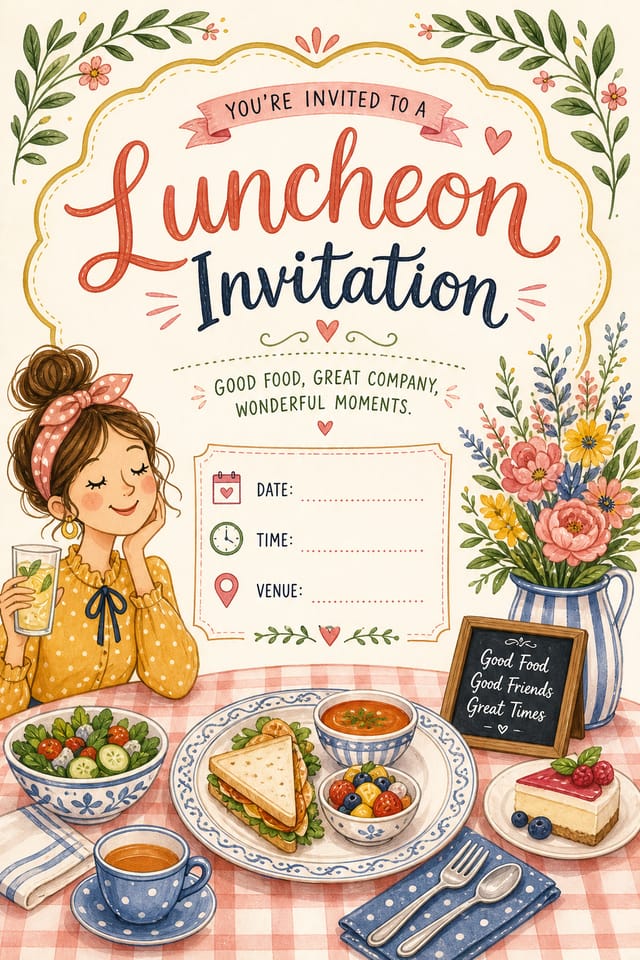
Luncheon Visual Language: Key Design Conventions
What Separates Good Luncheon Design from Generic
Effective luncheon invitation design depends on understanding what makes luncheon work visually.
Color relationships, typographic choices, and spatial arrangement all carry different weight depending on the design style.
Pixazo's AI has been trained to recognize these distinctions.
The practical result is that a luncheon invitation prompt produces designs that fit luncheon conventions rather than generic poster layouts.
Luncheon Invitation Generation: Made Simple
Declare the Design Direction
Start with a text description of your luncheon invitation concept. Specify the visual style, colors, layout direction, and key text. Detailed prompts produce more accurate luncheon invitation designs than general ones.
Witness the Result
The AI produces a luncheon invitation based on your description. If the first result isn't exactly right, adjust the prompt to address what needs changing. Most designs reach the target within a few iterations.
Hand Off the File
Download your completed luncheon invitation in the format that fits your use case. High-resolution files for print, web-optimized versions for digital, or PDF for production-ready delivery.
Watch: Creating Luncheon Invitation designs step by step
Luncheon Invitation AI: Core Strengths
Layered Style Application
Combine luncheon style with other design parameters in a single prompt. The AI interprets complex requests and applies multiple style constraints simultaneously.
Instant Iterations
Generate multiple luncheon invitation variations from a single prompt. Compare options and refine until the design matches your vision.
No Design Software Required
Create professional luncheon invitations without Photoshop, Illustrator, or other design applications. The AI handles all technical production.
Print-Ready Output
Generated luncheon invitations are sized and structured for professional printing. Download high-resolution files ready for production.
Commercial Use Rights
Designs generated with Pixazo are yours to use commercially. No additional licensing required for luncheon invitation projects.
Export Flexibility
Download your luncheon invitation in formats suited for your use case. Web-optimized versions for digital display, high-DPI files for print.
Download Your Luncheon Invitation: Format Guide
TIFF
High-fidelity format for luncheon invitation files destined for professional printing, supporting CMYK color and lossless compression.
PNG
Lossless image format ideal for luncheon invitation designs with transparency, sharp text, and web display at predictable file sizes.
WEBP
Modern web format offering smaller file sizes than PNG or JPG for luncheon invitation images without significant quality loss.
SVG
Scalable format for luncheon invitation designs that need to render crisply at any resolution, commonly used for web and responsive layouts.
Comparing Luncheon Invitation Tools: A Neutral Comparison
Adobe Express
Streamlined creative tool backed by Adobe's design ecosystem
Pixazo
AI-powered luncheon invitation generator with prompt-based design and professional output quality
VistaCreate
Visual content platform with templates and a built-in asset library
Snappa
Quick graphic creator focused on social media and marketing visuals
Canva
Drag-and-drop editor with a large template library and collaboration features
Creating Luncheon Invitations: Straight Answers
Individual luncheon invitations generate in seconds. For batch production, you can submit multiple prompts in sequence and download results as they complete. A series of ten luncheon invitation variations typically takes under five minutes total.
Pixazo offers a free tier that lets you generate luncheon invitations with standard resolution output. Paid plans unlock higher resolution, priority generation, and additional export formats. You can try luncheon invitation generation free with a credit card.
The AI generates designs at the specified dimensions. For professional print production, add 'with bleed area' to your prompt to extend background elements beyond the trim line. Crop marks and registration marks should be added in your print preparation software.
Generated designs that miss the mark usually need more specific prompts. Add details about the visual hierarchy you want, the feeling the luncheon invitation should create, or specific elements to include or avoid. More context in the prompt produces more targeted output.
How People Use Luncheon Invitations: Contexts and Scenarios
Content Creation Workflow
Incorporate luncheon invitation generation into a content production workflow. Fast output enables higher publishing frequency.
E-Commerce Product Promotion
Design luncheon invitations for online store banners, product launches, and seasonal sales. Conversion-focused visuals for digital retail.
Freelance Design Work
Use Pixazo to generate luncheon invitation concepts for client review. Present multiple directions quickly before committing to detailed execution.
Small Business Marketing
Produce luncheon marketing invitations without a design agency budget. Get professional results from a text description.
The Luncheon Invitation Pipeline: A Production Pipeline
Research
Collect examples of effective luncheon invitation designs, note what works, and identify patterns relevant to your project goals.
Approve
Get stakeholder approval on the finished luncheon invitation. Verify all text is accurate and the design meets brand and technical requirements.
Export
Export your luncheon invitation in the required formats and resolutions. Organize deliverables for handoff to the production or publishing team.
Review
Compare generated luncheon invitation options against your brief. Mark what works and note specific changes needed for the next iteration.
Luncheon Invitation Design Strengths: Why Creators Choose It
Multi-Format Export
Export your completed luncheon invitation in the format that fits your workflow. PNG for web, PDF for print, and JPG for universal compatibility.
Professional Output Quality
Every luncheon invitation is generated at production quality with proper resolution, color space handling, and typography rendering suitable for both digital and print use.
Iterative Refinement
Start with an initial generation and refine your luncheon invitation through follow-up prompts that adjust specific elements while preserving what already works.
Luncheon Design Styles: Visual Approaches
Contemporary Luncheon
Current luncheon design sensibility with updated proportions, modern typefaces, and contemporary color relationships.
Classic Luncheon
Traditional luncheon design principles applied to modern invitation format. Clean composition, conventional hierarchy, time-tested visual decisions.
Atmospheric Luncheon
Luncheon invitation design where mood takes priority. Color and composition work together to create a specific feeling.
Editorial Luncheon
Text-dominant luncheon invitation layout inspired by print publication design. Typographic variety creates visual rhythm.
Geometric Luncheon
Structured luncheon composition using grid systems and angular forms. Order and precision define the visual approach.
Ready-to-Use Luncheon Invitation Prompts That Work
Copy any prompt below and paste it into Pixazo to generate your design instantly.
Geometric luncheon invitation, structured grid system, angular composition, colors in blocks rather than gradients, modern clean finishEditorial-style luncheon invitation, text-dominant design, typographic treatment carries visual weight, layout proportions inspired by print publication designHigh-impact luncheon invitation, immediate visual read at thumbnail size, clear headline dominance, supporting information structured logicallyPortrait-orientation luncheon invitation, vertical composition, headline at natural reading entry point, supporting information flows downward logicallySeries-compatible luncheon invitation design, visual language that extends to multiple formats, consistent design system across variantsClean luncheon invitation design, geometric structure, disciplined typography, color accent used selectively for emphasis, printer-optimized resolutionShowcasing Luncheon Invitations: Showcase Gallery
Real creators sharing their luncheon designs made with Pixazo AI.


Current Luncheon Invitation Limits: Needs Human Help
Known limitations and trade-offs of AI-generated luncheon design. Every AI design tool has boundaries. Knowing these limits before you start helps you get the most out of luncheon invitation generation.

