Pixazo APIAI Image Upscaler API

AI Image & Video Upscaler APIs

Access AI Image & Video Upscaler APIs to increase image and video resolution without quality loss. Upscale with Crystal Upscaler, SeedVR, and Topaz via Pixazo API.

Explore AI Image Upscaler API Models

Browse and compare the best AI image and video upscaler API models. Filter by capability, check supported features and output quality, and pick the right model for your project.
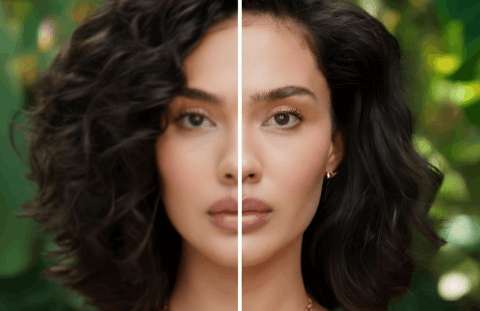
Crystal Upscaler

Crystal Upscaler

AI image upscaling up to 4x with detail preservation.

View API
Seed VR

Seed VR

AI upscaling for images and videos with detail enhancement.

View API
Topaz

Topaz

Professional AI video upscaling and enhancement.

View API

AI Image & Video Upscaler APIs

Enhance resolution by up to 16x with deep-learning super-resolution models. The Pixazo Upscaler API processes images and video frames through multi-pass neural networks, reconstructing detail that traditional interpolation cannot recover. Ideal for e-commerce catalogs, print-on-demand pipelines, archival restoration, and real-time video enhancement workflows.

How the Upscaler Works

A four-stage pipeline that analyzes, enhances, reconstructs, and delivers sharpened output -- all through a single API call.

Built for Real Workflows

From automated product photography pipelines to archival digitization -- upscaling that fits where you already work.

Why Developers Choose Pixazo Upscaler

Honest trade-offs, not just marketing claims. Here's what the API actually delivers -- and where its limits are.

Quick Start

A single API call is all you need. Here's a cURL example that upscales an image by 4x.

# Upscale an image 4x via the Pixazo API
curl -X POST https://api.pixazo.ai/v1/upscale \
  -H "Authorization: Bearer YOUR_API_KEY" \
  -H "Content-Type: application/json" \
  -d '{
    "image_url": "https://example.com/photo.jpg",
    "scale_factor": 4,
    "output_format": "webp",
    "denoise": true
  }'

# Response
{
  "status": "success",
  "output_url": "https://cdn.pixazo.ai/upscaled/abc123.webp",
  "original_size": "1920x1080",
  "output_size": "7680x4320",
  "processing_ms": 2840,
  "confidence": 0.92
}

Frequently Asked Questions

What image formats does the Upscaler API accept? +
The API accepts JPEG, PNG, WebP, and BMP inputs. For video upscaling, MP4 and MOV containers with H.264 or H.265 codecs are supported. Output can be returned in PNG, WebP, or JPEG -- you specify your preferred format in the request body.
What is the maximum upscale factor? +
The maximum supported factor is 16x for images. For video, the current maximum is 4x per frame. Keep in mind that higher factors on very low-resolution sources will produce diminishing returns -- the API returns a confidence score to help you evaluate output quality.
How does pricing work for the Upscaler API? +
Pricing is per-request based on output resolution and scale factor. A 2x upscale costs fewer credits than a 16x upscale. Cached results (repeated requests for the same input within 24 hours) are free. Check the Pixazo API pricing page for current rates and volume discount tiers.
Can the upscaler fix blurry or heavily compressed images? +
The artifact suppression pass handles JPEG banding and compression noise effectively. However, if the source image is extremely low quality (heavy motion blur, under 64x64 pixels), the model cannot reconstruct detail that was never captured. The confidence score in the response helps you decide whether the result is usable for your specific needs.
Is there a batch endpoint for bulk processing? +
Yes. The /v1/upscale/batch endpoint accepts an array of up to 50 images per request. Results are returned via a webhook callback or can be polled from a status endpoint. Batch processing is ideal for e-commerce catalog updates and archival digitization projects.