
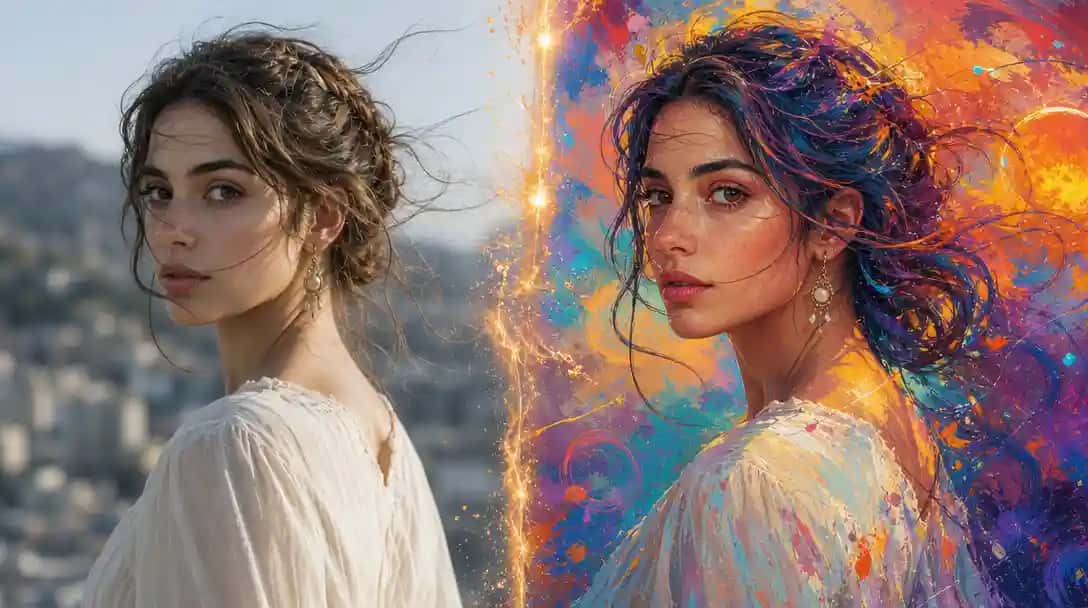
We’re excited to introduce Krea 2 API on Pixazo API, bringing Krea.AI’s flagship foundation image model to developers, creative teams, and product builders through Pixazo’s unified API platform. Krea 2 is purpose-built for creative control — combining text-to-image generation with style references, moodboard inputs, LoRA-based preset styles, and a tunable creativity spectrum that gives developers direct influence over how loosely the model interprets a prompt.
What sets Krea 2 apart from conventional image generation models is its architecture’s emphasis on creative direction over pure instruction-following. Rather than treating every prompt as a command to execute literally, Krea 2 allows teams to supply visual references and moodboards alongside a text prompt, letting the model synthesize a coherent aesthetic from multiple creative inputs simultaneously. This makes it particularly well-suited for brand campaigns, commercial design, and any workflow where visual consistency across a body of generated assets is as important as image quality.
What Is Krea 2 API?
The Krea 2 API provides programmatic access to Krea.AI’s large foundation image model, designed specifically for creative and commercial visual workflows. It accepts text prompts alongside optional style references, moodboards, and LoRA preset styles, and returns high-quality images that blend all of these creative inputs into a coherent visual output.
Unlike many image generation models that optimize primarily for photorealism or prompt adherence, Krea 2 is designed for creative control — the ability to guide not just what appears in an image, but how the entire image feels aesthetically. The model’s asynchronous architecture means generation requests are queued, processed, and returned via polling or webhook, enabling high-throughput integration without blocking application threads.
Krea 2 is available in the Large variant through Pixazo, supporting text-to-image generation with full access to all creative control parameters. It is designed for teams building tools, production pipelines, and creative platforms that require more than simple prompt-to-image generation.
| Provider | Krea.AI |
| Model variant | Krea 2 Large |
| Access | Pixazo API — single key, no separate vendor account |
| Generation type | Text-to-image with style references, moodboards, and LoRA styles |
| Creativity control | Four-level spectrum: raw, low, medium, high |
| Aspect ratios | 8 native formats (1:1, 4:5, 2:3, 9:16, 4:3, 3:2, 16:9, 2.35:1) |
| Seed support | Yes — fully reproducible outputs |
| Webhooks | Supported via X-Webhook-URL header |
| Free credits | $5 on first payment to evaluate the model |
Suggested Read: Introducing Pixelcut Video Background Removal API on Pixazo
Style-Reference Inputs for Directed Creative Output
One of Krea 2’s most distinctive capabilities is its support for image-based style references. Rather than trying to describe an aesthetic purely through text, developers can pass HTTPS image URLs as style references that guide the visual direction of the output. Each reference image can be accompanied by a strength value, allowing fine-grained control over how strongly the model is influenced by a given reference.
The API supports up to ten style reference images per request, and each reference can be set to a positive or negative strength value. Positive strength pushes the model toward the reference’s aesthetic characteristics — color palette, lighting quality, compositional approach, texture. Negative strength actively directs the model away from those characteristics, functioning as a visual exclusion instruction.
This makes style references useful in two distinct modes: as a creative guide that pulls outputs toward a known aesthetic, and as a correction tool that pushes outputs away from an unwanted visual direction. Both modes can be applied simultaneously within a single request by combining positive and negative strength values across multiple references.
Suggested Read: Introducing Happy Horse 1.1 API on Pixazo
Moodboard Integration for Brand-Consistent Generation
Krea 2 supports moodboard inputs, which are curated style collections from Krea.AI’s catalog that encode a broad aesthetic direction rather than a specific reference image. A moodboard captures a cluster of visual characteristics — color temperature, texture, compositional style, tonal range — and applies them as a holistic influence on the model’s output.
Each request accepts one moodboard entry, identified by a UUID from Krea.AI’s catalog and accompanied by a strength float that defaults to 0.23. The low default strength is intentional: moodboards are designed to add a subtle stylistic layer rather than dominate the composition, which preserves the specificity of the text prompt while enriching the output with a consistent aesthetic undercurrent.
For teams managing brand visual systems, moodboards offer a practical way to standardize the look and feel of generated assets across different prompts and campaigns. Rather than re-writing style instructions into every individual prompt, a single moodboard entry can encode the visual identity and apply it consistently across all requests in a pipeline.
Suggested Read: Best AI Image Generation Models in 2026: A Comparison Guide
Creativity Spectrum — Raw to High
Krea 2 introduces a creativity parameter that controls how loosely the model interprets a given prompt. This four-level spectrum — raw, low, medium, and high — allows developers to tune the model’s behavior between strict adherence and free creative interpretation within a single API parameter, without requiring complex prompt engineering adjustments.
At the raw setting, the model applies minimal interpretation and renders the prompt as literally as possible. At the low setting, it maintains strong adherence while allowing minor aesthetic decisions. Medium — the default — strikes a balance between fidelity and expressiveness, letting the model make compositional and stylistic choices while staying close to the prompt’s intent. At the high setting, the model is given significant latitude to interpret, embellish, and reinterpret the prompt, often producing outputs that go beyond the literal description while maintaining thematic relevance.
The creativity parameter is particularly useful when integrating Krea 2 into iterative creative workflows. Teams can begin at raw to establish a precise reference composition, then gradually increase the creativity level to explore stylistic variations on the approved direction — all from the same base prompt, without having to construct separate prompts for each variation.
LoRA-Based Preset Styles for Instant Aesthetic Control
Beyond moodboards and image references, Krea 2 supports LoRA-based preset styles drawn from Krea.AI’s internal style catalog. LoRA (Low-Rank Adaptation) styles are fine-tuned aesthetic overlays that apply a specific visual treatment to the generated output — covering characteristics like illustration style, color grading, surface texture, and compositional convention.
Each request supports up to ten style entries, and each entry is identified by a style ID from the Krea catalog accompanied by a strength float defaulting to 1.0. Multiple styles can be stacked in a single request, allowing developers to layer aesthetic treatments and blend different visual qualities into a single generated image.
LoRA preset styles are particularly well-suited for teams with recurring visual identity requirements. Rather than re-describing an aesthetic in text with every prompt, a style ID can be stored as a constant in a pipeline and applied automatically to every request. This removes the variability that comes from text-based style description and ensures consistent aesthetic application across large volumes of generated assets.
Suggested Read: Best Open-Source AI Image Generation Models in 2026
Multi-Aspect Ratio Support for Cross-Platform Content
Krea 2 supports eight aspect ratios out of the box, covering the full range of modern content formats: 1:1 for social feeds, 4:5 and 2:3 for portrait mobile content, 9:16 for vertical video and Stories formats, 4:3 and 3:2 for standard digital and photographic proportions, 16:9 for widescreen and presentation contexts, and 2.35:1 for cinematic compositions.
Because the aspect ratio is specified at the API level rather than through post-processing crop, Krea 2 generates images that are natively composed for the target format. A 9:16 request will produce a composition designed for vertical viewing, with subjects and focal points optimized for that frame — not a horizontally generated image that has been cropped. This eliminates the compositional problems that arise when trying to adapt horizontally generated outputs to vertical formats.
For teams producing content across multiple platforms simultaneously, this native format support significantly reduces the overhead of per-platform adaptation. A single prompt can be issued in multiple aspect ratio variants within a single pipeline pass, producing format-optimized outputs for each target context without requiring separate prompt iterations or post-processing workflows.
Reproducible Outputs with Seed Control
Krea 2 supports an integer seed parameter that locks the random generation process to a specific starting point. When the same seed is used alongside identical prompt and parameter values, the model produces the same output every time — enabling exact reproducibility across separate API calls, team members, or systems.
Seed control is valuable in several practical scenarios. During iterative design review, it allows teams to return to a specific approved visual direction and continue refining other parameters without losing the baseline composition. In automated pipelines, seeds can be used to create version-controlled image states that can be audited, compared, and reverted. In collaborative workflows, seeds allow one developer to share an exact generation state with another without having to transfer image files.
When no seed is provided, Krea 2 generates using a random seed, producing a new unique output on each request. This default mode is suitable for exploration and ideation workflows where variation is desirable, while seed-locked requests serve production workflows that require consistency and traceability.
Suggested Read: Introducing Nano Banana 2 API on Pixazo
Asynchronous Workflow with Webhook Support
Krea 2 operates on an asynchronous request model. When a generate request is submitted, the API returns a request ID and a polling URL immediately — the image is generated in the background and can be retrieved once the status progresses from QUEUED through PROCESSING to COMPLETED. This design allows applications to remain responsive during generation without blocking on a synchronous HTTP response.
For teams that prefer event-driven architectures, Krea 2 supports webhook callbacks via an optional X-Webhook-URL header. When this header is included in the generate request, the API sends a POST request to the specified URL once generation is complete, eliminating the need to poll and reducing infrastructure load on high-volume workflows. The webhook payload includes the full request status response, including the output media URL when generation succeeds.
This asynchronous architecture makes Krea 2 practical for production applications where generation is triggered by user actions but the result does not need to be returned synchronously. Content pipelines, design automation tools, and batch processing workflows can all integrate Krea 2 without redesigning their concurrency model to accommodate a slow synchronous response.
Accessing Krea 2 API on Pixazo
Krea 2 is available through Pixazo’s Image Generation API, following the same standardized request and response structure used across all models on the platform. Authentication uses the Ocp-Apim-Subscription-Key header, and both polling and webhook result retrieval are handled through Pixazo’s universal status endpoint at gateway.pixazo.ai.
The generate endpoint for Krea 2 Large accepts JSON bodies with the prompt, optional aspect ratio, creativity level, seed, style references, LoRA styles, and moodboard parameters. The API returns a request ID and polling URL in the initial response, with generation results retrievable via the status endpoint once processing is complete.
You can explore the full documentation, review parameter details, and get your API key at the Krea 2 API model page on Pixazo.
Get Krea 2 API Key
Suggested Read: Pixazo Launches Flawless Text Model
Frequently Asked Questions About Krea 2 API
1. What is Krea 2 API?
Krea 2 API provides programmatic access to Krea.AI’s flagship foundation image model, enabling text-to-image generation with style references, moodboards, LoRA preset styles, and a tunable creativity spectrum for fine-grained visual control.
2. How does the creativity parameter work in Krea 2?
The creativity parameter controls how loosely the model interprets a prompt. Raw applies minimal interpretation; low maintains strong adherence; medium balances fidelity and expression; high gives the model significant latitude to make stylistic and compositional choices beyond the prompt.
3. Can Krea 2 use multiple style references in a single request?
Yes. Krea 2 supports up to ten image-based style references per request. Each reference accepts a strength float, including negative values that actively push generation away from a reference’s aesthetic.
4. What is a moodboard in Krea 2?
A moodboard is a curated style collection from Krea.AI’s catalog identified by a UUID. It applies a broad aesthetic direction — color temperature, texture, tonal range — as a subtle overlay on the generated output, defaulting to a strength of 0.23.
5. Does Krea 2 support seed-based reproducibility?
Yes. An integer seed parameter is supported. Providing the same seed with identical prompt and parameter values produces identical outputs across separate API calls.
6. How does webhook support work in Krea 2?
Include the X-Webhook-URL header in your generate request. Once the image is generated, Krea 2 sends a POST request to your specified URL containing the full status response and the output image URL.
7. What aspect ratios does Krea 2 support?
Krea 2 supports eight native aspect ratios: 1:1, 4:5, 2:3, 9:16, 4:3, 3:2, 16:9, and 2.35:1. Images are natively composed for each format rather than cropped from a default generation.

Deepak Joshi
Author · Pixazo
Deepak writes about generative AI models, APIs, and the workflows teams use to ship them. Reviewed by Abhinav Girdhar.