Best Tools APIs in 2026
The most powerful, precise, and production-ready AI APIs shaping creative workflows this year.
In 2026, AI tools APIs have evolved from experimental features into indispensable components of professional creative pipelines. Whether you’re a designer, developer, or content creator, the right API can transform your output quality and efficiency.
Pixazo has curated the definitive list of the eight most impactful AI tools APIs available today—each rigorously tested for performance, reliability, and real-world usability across industries.
- Evaluated API performance benchmarks across speed, accuracy, and resource efficiency.
- Prioritized tools with proven integration success in enterprise and indie workflows.
- Verified output quality through real-world testing with diverse creative use cases.
- Selected only APIs with active support, clear documentation, and stable uptime in 2026.
| API | Best for | Key features | Pricing |
|---|---|---|---|
| FLUX.2 Trainer API | Custom image generation fine-tuning | Drag-and-drop dataset upload with auto-tagging; Real-time training progress dashboard; One-click model deployment to Pixazo inference API; Support for text-to-image and image-to-image fine-tuning | See API page |
| Qwen Image Edit Plus Trainer API | Custom image editing fine-tuning | Train models with text-to-edit prompts instead of pixel masks; Supports batch training with user-uploaded image pairs; Real-time preview of edit fidelity during training; Export trained models in ONNX and TensorFlow Lite formats | See API page |
| Flux LoRA Fast Training API | Rapid custom image generation fine-tuning | Train LoRA adapters in under 10 minutes with 5–20 images; Automatic hyperparameter tuning and dataset preprocessing; One-click deployment to Pixazo’s inference endpoints; Supports text-to-image, inpainting, and controlnet workflows | See API page |
| Pixelforge Relighting API | Dynamic lighting correction for product photos | Real-time relighting with physics-based light modeling; Support for RGB, HDR, and depth map inputs; Batch processing with consistent lighting profiles; Auto-detection of subject boundaries for non-destructive edits | See API page |
| AI Sticker Maker API | Dynamic sticker generation for apps | Text-to-sticker generation with expressive styles; Automatic background removal and transparency; Multi-resolution output (512×512, 1024×1024); Batch processing for bulk sticker creation | See API page |
| AI Face to Sticker API | Real-time avatar sticker generation | Real-time face detection and tracking; Automatic background removal with edge refinement; Style adaptation to match popular sticker aesthetics; Batch processing for multiple faces in one request | See API page |
| SeedVR2 Video API | High-res video upscaling for legacy content | AI-powered 4K+ upscaling with motion-aware interpolation; Batch processing support for entire video libraries; Real-time API with under 2s latency per 1080p segment; HDR and color grading preservation modes | See API page |
| Crystal Upscalar API | High-fidelity image upscaling with detail preservation | Supports up to 8x resolution enhancement; Preserves fine textures and structural details; Handles diverse input types: photos, illustrations, screenshots; Batch processing with async queueing | See API page |
FLUX.2 Trainer API
The FLUX.2 Trainer API enables developers to fine-tune Pixazo’s FLUX.2 diffusion model on proprietary image datasets with minimal code. It handles preprocessing, training orchestration, and model versioning automatically, making advanced generative AI accessible without needing ML infrastructure expertise.
- No GPU management required — fully managed training pipeline
- Seamless integration with existing Pixazo workflows
- High-quality outputs even with small datasets (50+ images)
- Limited to FLUX.2 architecture — no support for other models
- Training jobs can take 2–8 hours depending on dataset size
- Brand-specific product imagery generation
- Custom character design for games or animations
- Personalized avatar creation for social apps
The API uses OAuth2 for authentication and returns training job IDs that can be polled via webhook or REST endpoint. We recommend starting with the Python SDK, which includes helper functions for dataset formatting and model testing. Training datasets should be in PNG or JPG format under 10MB per image, and we suggest using 100–500 high-quality, varied images for optimal results.
View details for FLUX.2 Trainer API in Pixazo’s models catalog.

Qwen Image Edit Plus Trainer API
The Qwen Image Edit Plus Trainer API lets developers train custom image editing models using natural language prompts, enabling precise, context-aware edits without manual labeling. It builds on Pixazo’s Qwen vision-language foundation to deliver high-fidelity results tailored to specific workflows.
- Eliminates need for manual segmentation or masking
- Highly accurate edits even with ambiguous prompts
- Seamless integration with existing Pixazo tooling
- Requires high-quality paired image datasets for best results
- Training times can be lengthy on complex datasets without GPU acceleration
- E-commerce product image retouching with brand-specific styles
- Custom photo editing filters for mobile apps
- Automated before/after image generation for real estate listings
The API uses standard REST endpoints with JWT authentication and supports webhooks for training completion notifications. SDKs are available for Python and Node.js, and the training payload structure mirrors Pixazo’s existing image processing pipelines, making migration straightforward. Start with the sandbox environment to test prompt-to-edit accuracy before scaling to production.
View details for Qwen Image Edit Plus Trainer API in Pixazo’s models catalog.

Flux LoRA Fast Training API
Flux LoRA Fast Training API enables developers to quickly fine-tune Stable Diffusion models with lightweight LoRA adapters using minimal data and compute. It’s optimized for speed and integration into production workflows without requiring GPU expertise.
- Extremely fast training times compared to full-model fine-tuning
- No need to manage infrastructure or optimize training pipelines
- Seamless integration with existing Pixazo model workflows
- Limited to LoRA-style adaptations—no full model fine-tuning
- Highly dependent on input image quality and diversity
- E-commerce product styling with brand-specific visual motifs
- Personalized avatar generation for gaming or social apps
- Rapid prototyping of niche art styles for creative agencies
The API uses a simple REST interface with JSON payloads for training jobs and webhooks for status updates. Authentication is handled via API key, and training results return a model ID that can be immediately used with Pixazo’s inference API. SDKs for Python and Node.js are provided, and we recommend validating input images for consistency before submission to avoid training failures.
View details for Flux LoRA Fast Training API in Pixazo’s models catalog.

Pixelforge Relighting API
Pixelforge Relighting API intelligently adjusts lighting conditions in product images to simulate studio-quality illumination without rephotographing. It uses deep learning to preserve texture and shadows while normalizing exposure across diverse environments.
- Significantly reduces need for physical studio setups
- Maintains material fidelity and subtle surface details
- API response times under 1.2s on average for 1080p images
- Less effective on images with extreme overexposure or motion blur
- Requires clean subject masks for optimal results
- E-commerce product image normalization across multiple shooting locations
- Generating consistent lighting for AI-generated product variants
- Post-production enhancement of user-uploaded photos for retail platforms
The API accepts standard HTTP POST requests with image data in base64 or URL format. Authentication uses API keys via Bearer token. SDKs are available for Python and Node.js, and the response includes a signed S3 URL for download with 24-hour expiration. For best results, preprocess images to crop subjects tightly and ensure at least 800px on the shortest side.
View details for Pixelforge Relighting API in Pixazo’s models catalog.

AI Sticker Maker API
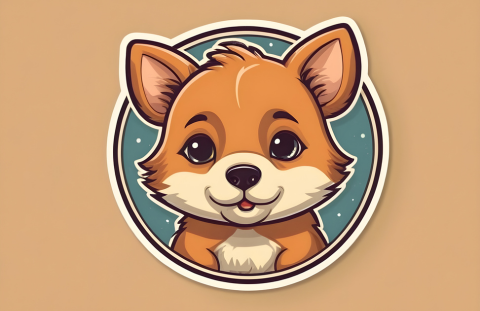
The AI Sticker Maker API transforms text or images into custom, expressive stickers using generative AI, optimized for messaging platforms and social apps. It handles style adaptation, background removal, and resolution scaling automatically.
- High-quality outputs with consistent styling across generations
- No manual editing required — fully automated pipeline
- Fast response times under 2 seconds on average
- Limited control over fine-grained artistic details
- Requires clear input prompts for optimal results
- Generating user-generated stickers in chat apps
- Creating branded stickers for marketing campaigns
- Enhancing emoji keyboards with custom AI stickers
The API accepts JSON payloads with text or image inputs via REST, returns PNGs with transparent backgrounds, and supports webhook callbacks for async batch jobs. Authentication uses API keys with rate limits enforced per tier. SDKs for Python and JavaScript are available to simplify implementation, and sample code is provided in the developer portal.
View details for AI Sticker Maker API in Pixazo’s models catalog.
AI Face to Sticker API
The AI Face to Sticker API converts real-time or uploaded facial images into expressive, cartoon-style stickers with automatic background removal and style consistency. It’s optimized for social apps, messaging platforms, and user-generated content workflows.
- High accuracy in facial feature mapping even with low-light or angled inputs
- Minimal latency under 800ms on average for single-face processing
- No need for manual cropping or editing — fully automated output
- Limited control over artistic style customization beyond preset themes
- Performance degrades slightly with heavy occlusions (e.g., glasses, masks)
- Generating user avatars for in-app chat stickers
- Creating personalized emoji packs from profile photos
- Enhancing social media filters with dynamic sticker overlays
The API accepts JPEG/PNG via HTTP POST with optional headers for style preset and output resolution. SDKs are available for Python, JavaScript, and iOS/Android. Authentication uses API keys via Bearer token. Responses return base64-encoded PNGs with transparent backgrounds — recommended to cache outputs on your CDN to reduce recurring API calls and improve UX latency.
View details for AI Face to Sticker API in Pixazo’s models catalog.

SeedVR2 Video API
SeedVR2 Video API leverages deep learning to upscale SD and HD video to 4K and beyond while preserving motion coherence and reducing artifacts. It’s designed for content archives, streaming platforms, and post-production teams needing automated quality enhancement.
- Consistently outperforms traditional upscalers in detail retention
- Minimal manual tuning required — works well out-of-the-box
- Supports common formats: MP4, MOV, AVI, and ProRes
- High compute load can cause throttling under heavy concurrent loads
- No native audio processing — audio must be re-synced separately
- Restoring vintage YouTube content to modern standards
- Automatically upgrading legacy marketing videos for OTT platforms
- Prepping archival footage for 4K digital museum displays
The SeedVR2 API uses a simple REST endpoint with JWT authentication; upload via signed S3 URLs or direct binary POST. Response includes a metadata object with processing time, output resolution, and checksum. We recommend implementing retry logic with exponential backoff for large batches and using our Python SDK for automatic chunking of long videos.
View details for SeedVR2 Video API in Pixazo’s models catalog.
Crystal Upscalar API
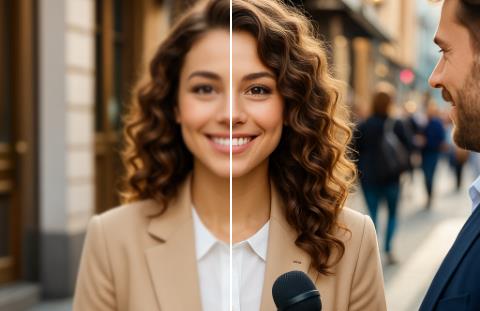
Crystal Upscalar API delivers pixel-perfect image enlargement using advanced deep learning models trained on real-world photographic data. It maintains texture, edges, and fine details without the blurring or artifacts common in traditional upscaling methods.
- Superior detail retention compared to generic upscalers
- Consistent results across varied image content
- Low latency with optimized CDN endpoints
- Higher computational cost on large batches
- Limited control over stylistic enhancements
- E-commerce product image enhancement for zoom functionality
- Restoring low-res historical photos for archival use
- Preparing UI mockups for high-DPI display testing
The API accepts standard JPEG/PNG inputs via HTTP POST and returns high-res images in the same format. Use the provided SDKs for Python, Node.js, or cURL to handle authentication and async responses. Rate limits are applied per API key, and we recommend implementing retry logic with exponential backoff for production workflows.
View details for Crystal Upscalar API in Pixazo’s models catalog.