How to Download Instagram Videos [4 Simple Ways You Didn’t Know]

By Jayesh | Last Updated on May 29th, 2026 12:36 pm
Table of Content
Instagram is the definitive social media of this decade. Instagram has a lot to offer and is still expanding rapidly even after being around for nearly 10 years. Instagram has evolved from a mere image sharing platform to one that allows limited length videos and stories. This evolution can be credited to the evolution of social media and the rise of influencer culture. Instagram has also seen a significant rise in brands that use the platform as a marketing channel. One major problem with Instagram is that it still doesn’t allow its users to download images directly. It’s designed in a way to prevent that for privacy reasons.
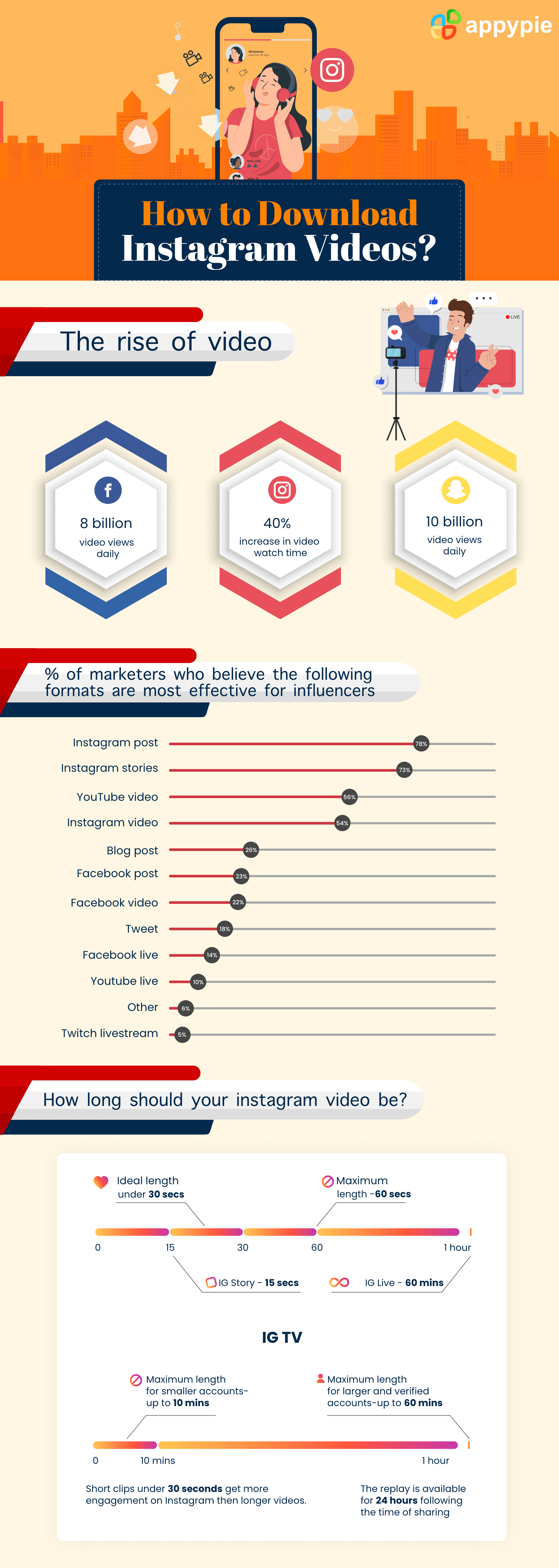 This carries on to videos too. So far Instagram doesn’t provide an active way to download videos even the ones which influencers have created on the platform. This creates a unique challenge for marketing teams who want to include photos and videos during meetings making it harder to share ideas. It is also a challenge for individual users who want to download funny videos from Instagram.
Dealing with images is relatively easier than dealing with videos. For images, one can simply screenshot the page and crop or resize an image for use where required. For videos, however, the process is a bit more complicated. Read on to find out.
This carries on to videos too. So far Instagram doesn’t provide an active way to download videos even the ones which influencers have created on the platform. This creates a unique challenge for marketing teams who want to include photos and videos during meetings making it harder to share ideas. It is also a challenge for individual users who want to download funny videos from Instagram.
Dealing with images is relatively easier than dealing with videos. For images, one can simply screenshot the page and crop or resize an image for use where required. For videos, however, the process is a bit more complicated. Read on to find out.Screen Recording a Video
One of the ways to capture an Instagram video.is by using a screen recorder app. Screen recorder apps record your device screen. These tools can be found for both PCs and smartphones. However, downloading with a screen recorder is very clunky. It usually produces a poor video that can be interfered with by notifications and calls. In addition, it will include the entire screen of your device and the video will only occupy a small area of the screen. This is why we look onto other ways to download a video on Instagram.Downloading an Instagram Video on PC
Downloading an Instagram video on PC requires two things, namely, the video’s link and a video downloader. Remember that private videos and stories cannot be downloaded. There are ways for it, but they are usually done with the help of shady software. Here is how you can download a public Instagram video:- Open Instagram Account
- Go to the account you want to download the video from
- Copy the link in the URL box
- Open an Instagram downloader tool
- Paste link
- Click on the download button
Open Instagram and log into your account.
Open the page of the person whose video you want to download. Scroll down to the post you want to download. Videos have a small video icon on the top-right which you can use to identify the relevant video.
Open the video by clicking on it. This will open a new window that has its own unique URL. Copy the URL given in the box above.
Instagram downloading tools can be found on the Internet. These are available online for free and a simple Google search can give you the tool you need. Just for you, we have linked HashtagsforLikes Instagram Downloader.
Paste the link you copied into the downloader tool.
Whatever tool you use, will have a download button. There are two different outcomes of using a downloader. Either the video will begin downloading or a new browser window will open and play the video.
If it opens a new window, hover over the video and you will see three dots at the right-bottom of the screen. Click on it and you will see a Download option.
After downloading, you can find the download in your PCs ‘Downloads’ folder.Downloading an Instagram Video on a Smartphone (Android/iOS)
To download Instagram videos on your smartphone, follow the steps given below:- Download an Instagram downloader app
- Go to the Instagram post you want to download
- Tap the three dots
The first step is downloading an app from the Play Store or the Apple AppStore that allows you to download. Searching for ‘Instagram video downloader’ on the stores will give you plenty of options to choose from.
Open Instagram on your phone and go to the video you want to download. Just like the web, videos will be marked with a video icon in the top-right. Tap on the post and open it.
Tap on three dots given in the upper corner of the screen. On clicking these a menu will appear. One of the options you will see on the menu is ‘Copy Link’. Click on it. This will copy the link of the video to the clipboard. The downloader app will automatically download the video to your gallery.
The Downloaded Video can be found in your gallery under the ‘Downloads’ folder.Downloading an Instagram Video with a Web App
If you do not want to download a separate app for downloading Instagram videos on your Smartphone, you can simply use a web app for downloading videos onto your phone. To do this, copy the link of the video you want to download and open your smartphone browser. Search for ‘Instagram Video downloader’ on your smartphone browser. Search results will give you a web app that allows you to download the video. Simply paste the link and tap on ‘Download’ to download your video.Conclusion
These are the ways you can download Instagram videos on your PC or smartphone. You can use the downloaded videos and share them with your friends or use them in your next marketing pitch. About your marketing pitch! Did you know that you can learn how to market on Instagram and how you can optimize your profile all in one course? Take our Instagram Course today! Don’t worry, head over there now! Before you start downloading videos, it is a humble request to avoid downloading videos belonging to private accounts. They’re private for a reason. Thanks!Related Articles
Most Popular Posts
- Best AI Image and Video Generators in 2026
- Best AI 3D Model Generators in 2026
- Best AI Image Generation Models in 2026
- Best AI Video Generation Models in 2026
- Best Open Source Image Generation Models in 2026
- Best Open Source Video Generation Models in 2026
- Best Prompts to Create Amazing Videos using AI