Create with Pixazo AI
Turn a prompt into studio-quality images and videos — free to try.
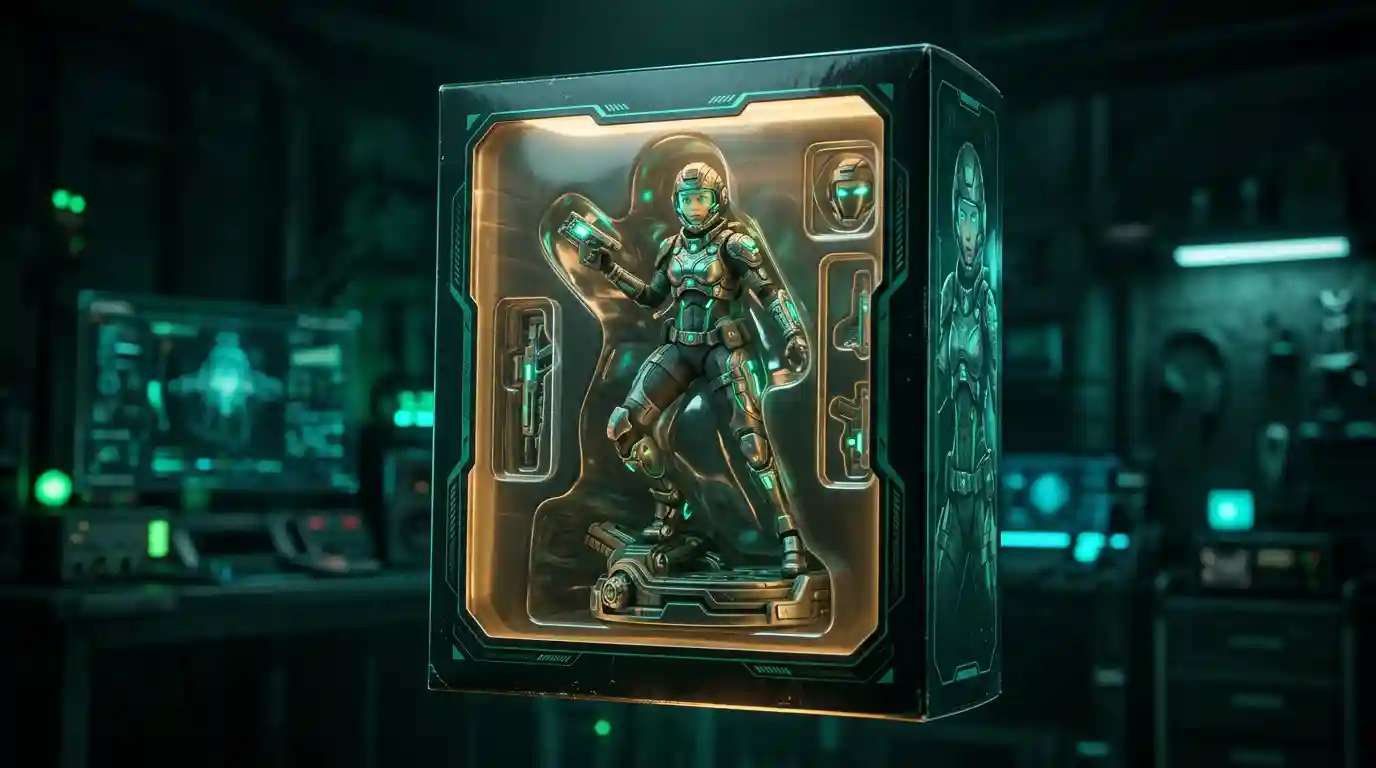
If you have been scrolling through social media lately, you have probably seen everyone turning themselves into tiny plastic heroes. How to make an AI action figure is one of the most searched creative questions of 2026 — and for good reason. In minutes, you can transform any photo or idea into a hyper-detailed collectible toy render, complete with blister packaging, themed accessories, and a name badge on the card. This guide walks you through the entire process: what an AI action figure is, how the technology works, a step-by-step walkthrough you can follow right now, ready-to-use prompts, and expert tips for getting shareable results.
What Is an AI Action Figure?
An AI action figure is a digitally generated image that depicts a person, character, or persona as a miniature plastic toy styled to look like a mass-produced collectible. Think Funko Pop meets vintage Kenner Star Wars figure: the subject is posed inside a bright retail blister pack, surrounded by small accessories relevant to their identity or theme, with a printed card showing the character’s name and a tagline.
The trend exploded in early 2025 when people began sharing their AI-generated toy versions online. What makes it so compelling is the specificity — a good AI action figure render includes legible text on the packaging card, themed accessories that reflect the character’s personality, and the slightly worn cardboard texture of a real toy box fresh off a store shelf. It looks uncannily like a product that could sit next to real collectibles at a hobby store.
The underlying technology is text-to-image AI. You write a prompt describing the character, toy styling, accessories, and packaging details — and an AI action figure generator converts that prompt into a photorealistic render in seconds. No design software, no 3D modeling skills, no experience required.
Why AI Action Figures Are Going Viral in 2026
The format taps into deep nostalgia. Anyone who grew up in the 1980s or 1990s with G.I. Joe, He-Man, or Power Rangers immediately connects with the blister-pack aesthetic. At the same time, the hyper-personalization aspect — turning yourself or a friend into the action figure — makes every output feel worth sharing. People tag their friends, challenge them to make their own version, and the loop repeats across platforms.
From a creative standpoint, the format is also remarkably flexible. You can render yourself as a fantasy wizard, a sci-fi space explorer, a cyberpunk hacker, a retro sports legend, or a branded mascot for a business. The accessories and packaging copy can be tailored to inside jokes, professional identities, or pop-culture references, making each output genuinely unique.
For brands and creators, the AI action figure format has practical applications beyond viral posts: personalized gifts, team recognition programs, character development for games and stories, and consistent content series that build audience recognition over time.
How to Make an AI Action Figure: Step-by-Step
Learning how to make an AI action figure is simpler than most people expect. The process takes about ten to fifteen minutes from concept to final image. Here is the complete walkthrough.
Step 1 — Define Your Character Concept
Before writing a single prompt, spend two minutes planning the core concept. The more specific your planning, the sharper your output will be.
- Who is the figure? Yourself, a friend, a fictional persona, or a professional archetype (such as “startup founder action figure” or “data scientist action figure”).
- What is the visual theme? Fantasy, sci-fi, sports, retro 80s, anime, superhero, horror, or real-world professional.
- What accessories will the figure include? Three to five small props themed to the character make the packaging look authentic. A content creator might have a ring light, microphone, and laptop; a chef might have a tiny knife, chef’s hat, and cookbook.
- What does the packaging text say? A product name, a series name (for example, “Series 1: Digital Creators”), and a short tagline complete the toy-store illusion.
- What color scheme does the packaging card use? Bold, high-contrast colors — red and silver, navy and gold, black and neon green — read as more authentic to real toy packaging.
Step 2 — Open the AI Image Generator
Head to Pixazo’s AI Image Generator. The platform supports detailed text prompts and produces high-resolution outputs well-suited to the photorealistic toy render style that AI action figures require. You can start generating immediately without complex onboarding.
If you prefer a more stylized anime-influenced look — bold outlines, cel-shaded colors, and the aesthetic of Japanese character merchandise — try the Pixazo Anime Art Generator for a distinct visual treatment that works exceptionally well for manga-inspired action figure designs.
Step 3 — Write Your Prompt
The prompt is the heart of the process. A strong AI action figure prompt has five essential components:
- Subject description — Physical appearance, outfit, hair, distinctive features, and pose.
- Toy style cue — “5-inch scale plastic action figure,” “blister pack retail packaging,” “collectible toy,” “molded plastic texture.”
- Accessories list — Three to five specific items relevant to the character, listed explicitly.
- Packaging details — The brand name on the card, tagline, series name, and card color scheme.
- Rendering style — “Product photography,” “studio lighting,” “high resolution,” “sharp focus,” “photorealistic.”
Here is a full example prompt you can adapt directly:
“A 5-inch plastic action figure of a female software engineer with short dark hair, wearing a navy hoodie and jeans, posed confidently in blister pack retail packaging. Accessories include a tiny laptop, a coffee mug, a rubber duck debugging toy, and a miniature server rack. Packaging card reads ‘CODER SERIES — The Bug Fixer’ in bold white text on a red and white card. Molded plastic texture, visible seam lines, painted toy finish, product photography, studio lighting, hyper-detailed, photorealistic.”
Step 4 — Generate and Iterate
Hit generate and review the output carefully. AI image generators are probabilistic — the first result may be excellent or may need refinement. Look for these common issues and their fixes:
- Blurry or illegible text on the card — Add “crisp legible text,” “clean typography,” or “sharp readable font” to your prompt.
- Accessories missing or merged together — Reduce the count to three, or describe each accessory more explicitly with size and position.
- Figure looks too realistic rather than toy-like — Strengthen the toy cues: “molded plastic texture,” “visible mold seam lines,” “painted toy finish,” “hard plastic material.”
- Background is distracting — Add “plain white background” or “isolated product shot on white” to your prompt.
- Packaging card missing — Move the packaging description earlier in the prompt and add “sealed in blister pack with printed card backing.”
Run three to five variations, adjusting one element at a time. The iterative approach consistently produces better results than abandoning a prompt after one attempt.
Step 5 — Create an Action Figure from a Photo (Optional)
If you want to create an action figure from a photo — making the figure look like a specific real person — use an image reference or image-to-image workflow where available. Upload a clear photo of the subject and use a prompt like:
“Transform this person into a 5-inch plastic action figure in blister pack retail packaging. Preserve the subject’s facial features and hair color. Accessories: [list three to five items]. Packaging card reads: [character name + tagline]. Photorealistic product photo, studio lighting, molded plastic texture.”
This approach produces more accurate likenesses than text-only prompts, especially for personalized gifts or social content where identity recognition matters. A clear, well-lit, front-facing photo gives the AI the best reference material to work with.
Step 6 — Customize and Polish
Once you have a strong base image, apply finishing touches:
- Use Pixazo’s Background Remover to isolate the figure if you want to place it on a custom background — a shelf scene, a branded backdrop, or a festive holiday setting.
- Add overlaid text — the character’s name, a series title, a price sticker, or a humorous “batteries not included” disclaimer — using any basic image editing tool.
- Adjust composition for the platform: square crop for Instagram feed posts, vertical 9:16 for Stories and TikTok, horizontal 16:9 for Twitter/X and YouTube thumbnails.
Step 7 — Share and Engage
Export your final image at full resolution and post it. For maximum social engagement:
- Use hashtags like #AIActionFigure, #AIArtTrend, and #AIToyMaker to reach active communities already following the trend.
- Post a before-and-after: the original photo alongside the action figure render, or the plain prompt text alongside the output.
- Tag friends or colleagues by generating action figures of them — this reliably drives reposts, comments, and new participants.
- In your caption, describe the accessories and the story behind them. Readers love discovering the inside jokes and personality details baked into the figure.
Ready-to-Use Prompts for Any Theme
Copy any of these prompts directly into the generator and customize the details to match your character concept.
Fantasy Knight
“Plastic action figure of a female fantasy knight in ornate gold and silver plate armor, 5-inch scale, posed heroically with sword raised, sealed in retail blister pack packaging. Accessories: miniature sword, shield with dragon emblem, glass potion vial, and parchment scroll. Packaging card reads ‘REALM DEFENDERS — The Iron Shield’ in gold lettering on a deep purple and gold card. Molded plastic texture, product photography, studio lighting, photorealistic.”
Suggested Read: Introducing the Google Virtual Try-On API
Space Explorer
“Plastic action figure of a male astronaut in a sleek white and orange spacesuit with tinted visor, 5-inch scale, in blister pack retail packaging. Accessories: removable helmet, jetpack, alien artifact crystal, and mission patch. Packaging reads ‘DEEP ORBIT SERIES — Mission Commander’ in bold white on a navy blue and silver metallic card. Product photography, sharp focus, high resolution, photorealistic.”
Suggested Read: 10 Ways to Make Money with AI Using Pixazo
Tech Startup Founder
“5-inch plastic action figure of a young South Asian male in business casual — navy blazer over a white t-shirt, dark jeans — posed confidently in blister pack packaging. Accessories: miniature laptop with stickers, coffee cup, pitch deck printout, and a tiny trophy. Packaging reads ‘STARTUP HEROES — The Pivot King’ in clean sans-serif on a white and lime green card. Photorealistic, studio lighting, molded plastic finish.”
Suggested Read: Introducing the Muse Image and MiniMax H3 Max APIs
Retro 80s Rock Star
“Vintage-style plastic action figure of a female rock musician with voluminous dark hair, leather jacket, and electric guitar, styled like a 1984 Kenner toy, in sealed blister pack packaging. Accessories: electric guitar, chrome mic stand, small amplifier, star-shaped sunglasses, and tour bus. Packaging reads ‘ROCK LEGENDS SERIES — The Axe Queen’ on a neon pink and black card with chrome 80s lettering. Product photography, retro toy aesthetic, photorealistic.”
Custom Action Figure AI: Tips That Actually Make a Difference
Working with custom action figure AI tools reveals patterns that separate mediocre outputs from genuinely shareable results. These refinements consistently improve quality.
- Specify the scale: “5-inch scale” or “3.75-inch scale” grounds the AI in a specific toy-industry standard and improves figure proportions relative to the packaging.
- Reference real toy lines: Phrases like “styled like 1980s Kenner packaging” or “in the style of a Marvel Legends blister card” activate the model’s training on real toy design aesthetics.
- Cap accessories at five: More than five items in the blister tray tends to blur and merge. Three to four clearly described items produce cleaner layouts.
- Describe the card stock texture: “Cardboard blister pack with glossy printed card” or “matte cardboard backing with foil logo treatment” adds tactile authenticity to the render.
- Always include “product photography” and “studio lighting”: These two phrases reliably shift the output from an illustration toward a photorealistic product render.
- Specify font style for packaging text: “Bold white sans-serif font,” “retro chrome lettering,” or “stencil-style military font” gives the card text a purposeful character rather than a default look.
- Request “visible mold seam lines”: This small detail makes figures look genuinely mass-produced rather than CGI-rendered — it is the difference between a toy render and a toy photo.
For more AI image generation techniques and creative tools, explore the full library at Pixazo AI Tools — including avatar generators, art generators, background removers, and dozens of other creative formats to extend your work beyond the action figure trend.
AI Toy Maker Use Cases Beyond Social Media
The AI toy maker concept extends well beyond viral social posts. Here are the most practical applications where AI action figure generation delivers genuine value.
Personalized Gifts
A custom action figure render printed on high-quality photo paper, mounted in a frame, or turned into a canvas print makes a memorable and genuinely unique gift for birthdays, graduations, work anniversaries, or retirements. The recipient gets a one-of-a-kind collectible that no store could have produced for them.
Brand Mascots and Marketing
Businesses use the format to create branded mascot action figures for product launches, team pages, and social media campaigns. A mascot rendered in packaging format — with the brand name on the card — communicates personality in a way that static logo images cannot.
Team Recognition Programs
HR teams and managers generate “Employee of the Month” or “Team MVP” action figures for internal newsletters, Slack channels, and all-hands presentations. It is a creative, non-generic alternative to certificate graphics or headshot spotlights — employees consistently share them on their own social profiles.
Game and Story Character Development
Writers and game designers use AI action figure renders as rapid character visualization tools in early development. Seeing a character as a physical toy render — with accessories representing their key traits — often surfaces personality and backstory details that pure text character sheets miss.
Content Series and Community Building
Creators build recurring “Hero of the Week,” “Community Spotlight,” or “Character of the Month” series around the format, creating a consistent, immediately recognizable content pillar that drives regular engagement and gives community members something to aspire to be featured in.
Ready to start generating? Open Pixazo’s AI Image Generator and try the prompt templates from this guide — your first action figure is minutes away.
Frequently Asked Questions
How do I make an AI action figure for free?
The most accessible free approach is to use an AI image generator with a free tier, write a detailed blister-pack prompt following the five-component structure described in Step 3 above, and iterate through a few variations. Pixazo’s AI Image Generator lets you get started without requiring a paid subscription upfront, making it a practical first option for anyone trying the format for the first time.
What is the best AI action figure generator for photorealistic results?
The best AI action figure generator for photorealistic results is one that handles both detailed rendering and legible text on packaging cards — two things that separate strong outputs from generic-looking results. Including “product photography,” “studio lighting,” and “crisp legible text” in every prompt significantly improves output quality regardless of which platform you use. Pixazo’s generator handles the photorealistic rendering side reliably, particularly when toy-specific style cues like “molded plastic texture” and “visible seam lines” are included.
How do I create an action figure from a photo of myself?
To create an action figure from a photo, use an image-to-image or reference-upload workflow: upload a clear, well-lit, front-facing photo of yourself, then write a prompt asking the AI to transform it into a 5-inch scale plastic action figure in blister pack packaging with your chosen accessories and card design. The AI uses the uploaded image as a visual reference for facial features and hair, then applies the toy render styling on top. Results improve considerably with higher-quality reference photos.
What accessories should I include in my AI action figure prompt?
Choose three to five accessories that tell the character’s story at a glance. For a developer: laptop, rubber duck, coffee mug. For a chef: knife roll, cookbook, apron. For a musician: instrument, microphone, tour laminate. For a fantasy character: weapon, spellbook, magical artifact. Keep each item specific and clearly described — “a red ceramic coffee mug” reads better to the AI than just “coffee” — and cap the list at five to avoid crowding in the blister tray.
Can I use AI-generated action figure images commercially?
Commercial use rights depend entirely on the terms of service of the AI image generator platform you use. Always review the platform’s terms before using generated images in paid products, merchandise, marketing campaigns, or client deliverables. For personal social media use, AI action figure images are generally unrestricted, but commercial applications require a platform-by-platform review of the applicable license terms.
{
“@context”: “https://schema.org”,
“@type”: “FAQPage”,
“mainEntity”: [
{
“@type”: “Question”,
“name”: “How do I make an AI action figure for free?”,
“acceptedAnswer”: {
“@type”: “Answer”,
“text”: “The most accessible free approach is to use an AI image generator with a free tier, write a detailed blister-pack prompt following the five-component structure described in Step 3 above, and iterate through a few variations. Pixazo’s AI Image Generator lets you get started without requiring a paid subscription upfront, making it a practical first option for anyone trying the format for the first time.”
}
},
{
“@type”: “Question”,
“name”: “What is the best AI action figure generator for photorealistic results?”,
“acceptedAnswer”: {
“@type”: “Answer”,
“text”: “The best AI action figure generator for photorealistic results is one that handles both detailed rendering and legible text on packaging cards — two things that separate strong outputs from generic-looking results. Including \”product photography,\” \”studio lighting,\” and \”crisp legible text\” in every prompt significantly improves output quality regardless of which platform you use. Pixazo’s generator handles the photorealistic rendering side reliably, particularly when toy-specific style cues like \”molded plastic texture\” and \”visible seam lines\” are included.”
}
},
{
“@type”: “Question”,
“name”: “How do I create an action figure from a photo of myself?”,
“acceptedAnswer”: {
“@type”: “Answer”,
“text”: “To create an action figure from a photo, use an image-to-image or reference-upload workflow: upload a clear, well-lit, front-facing photo of yourself, then write a prompt asking the AI to transform it into a 5-inch scale plastic action figure in blister pack packaging with your chosen accessories and card design. The AI uses the uploaded image as a visual reference for facial features and hair, then applies the toy render styling on top. Results improve considerably with higher-quality reference photos.”
}
},
{
“@type”: “Question”,
“name”: “What accessories should I include in my AI action figure prompt?”,
“acceptedAnswer”: {
“@type”: “Answer”,
“text”: “Choose three to five accessories that tell the character’s story at a glance. For a developer: laptop, rubber duck, coffee mug. For a chef: knife roll, cookbook, apron. For a musician: instrument, microphone, tour laminate. For a fantasy character: weapon, spellbook, magical artifact. Keep each item specific and clearly described — \”a red ceramic coffee mug\” reads better to the AI than just \”coffee\” — and cap the list at five to avoid crowding in the blister tray.”
}
},
{
“@type”: “Question”,
“name”: “Can I use AI-generated action figure images commercially?”,
“acceptedAnswer”: {
“@type”: “Answer”,
“text”: “Commercial use rights depend entirely on the terms of service of the AI image generator platform you use. Always review the platform’s terms before using generated images in paid products, merchandise, marketing campaigns, or client deliverables. For personal social media use, AI action figure images are generally unrestricted, but commercial applications require a platform-by-platform review of the applicable license terms.”
}
}
]
}
Deepak Joshi
Author · Pixazo
Deepak writes about generative AI models, APIs, and the workflows teams use to ship them. Reviewed by Abhinav Girdhar.