Realistic AI Image Generator — Create Realistic Images with AI
Generate photorealistic images with Pixazo's Realistic AI Image Generator. Create lifelike portraits, product photos, hyperrealistic landscapes, and detailed scenes for free.
100 free credits · no watermark
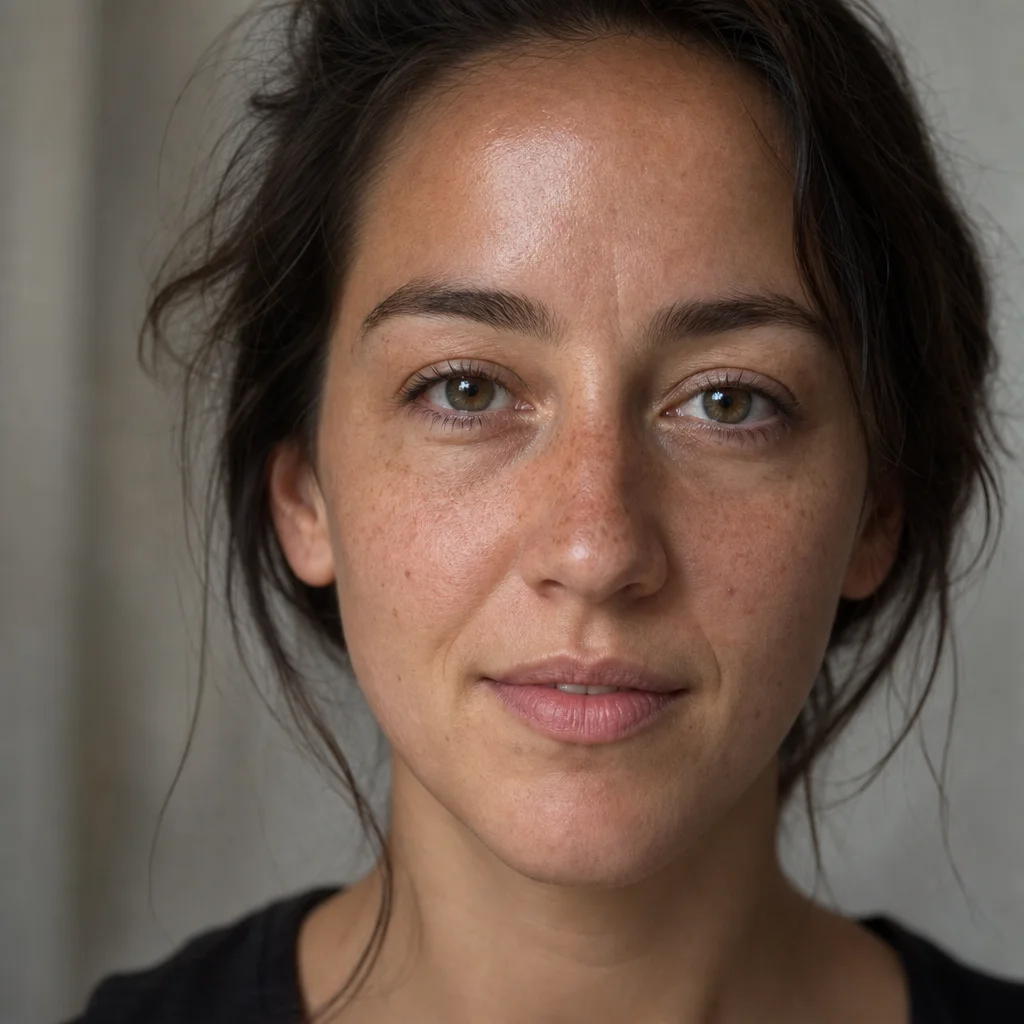
Fig. 01Close-ups · three separate images at full size
What a realistic AI image looks like up close
An image can look real as a thumbnail and fall apart when you zoom in. So zoom in. Each image below was made for this page on a free model, at 1024px, with no sharpening and no upscaling. Skin, eyes and hair each go wrong in their own way, so there is one of each.
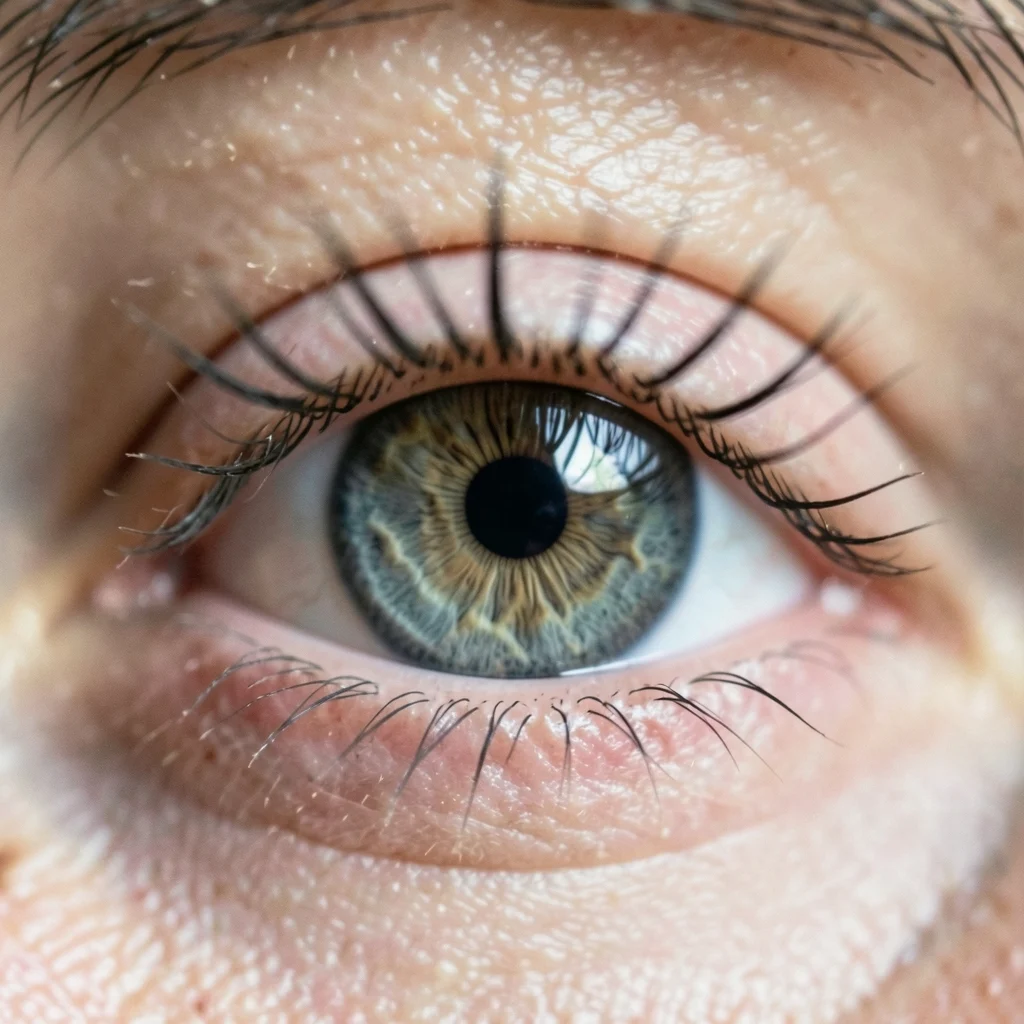
Each lash is separate instead of one dark blob. The iris has fine lines running through it. There is one highlight in the eye, not two.
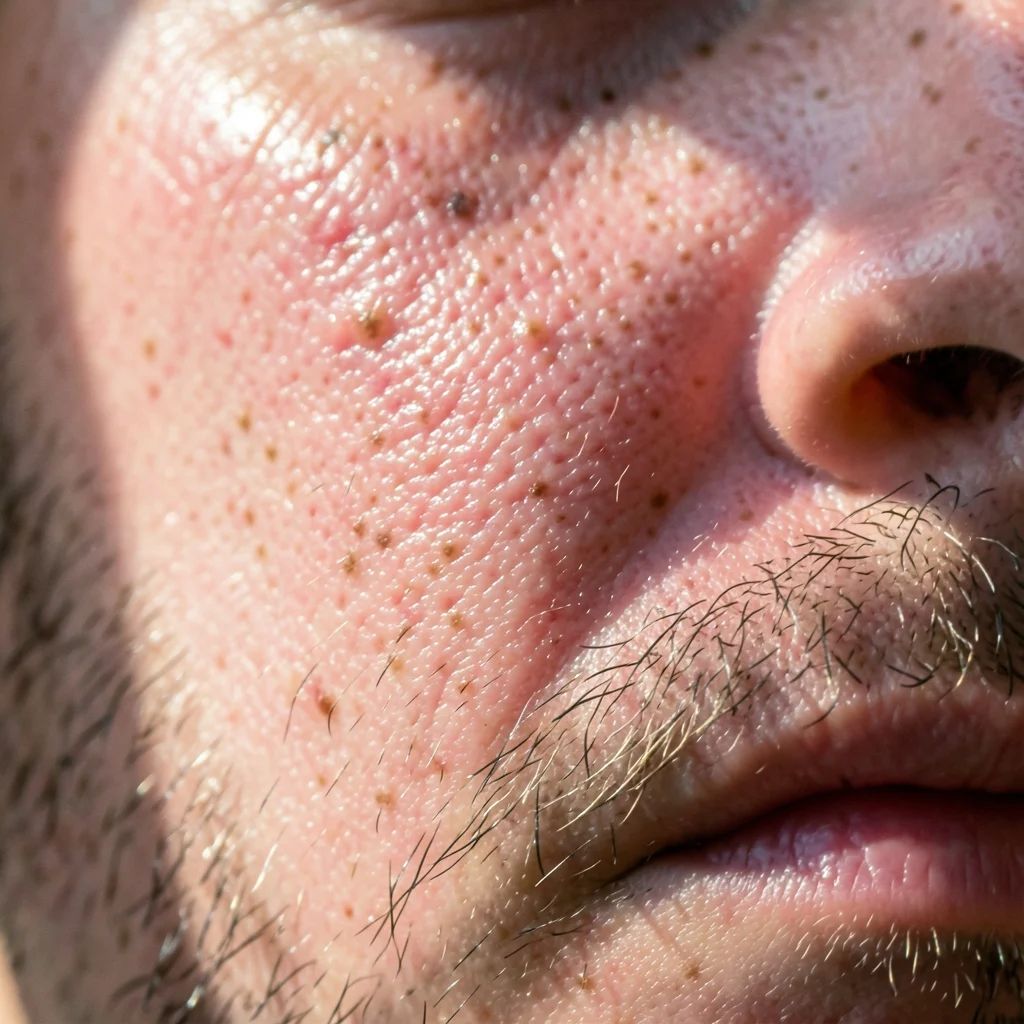
Open pores, single hairs, moles and patchy redness. Shiny in some places, matte in others. Real skin is never one finish.
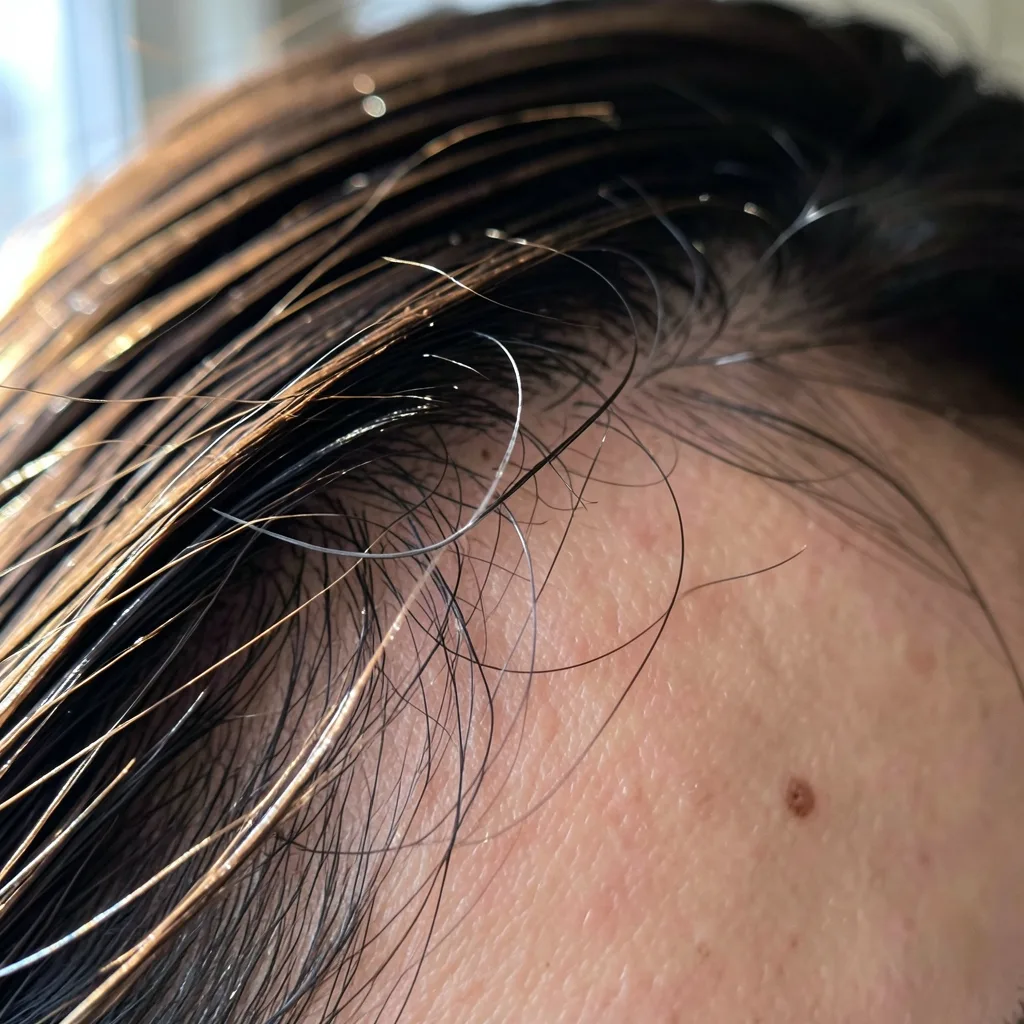
Strands stay separate instead of merging into a helmet. Loose hairs break the edge. You can see scalp at the parting. Hair is the hardest part to get right.
Look long enough and you will still find something a camera would not do. That is the honest answer. These images are good enough to use at normal size, not good enough to pass a forensic check.
Want to zoom in on your own image? Generate one and view it at full size. New accounts get 100 free credits.
Fig. 02Four reasons images look fake, and the fix for each
Why AI images look fake, and how to fix it
Most fake-looking images fail for one of four reasons. Each one has a simple wording fix. The two images below came from the same model, minutes apart. Only the prompt changed.
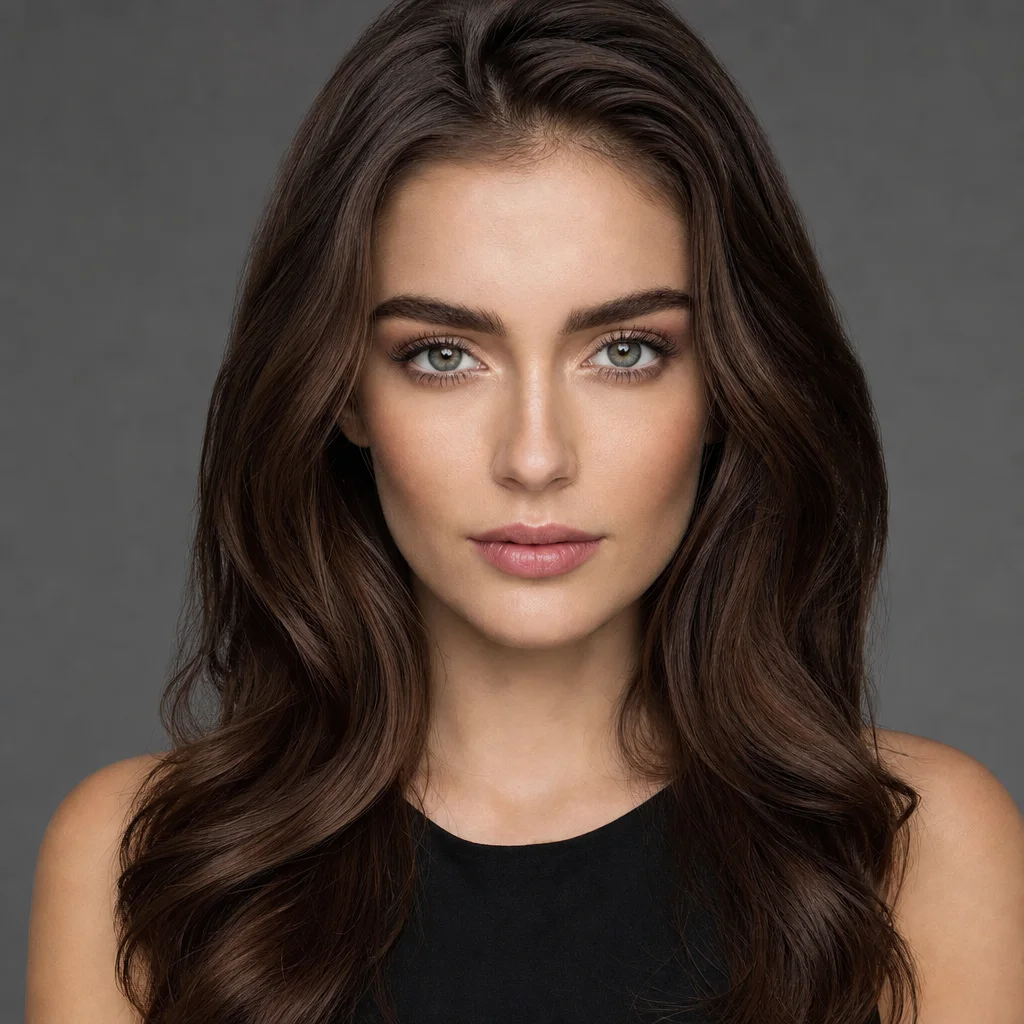
This prompt asked for “flawless skin”, “perfectly symmetrical face”, “even studio lighting” and “8k”. It looks fine until you look closely. No pores anywhere. Both sides of the face match. No shadows. A retouched shine down the nose and cheekbones.
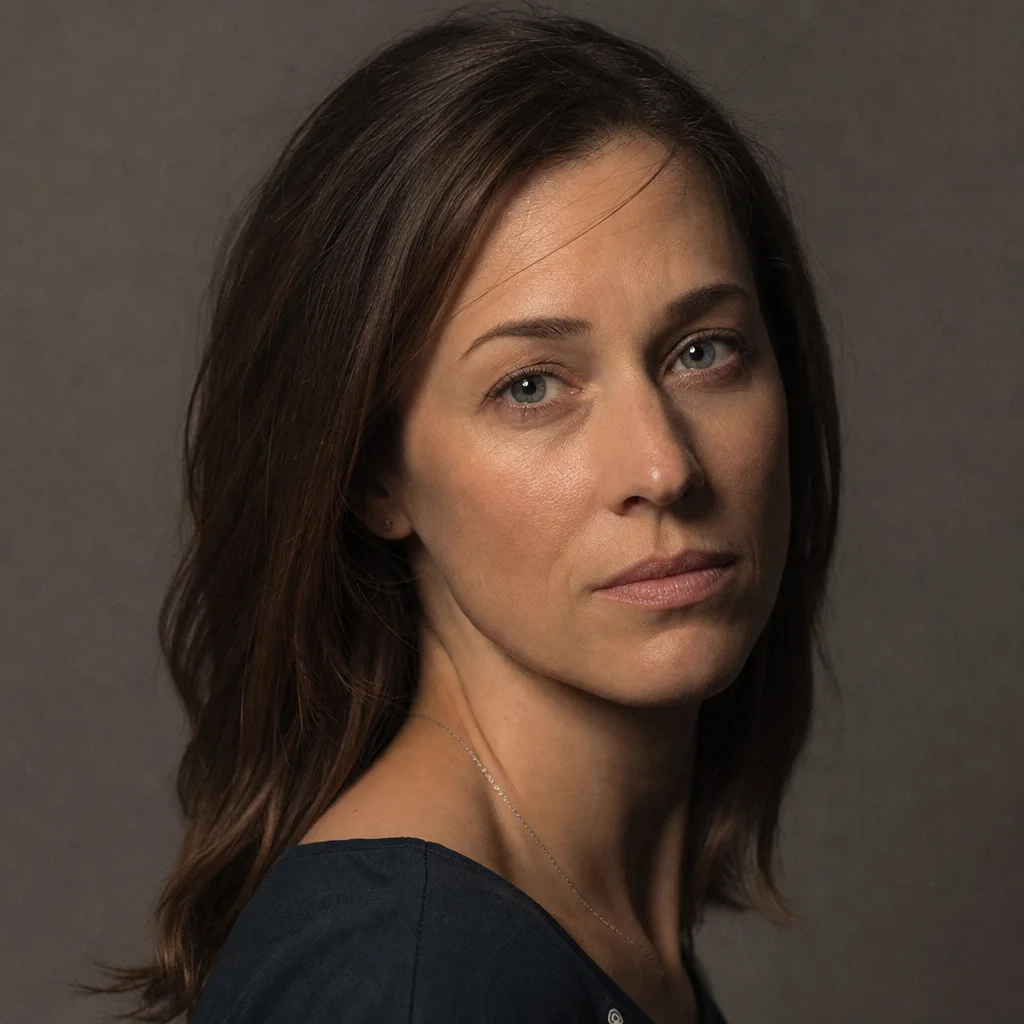
Same model, same setup, minutes later. This prompt named the lens (85mm at f/2), one light high on the right, a shadow under the jaw, pores and fine lines left in, and hair that is not perfectly placed.
-
Reason 01
Skin that is too smooth
The skin is one flat, even colour. No pores, no fine hair, no blotches. This is the fastest giveaway of all.
Type instead“visible pores, fine facial hair, uneven skin tone, slight shine on the forehead”
-
Reason 02
A face that is too symmetrical
No real face is a mirror image. Matching eyes, level eyebrows and a perfectly centred nose look like a mask.
Type instead“asymmetric features, one eyebrow slightly higher, head turned a few degrees”
-
Reason 03
Light with no direction
The light comes from everywhere at once. Nothing casts a shadow, so the subject looks pasted onto the background.
Type instead“single window light from the left, soft shadow under the jaw, light fading into the background”
-
Reason 04
Surfaces with no texture
Fabric with no weave. Walls with no grain. Metal with no scratches. Surfaces look like flat colour instead of real material.
Type instead“linen weave visible, matte paint with dust, brushed metal with fine scratches”
Fig. 03Six things to put in your prompt
How to write a prompt for realistic images
Describe the photo the way a photographer would: the lens, the light, the surface, and one thing out of place. Words like “8K”, “masterpiece” and “ultra detailed” sound useful but change very little.
Here is why. “85mm at f/1.8” tells the model how close the framing is and how much stays in focus. “One window on the left” tells it where the shadows fall. Those are facts it can act on. “Beautiful” is not.
- Lens
Focal length and aperture
“85mm, f/1.8” gives a portrait look with a blurred background. “24mm” gives a wide shot with visible distortion.
- Light
One source, and where it is
Name a single light and place it. A cloudy window, hard midday sun and one softbox on the left all look completely different.
- Surface
How the material behaves
Say whether a surface is matte, satin or shiny. This is what keeps skin from looking like plastic.
- Flaw
One thing out of place
A stray hair, a crease, some dust, a fingerprint. Nothing looks real if everything is perfect.
- Focus
What is sharp, what is blurred
Say which part should be sharp. A background that is sharp everywhere looks computer-made.
- Colour
Film or plain digital
“Portra 400 grain” and “plain digital, no colour grading” both work. Pick one instead of leaving it open.
Try one prompt with the lens, the light and one flaw in it. The difference shows up on the first run.
Fig. 04What it gets wrong
What the realistic AI image generator still gets wrong
You cannot switch these off. Knowing about them upfront saves you credits.
- Anatomy
Hands and teeth
Hands and teeth change with every run. Hands go wrong often, so plan to run it again or crop them out.
- Text
Words in the picture
Any text in frame, such as a sign, a label or a book spine, comes out misspelt. Treat text as decoration, not as words.
- People
Real, named people
You cannot generate a real person by name. You can describe a type of person: age, build, clothes, expression.
- Repeats
The same face twice
The same prompt gives you a different person each time. To keep one face across several images, reuse your first image as a reference.
- Physics
Reflections and shadows
Mirrors, glass and shadows look believable but are not accurate. They rarely hold up to a close look.
- Sizes
Measurements
Sizes and proportions are there to look right, not to be correct. Never use an AI image to check whether something fits.
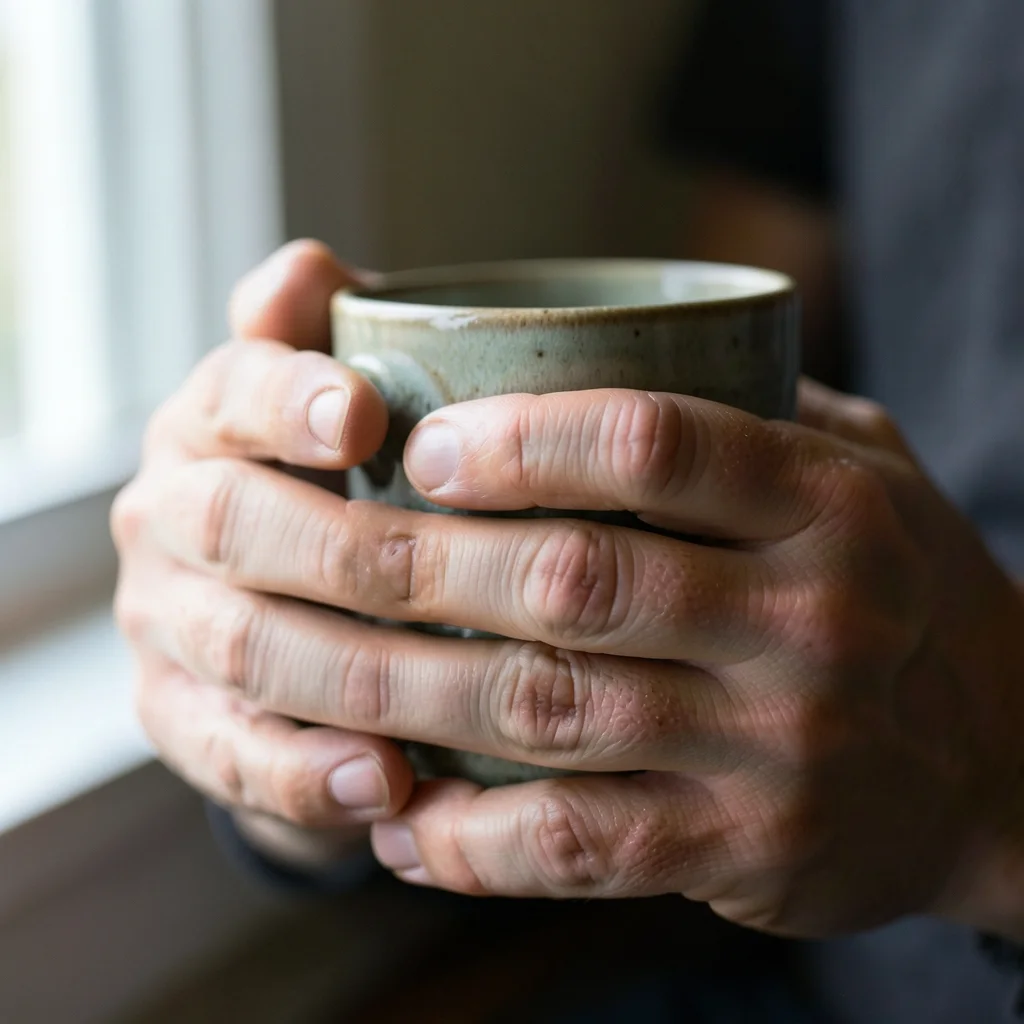
This one came back right on the first try: ten fingers, creases at the knuckles, veins, nails sitting where they should. That is the honest point about hands. They do not fail every time. They fail at random.
Random is worse than always, because you cannot plan around it. Check the hands in every image you generate. Run it again, or crop, when they come out wrong.
Fig. 05Which model to use
Which AI model makes the most realistic images
Several models sit behind the same prompt box, and they are good at different things. For photo-style work, start with the first one. If a result is close but not right, switch models. Your prompt carries over.
- Start here
FLUX 2 Max
The best texture and the most camera-like focus. Use it for anything that has to pass as a photograph.
Open FLUX 2 Max - Long prompts
GPT Image 2
The best at following a long prompt where several instructions must all be obeyed.
Open GPT Image 2 - Dramatic light
Seedream 5 Pro
Gives you film-like, art-directed light straight away. Pick it when mood matters more than accuracy.
Open Seedream 5 Pro
Every model shows its credit cost on the Generate button once you sign in. Draft on a cheap model, then run the prompt you like on a better one.
Fig. 06The process
How to create realistic AI images in four steps
- 01
Write it like a photographer
Name the subject, the lens, the light, the surface and one flaw. Twenty exact words beat sixty vague ones.
- 02
Run it two or three times
Every run starts fresh, so the results differ. Keep the one that matches your prompt, not the prettiest one.
- 03
Zoom in and check it
View skin, hands and any text at full size. That is where the mistakes will be.
- 04
Change one thing
Edit one instruction at a time. Change two and you will not know which one helped.
That is the whole process. Write one prompt, run it twice, then zoom in on the better result.
Fig. 07Good uses and bad uses
What photorealistic AI images are good for
Use them anywhere you would have used a stock photo: website banners, ads, social posts, packaging mockups, mood boards and concept work. At normal screen size, a good photorealistic image is hard to tell apart from stock.
Do not use them as proof of anything, for exact measurements, for a real named person, or anywhere the viewer needs to trust the picture as a record of something that happened.
Fig. 08Questions
Questions about realistic AI images
How do you make AI images look real?
Describe the photo like a photographer, not like a wish list. Give the lens and aperture, one light and where it is, how the surfaces behave, and one imperfection. Those four things change the picture. Words like “photorealistic” and “8K” barely do anything.
Can it generate realistic human faces?
Yes, for people you describe: age, build, expression and lighting. Not for real, named people. The same prompt gives a different face every run, so reuse your first image as a reference if you need the same person again.
Why do the hands look wrong?
Hands are the weakest part of AI image generation, after text. They fail at random rather than every time. Run it again, crop the hands out, or frame the shot so the hands are not the focus.
Is it free, and is there a watermark?
You can start free. New accounts get 100 credits. Downloads have no watermark. Each run uses credits, and the cost shows on the Generate button before you press it.
Which model is best for photorealism?
Start with FLUX 2 Max. Use GPT Image 2 for long prompts with several instructions. Use Seedream 5 Pro when you want dramatic, film-like light instead of plain accuracy. Your prompt carries over when you switch.
Can I use the images commercially?
That depends on your plan, so check yours before you use an image in paid work. The free trial and the paid plans are not the same on this point.
Fig. 09Your turn
Write it like a photographer. Then zoom in.
Name the lens, the light and one flaw. Run it twice. View it at full size before you use it.
Written by
Deepak Joshi
Deepak Joshi is a Content Marketing specialist having a combined experience of 10+ years working in the digital world. He is one of the active contributors to Pixazo Blog and has keen interest creating and marketing content related to AI tools, No-Code technology, Design Industry, Social Influencers, and other trending topics. A health and sport enthusiast, Deepak loves to indulge in all kinds of sports & games.