80s Photo Trend
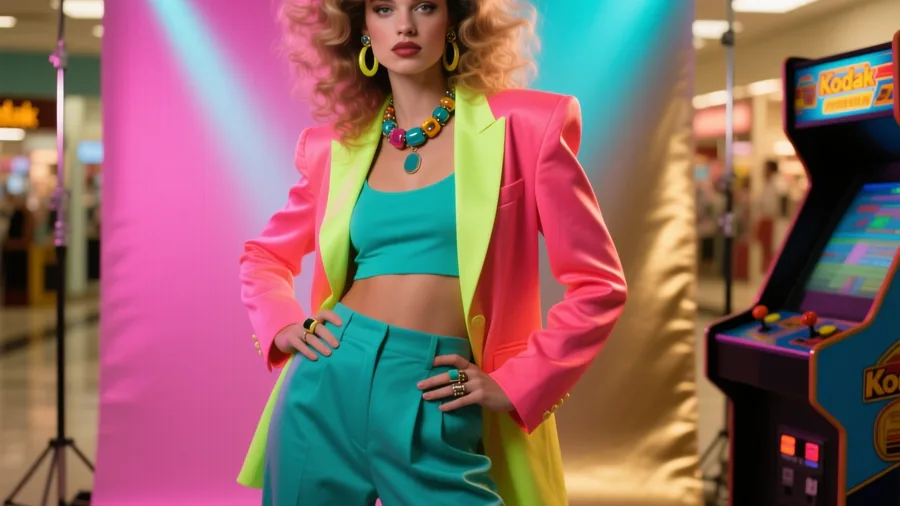
Your selfie sent back to the 1980s — big hair, era fashion and that mall-studio glow.
 Made on Pixazo
The effect
What does an 80s photo look like?
An 80s photo restyles your selfie into the decade — teased hair, retro wardrobe, soft-focus mall-studio light and analog grain. The example was generated on Pixazo.
How it works
How do you make it?
- 01
Add your photo
Upload a clear, front-facing selfie of yourself.
- 02
Generate
Pixazo restyles your hair, wardrobe and lighting into an authentic 1980s throwback with warm film grain.
- 03
Download & share
Save your retro 80s portrait and post it.
Ideas
What can you use it for?
Mall-studio portraits
The soft-focus laser-backdrop portrait everyone's parents had.
Prom & yearbook throwbacks
Big-hair prom and class-photo looks for you and your friends.
Couples & ‘how we met’
Restyle a couple into an 80s throwback for a nostalgia post.
Band & music-video looks
Neon, leather and big-hair rock-star styling.
Party & theme invites
Retro hero art for an 80s-themed party.
Gifts & keepsakes
A funny, affectionate throwback print for family and friends.
At a glance
What does it support?
| Detail | What you get |
|---|---|
| Input | A front-facing selfie. |
| Output | A retro 80s portrait image with your face kept recognizable. |
| Looks | Mall-studio, prom, yearbook, music-video and neon backdrops. |
| Subjects | You, a couple or a group — from clear photos. |
| Price | Free to create while you build; new accounts start with 100 credits. |
The honest bit
What to know before you generate
- Likeness needs a clear photo. A well-lit, front-facing, single-subject selfie gives the best face match.
- It leans into the cliches. Big hair, grain and mall-studio light are intentional — dial them down if you want subtle.
- Details vary between runs. Wardrobe and hair change each generation; regenerate to get the look you want.
- Use photos you own. Only upload photos you have the right to use and share.
FAQ
80s photo: frequently asked questions
What is the 80s photo trend?
It's the viral look of restyling a modern selfie into a 1980s throwback — teased hair, era fashion, soft mall-studio light and analog grain. Pixazo recreates it from a single photo while keeping your face recognizable.
How do I make an 80s photo of myself?
Upload a clear, front-facing selfie and hit generate. Pixazo restyles your hair, wardrobe and lighting into an authentic 1980s look with warm film grain in seconds.
Is the 80s photo trend free?
You can create 80s photos free while you build, and new accounts start with 100 credits. HD downloads and premium models use credits.
Will it still look like me?
Yes, from a clear, well-lit, front-facing photo. Group shots, heavy angles and low light reduce the resemblance.
Can I make an 80s photo with my partner or friends?
Yes — upload a clear photo of a couple or group and restyle everyone into the decade together.