Disco Photo Trend
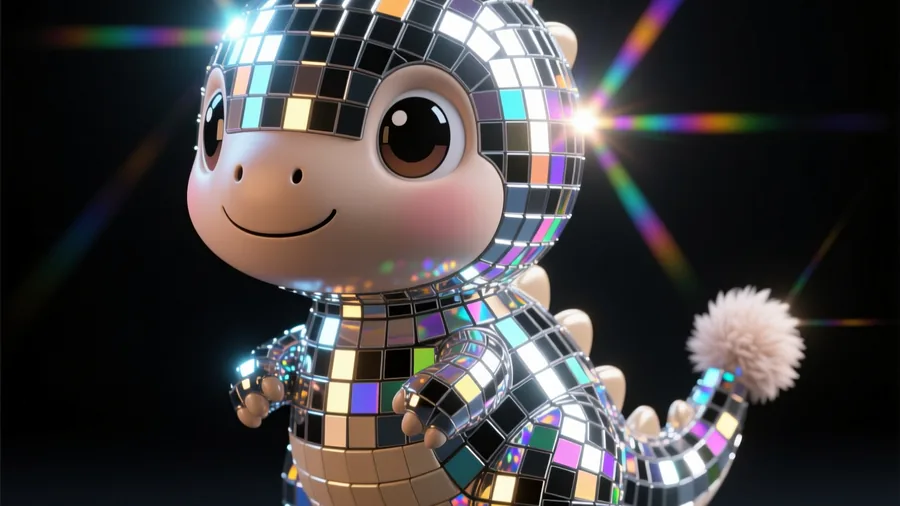
Any subject turned into a sparkling disco-ball mirror-mosaic that catches and throws the light.
 Made on Pixazo
The effect
What does the AI disco-ball effect look like?
The disco effect re-skins your subject in mirror-mosaic tiles like a disco ball — glossy, faceted and glittering, throwing light around a dark studio. The example was generated on Pixazo.
How it works
How do you make it?
- 01
Add your subject
Upload a photo of a person, pet or object.
- 02
Generate
Pixazo re-skins the subject in tiny reflective mirror tiles like a disco ball, with glittering light and flares.
- 03
Download & share
Save the sparkling disco version and post it.
Ideas
What can you use it for?
Party & NYE posts
A dazzling disco version of you or your pet for celebrations.
Music & nightlife
Cover art and promo visuals with a shiny club aesthetic.
Product glow-ups
Turn a product into a mirror-mosaic showpiece for a launch.
Pet disco portraits
Your dog or cat as a sparkling disco-ball statue — a share magnet.
Event invites
Glittering hero art for a disco, birthday or launch invite.
Profile pictures
A high-shine PFP that pops in a feed.
At a glance
What does it support?
| Detail | What you get |
|---|---|
| Input | A photo of a person, pet or object. |
| Output | A mirror-mosaic “disco-ball” render of your subject as a downloadable image. |
| Looks | Club-dark with light flares, bright studio, coloured spotlights and more. |
| Subjects | People, pets, products and objects. |
| Price | Free to create while you build; new accounts start with 100 credits. |
The honest bit
What to know before you generate
- It's a stylized re-skin. The effect covers your subject in mirror tiles — fine detail like faces becomes abstract and glittery by design.
- Simple subjects sparkle best. One clear subject on a plain background gives the cleanest mirror-mosaic; busy scenes get noisy.
- It's an image, not a real object. Pixazo renders a picture of a disco-ball version — not a physical mirrored sculpture.
- Use subjects you own. Only upload photos you have the right to use.
FAQ
Disco photo: frequently asked questions
How do I make a disco-ball photo?
Upload a photo of a person, pet or object and hit generate. Pixazo re-skins the subject in tiny reflective mirror tiles like a disco ball, then adds glittering light. Download in seconds.
Is the disco photo trend free?
You can create disco photos free while you build, and new accounts start with 100 credits. HD downloads and premium models use credits.
What subjects work best?
One clear subject — a person, a pet or a product — on a plain background gives the cleanest, most reflective mirror-mosaic. Busy scenes get visually noisy.
Can I make my pet a disco ball?
Yes — pets are one of the most popular and most-shared disco subjects. Upload a clear photo and pick the sparkle and lighting.
Will my face still be recognizable?
The disco effect is deliberately abstract — it re-skins the subject in mirror tiles, so faces read as glittering shapes rather than sharp detail.
Can I use it commercially?
Images from your own photos are yours to use, including for covers and launches. Don't depict a real person without permission.