Photo Doodle Trend
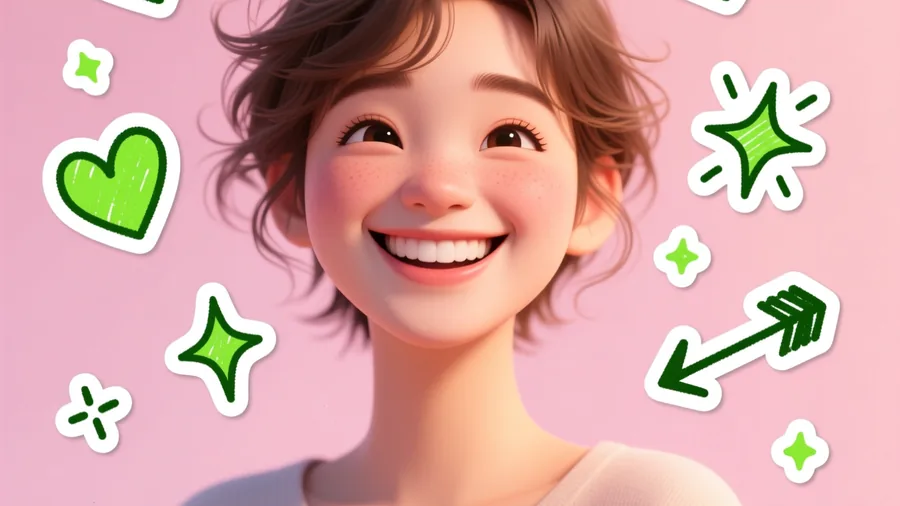
Your photo covered in playful hand-drawn doodles — hearts, stars, sparkles and marker scribbles.
 Made on Pixazo
The effect
What does the AI doodle effect look like?
The doodle effect keeps your photo and adds hand-drawn marker scribbles on top — hearts, stars, crowns, sparkles and captions arranged around the subject. The example was made on Pixazo.
How it works
How do you make it?
- 01
Add your photo
Upload the photo you want to decorate.
- 02
Generate
Pixazo draws playful hearts, stars, sparkles, crowns and captions over your photo in a hand-drawn marker style.
- 03
Download & post
Save the doodled version and share it in seconds.
Ideas
What can you use it for?
Birthday & celebration posts
Crowns, confetti and “happy birthday” scribbles over a friend's photo.
Couple & bestie edits
Hearts, arrows and cute captions between two people.
Story stickers
Doodled overlays that match the hand-drawn Instagram-story look.
Highlight & annotate
Circle, arrow and label things in a photo to make a point.
Fan & meme edits
Playful reactions and captions on a screenshot or still.
Brand playfulness
On-brand doodles and callouts over product or team photos.
At a glance
What does it support?
| Detail | What you get |
|---|---|
| Input | Your own photo to decorate. |
| Output | Your photo with hand-drawn doodle overlays — a downloadable image. |
| Doodle types | Hearts, stars, sparkles, crowns, arrows, squiggles and short captions. |
| Style controls | Colour, stroke weight and placement, from neat lines to marker scribbles. |
| Subjects | People, pets, couples, groups or product shots. |
| Price | Free to create while you build; new accounts start with 100 credits. |
The honest bit
What to know before you generate
- The base photo stays yours. The effect adds drawings on top of your image — it doesn't repaint the photo underneath.
- Doodle placement is a draft. AI places the doodles for you; nudge, recolour or remove any of them before you download.
- Legible captions need short text. Keep captions to a few words — long sentences in a doodle font get hard to read.
- Use photos you own. Only decorate photos you have the right to use and share.
FAQ
Photo doodle: frequently asked questions
How do I add doodles to a photo?
Upload your photo on the photo doodle trend and hit generate. Pixazo draws hearts, stars, crowns, arrows, sparkles and short captions over your image in a hand-drawn style. Download and post in seconds — no design skills needed.
What is the photo doodle trend?
It's the look of scribbling playful, hand-drawn marker doodles over a photo — hearts, stars, crowns and captions — that spread across Instagram Stories and TikTok. Pixazo recreates it automatically from any photo.
Is the photo doodle effect free?
You can add doodles free while you build, and new accounts start with 100 credits. HD downloads and premium models use credits.
Can I doodle on a pet or group photo?
Yes. It works on any photo — a pet, a couple, a whole group — and you can place different doodles around each subject.
Does it cover my photo?
No. The doodles sit on top as an overlay, so your original photo stays visible underneath.
Try photo doodle now.
Upload your photo — free to start, no card required.

