8-bit, 10-bit, 16-bit: What HDR Conversion Really Recovers


HDR conversion sounds like free detail: feed in a standard clip, get back bright highlights and deep shadows. The truth is more specific, and it starts with bit depth. The number of bits per pixel decides how many tonal steps a file can hold, and that sets what a conversion has to work with. An 8-bit clip with blown highlights cannot have that detail put back, because it was never recorded. Understanding what 8-bit, 10-bit and 16-bit actually store is what separates a real HDR grade from a stretched fake, and it is what a good AI SDR to HDR Conversion pass is honest about.
You will learn what bit depth really means, what an SDR to HDR conversion can genuinely recover, what is gone for good, and how to convert well.
Bit Depth and Dynamic Range Are Not the Same Thing
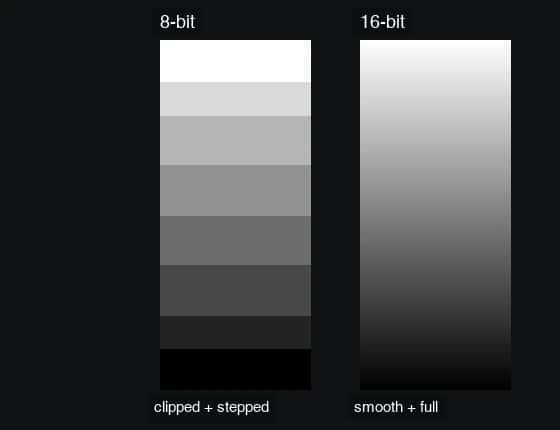
- ▸Bit depth is the number of steps: 8-bit holds 256 steps per channel, 10-bit holds 1024, and 16-bit holds 65536. More steps mean smoother gradients and more room to push an image without banding.
- ▸Dynamic range is the distance covered: Dynamic range is how far the image reaches from darkest to brightest. HDR simply covers more of that range than SDR does.
- ▸Depth protects the range: You can have range without enough depth and get banding, so HDR work wants both high bit depth and a wide range together.
- ▸SDR versus HDR: SDR is built for a limited brightness range, HDR for a much wider one. Converting between them is a mapping job, not a magic one.
What HDR Conversion Can Recover
- ▸Smoother gradients: Regrading in higher bit depth spreads the existing tones across more steps, so banding in skies and soft falloff eases.
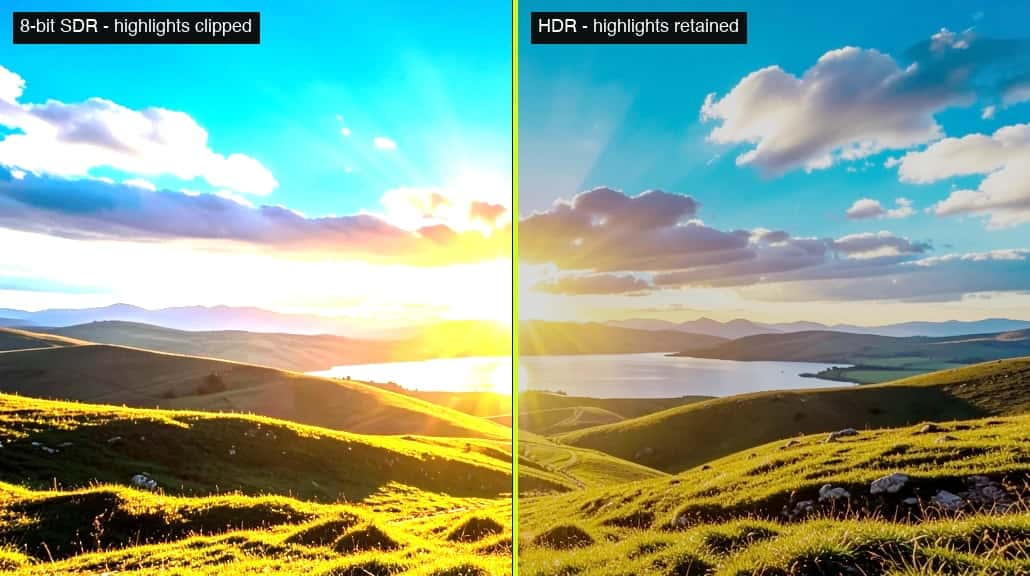
- ▸A plausible wider range: Inverse tone mapping can expand the range and lift highlights that were compressed but not clipped, giving a believable HDR look.
- ▸Usable shadow detail: Detail that was recorded but sat crushed near black can often be lifted cleanly when there are enough steps to work with.
- ▸Reconstructed texture: An AI restoration pass can rebuild fine texture and reduce compression artefacts, which makes an expanded image hold up on a bright display.
Suggested Read: Color Space Handoffs That Break AI VFX Shots
What HDR Conversion Cannot Recover
Conversion works with what is in the file. Where the original clipped or crushed, there is no data underneath to restore, and a tool that claims otherwise is inventing it.
- ▸Clipped highlights: Once a highlight hits pure white and flattens, the detail is gone. Expanding the range only stretches a flat patch.
- ▸Crushed blacks: Shadow areas recorded as solid black hold no detail to lift, so pushing them only reveals noise.
- ▸Detail never captured: A conversion cannot add information the sensor and codec did not record. It can only redistribute what is there.
- ▸True color volume from 8-bit: Stretching 8-bit into a wide HDR container without care exposes banding, because there are not enough steps to fill the range smoothly.
Suggested Read: Codecs, Bit Depth and Why Proxies Ruin Mattes
8-bit vs 10-bit vs 16-bit at a Glance
Each bit depth suits a different job, and the right one depends on whether you are delivering a final file, grading a master or recovering a weak source. Here is how the three compare on the number of steps they carry per channel and where each one earns its place in a pipeline.
| Bit depth | Steps per channel | Best use |
|---|---|---|
| 8-bit | 256 | Standard SDR delivery. Bands and clips under heavy HDR conversion. |
| 10-bit | 1024 | Broadcast HDR and most delivery. Enough steps for a clean HDR grade. |
| 16-bit | 65536 | VFX and mastering. Float headroom for grading, conversion and recovery. |
Suggested Read: Chroma Subsampling: The Setting That Decides Your Key
How to Convert SDR to HDR Well
Suggested Read: What Footage Survives AI Rotoscoping
Where AI Restoration Fits Into HDR Work
When the only source is 8-bit and already compressed, restoration is what makes an HDR pass hold up. An AI restoration and upscaling pass reduces banding, rebuilds plausible texture and lifts resolution so an expanded image survives on a bright display, while staying honest about the highlights that genuinely clipped. For a library of older or low bit depth footage headed for HDR, Pixazo for enterprise video and VFX runs that recovery at volume.
Talk to Pixazo About VFX at Scale
Suggested Read: Best AI Photo Colorizers for Black and White Photos
A Quick Bit Depth and HDR Checklist
- ▸The source is the highest bit depth available, not an 8-bit export
- ▸The conversion runs in a 16-bit or float pipeline
- ▸Highlights are rolled off, not stretched, and clipped areas are accepted
- ▸Shadows are lifted only where real detail exists
- ▸Grain or texture masks any banding in smooth gradients
- ▸The master targets a real HDR standard, not a stretched SDR file
Conclusion
HDR conversion is redistribution, not invention. Bit depth decides how much you have to redistribute, which is why a 16-bit source converts cleanly and an 8-bit one bands and clips. A good pass smooths gradients, expands range plausibly and rebuilds texture, and it refuses to fake the highlights that were never recorded. Start from the deepest source you have, work in float, and be honest about the limit. That is the difference between a true HDR grade and a stretched one that falls apart on a bright screen.
FAQ
What is the difference between bit depth and dynamic range?
Bit depth is how many tonal steps a file holds per channel, such as 256 for 8-bit or 65536 for 16-bit. Dynamic range is how far the image reaches from darkest to brightest. HDR needs both: a wide range and enough depth to fill it without banding.
Can HDR conversion recover blown out highlights?
No. Once a highlight clips to pure white the detail was never recorded, so there is nothing to restore. A conversion can expand range and roll off highlights that were compressed but not clipped, but it cannot rebuild data that is gone.
Is 8-bit good enough for HDR?
Not really. 8-bit has only 256 steps per channel, so stretching it into a wide HDR range exposes banding. 10-bit is the practical minimum for HDR delivery, and 16-bit or float is best for grading and conversion.
What can an SDR to HDR conversion actually recover?
It can smooth gradients by regrading in higher bit depth, expand the range plausibly with inverse tone mapping, lift shadow detail that was recorded but crushed, and with AI restoration rebuild fine texture. It redistributes existing data rather than inventing new data.
Why does converting 8-bit to HDR cause banding?
Because there are not enough tonal steps to fill the wider range smoothly. Spreading 256 steps across a large HDR range leaves visible jumps between them, which show as banding, especially in skies and soft gradients.
How do I convert SDR to HDR without it looking fake?
Start from the highest bit depth source, work in a 16-bit or float pipeline, roll highlights off with a soft curve, lift shadows only where real detail exists, add grain to hide banding, and accept clipped areas instead of inventing detail.
Does AI restoration help with HDR conversion?
Yes. When the source is low bit depth or compressed, an AI restoration and upscaling pass reduces banding, rebuilds plausible texture and lifts resolution so the expanded image holds up on a bright display, while staying honest about genuinely clipped highlights.
Deepak Joshi
Author · Pixazo
Deepak writes about generative AI models, APIs, and the workflows teams use to ship them. Reviewed by Abhinav Girdhar.