How to Create AI Short Drama Series?


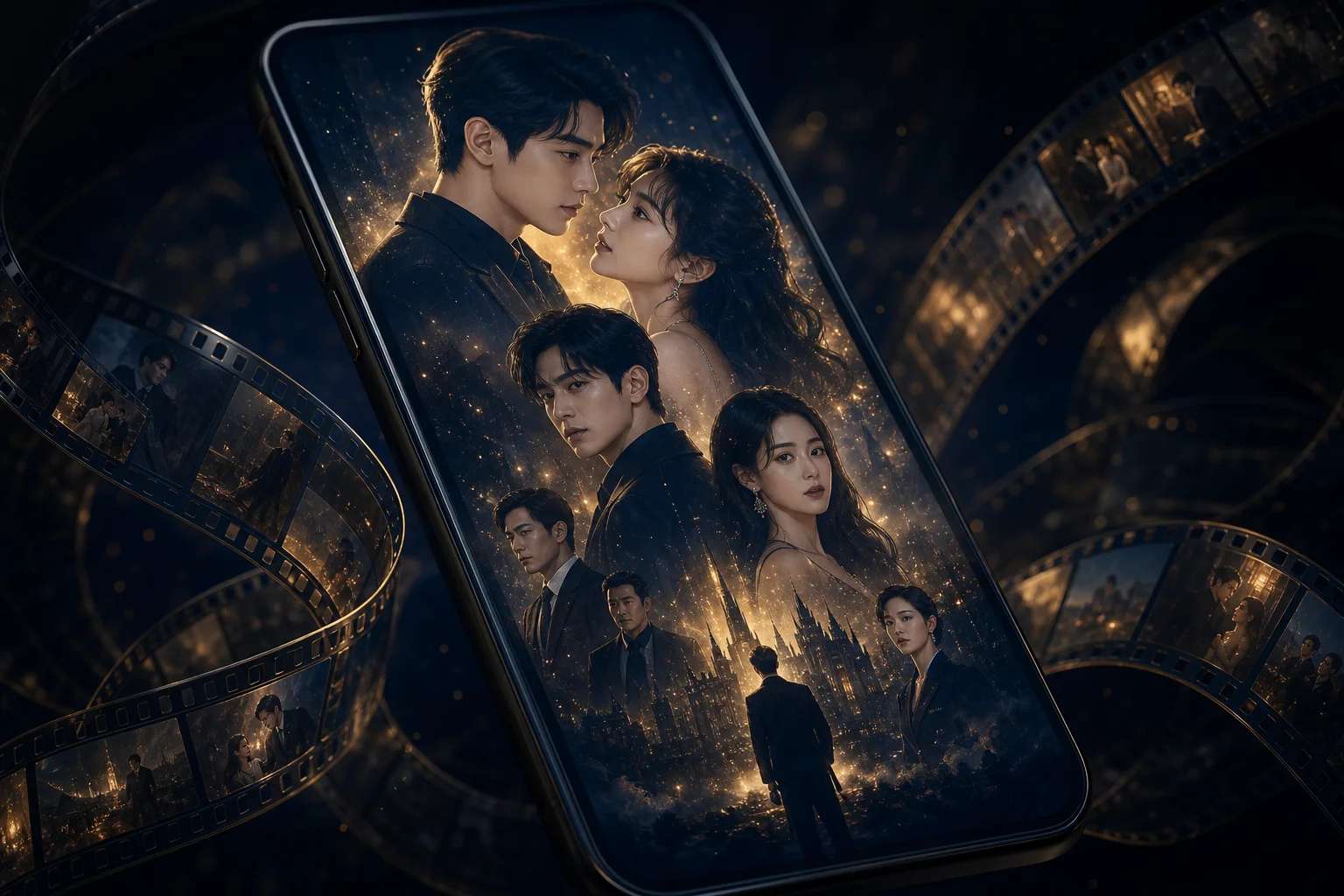
What Are Short Dramas?
Short dramas are compact stories designed to deliver emotional impact within seconds. They’re built around focused plots, character-driven moments, and strong visual hooks. Audiences today prefer quick, meaningful storytelling — a trend driven by platforms like YouTube Shorts, Instagram Reels, and TikTok. That’s why mini dramas are becoming popular across social media; they captivate attention and leave viewers wanting more. AI Image Generator is available if you want to try it.
AI technology takes this format even further. By using an AI short drama generator, creators can bring their stories to life without needing a camera or crew. These tools interpret written prompts and turn them into moving scenes with characters, settings, and emotions. With tools like Pixazo, you can control tone, expressions, and pacing while focusing entirely on creative direction.
Each short drama becomes a digital micro-story that blends narrative and technology. The fusion of human creativity and machine learning gives rise to storytelling that’s fast, accessible, and visually stunning — empowering anyone to produce professional-quality dramas for social platforms or streaming audiences.
How Can AI Enhance the Creation of Short Dramas?
AI brings scale, ease, and consistency to storytelling. With an AI mini drama generator, the platform can analyze your narrative cues and automatically generate coherent visuals, background music, and vocal expressions. This removes the friction of hiring actors, shooting scenes, or editing complex footage. Whether you’re working solo or managing a creative team, AI drastically reduces production time and effort while amplifying visual quality.
Beyond speed, AI opens up creative experimentation. The system can explore alternate visual interpretations — switching tones, lighting, or camera motion to match your desired mood. It can also simulate cinematic styles from romance to thriller, allowing endless aesthetic variety. This flexibility gives creators room to test what resonates most with their audience and perfect the flow of their storytelling.
Furthermore, AI models bridge the gap between imagination and execution. They interpret descriptive language and emotion markers to produce expressive lighting, angles, and gestures. This understanding of how AI video generators work helps artists and beginners alike translate ideas into screen-ready output. With Pixazo’s smart rendering capabilities, you can achieve studio-grade visuals without deep technical expertise.
Why Is Pixazo Ideal for AI Short Dramas?
Pixazo excels in the art of creative automation. As one of the most advanced platforms for crafting AI-based films, it offers tools that combine flexibility and precision. Its intuitive controls allow creators to fine-tune tone, color palette, and scene depth for emotionally rich storytelling.
Using its integrated AI image generator, you can build static compositions that evolve into animated sequences, maintaining stylistic harmony throughout. The result is a coherent, cinematic flow that mirrors professional production quality. From lighting to lip-syncing, every detail feels organic and lifelike.
Pixazo’s rendering engine also ensures performance optimization across devices, meaning your final videos load quickly and play smoothly. For creators exploring short dramas as part of content strategy, Pixazo offers both scalability and creative control — making it a leader among AI tools for short-form storytelling.
How to Create Mini Dramas with Pixazo in Just a Few Steps?
Step 1: Visit Pixazo.ai’s AI Image Generator
Head over to the official Pixazo’s AI Image Generator, and write a prompt to create a image for your drama. Then click on “Generate”.
Prompt Example: “Using the provided images of the Indian woman and her 4–5 year old son, create a photorealistic and emotional scene where they are seen through the flames of the husband’s funeral pyre. The burning pyre is in the foreground, glowing brightly, while the woman stands behind it with eyes full of unshed tears, her expression heavy with grief and sorrow. She wears a traditional saree with fading sindoor. Her young son holds her hand tightly, his innocent face reflecting sadness and confusion. Their likeness from the given images should be preserved, with the flickering flames partially framing their figures. The atmosphere must be cinematic, respectful, and intense, capturing the deep pain of mourning.”
Step 2: Sign-Up or Log In to Pixazo
Log in or sign-up for an account if you don’t already have one. Pixazo offers free credits if you sign-up for an account.
Step 3: Generate Images to Your Liking
An image will be generated using Nano Banana 2.5 Flash, you can change the AI model if you wish to use a different one. Here is an example of an image generated by the tool:
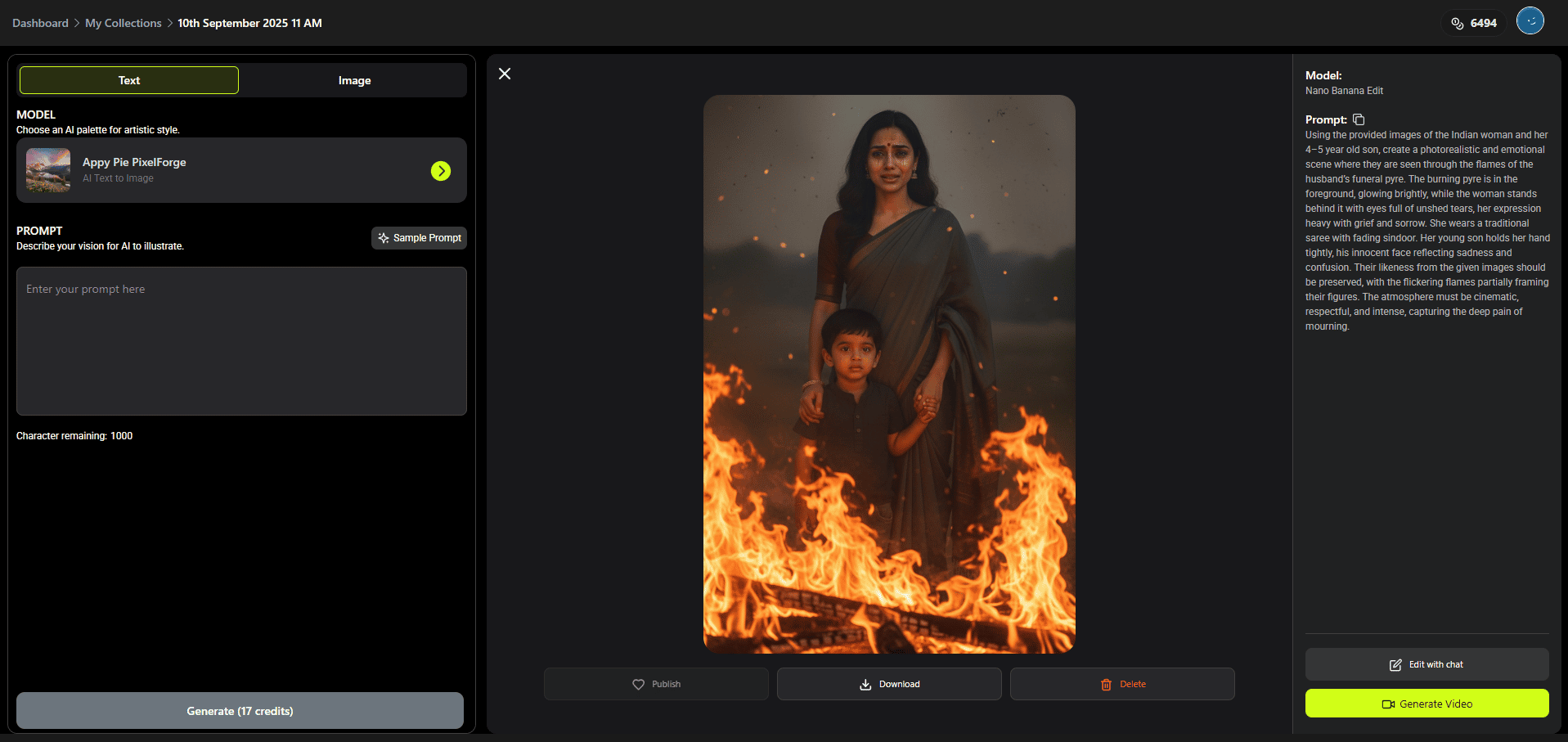
Use different and specific prompts to generate images to your liking. Below is another prompt and it’s result:
Prompt Example: “Using the provided reference images of the couple, create a realistic scene inside a modern coffee shop in a shopping mall. Keep their faces the same as in the source images but change their outfits to new, stylish attire — for example, the woman in a chic casual dress and the man in a smart casual shirt and jacket. Place the couple at a table that is set a little farther back from the large glass window, so they are visible through it but with some space between them and the window. Capture the scene with a wider camera angle from outside the coffee shop, showing not only the couple through the window but also parts of the coffee shop’s interior — décor, lights, furniture, and other subtle details. Make them appear like they are dating: sitting close to each other, smiling, leaning slightly toward one another, with coffee cups on the table. Ensure realistic reflections on the glass and a warm, cozy atmosphere inside the shop.”

Step 4: Convert the Images to Videos
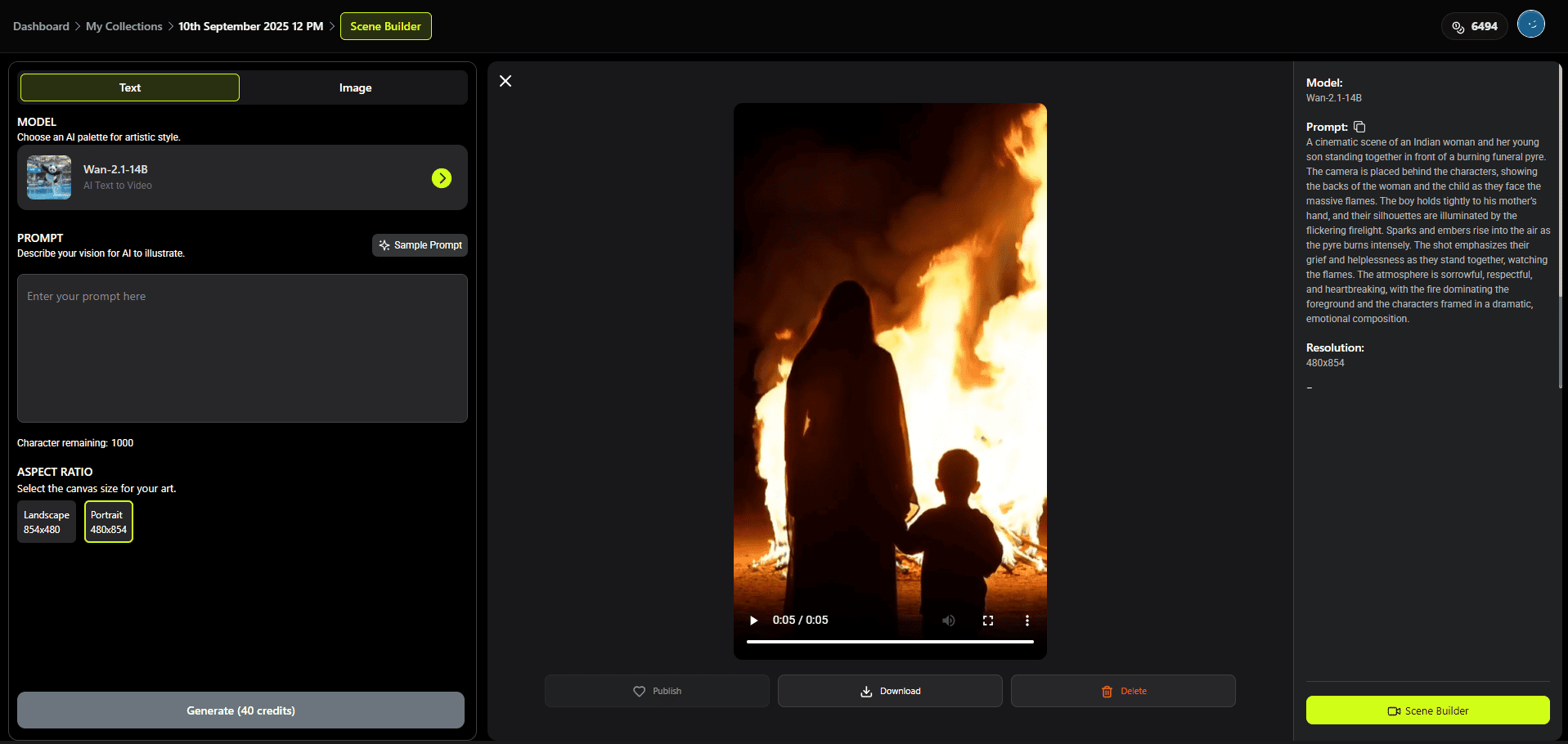
Once the image is generated to your liking, select “Convert to video” and enter a prompt to generate a video to your liking. The videos are generated using Wan 2.1 AI model, but you can use different models for different results. Here is an example of a video prompt and a generated video:
Prompt Example: “A cinematic scene of an Indian woman and her young son standing together in front of a burning funeral pyre. The camera is placed behind the characters, showing the backs of the woman and the child as they face the massive flames. The boy holds tightly to his mother’s hand, and their silhouettes are illuminated by the flickering firelight. Sparks and embers rise into the air as the pyre burns intensely. The shot emphasizes their grief and helplessness as they stand together, watching the flames. The atmosphere is sorrowful, respectful, and heartbreaking, with the fire dominating the foreground and the characters framed in a dramatic, emotional composition.”
This way you can generate multiple short length videos.
Bonus Tip:
You can also add a script for any video you want to generate in the prompt. This is done using Wan 2.2 Speech AI model. Here is a sample prompt and output video:
Prompt Example: “Animate the character from the given image so that it speaks in Hindi, perfectly lip-synced with the provided audio file. Ensure natural mouth movements, expressions that match the tone of the audio, and smooth synchronization throughout the video. make lip movement only on male character which is in the left corner.”
Step 5: Combine Generated Short-Length Videos for a Long One
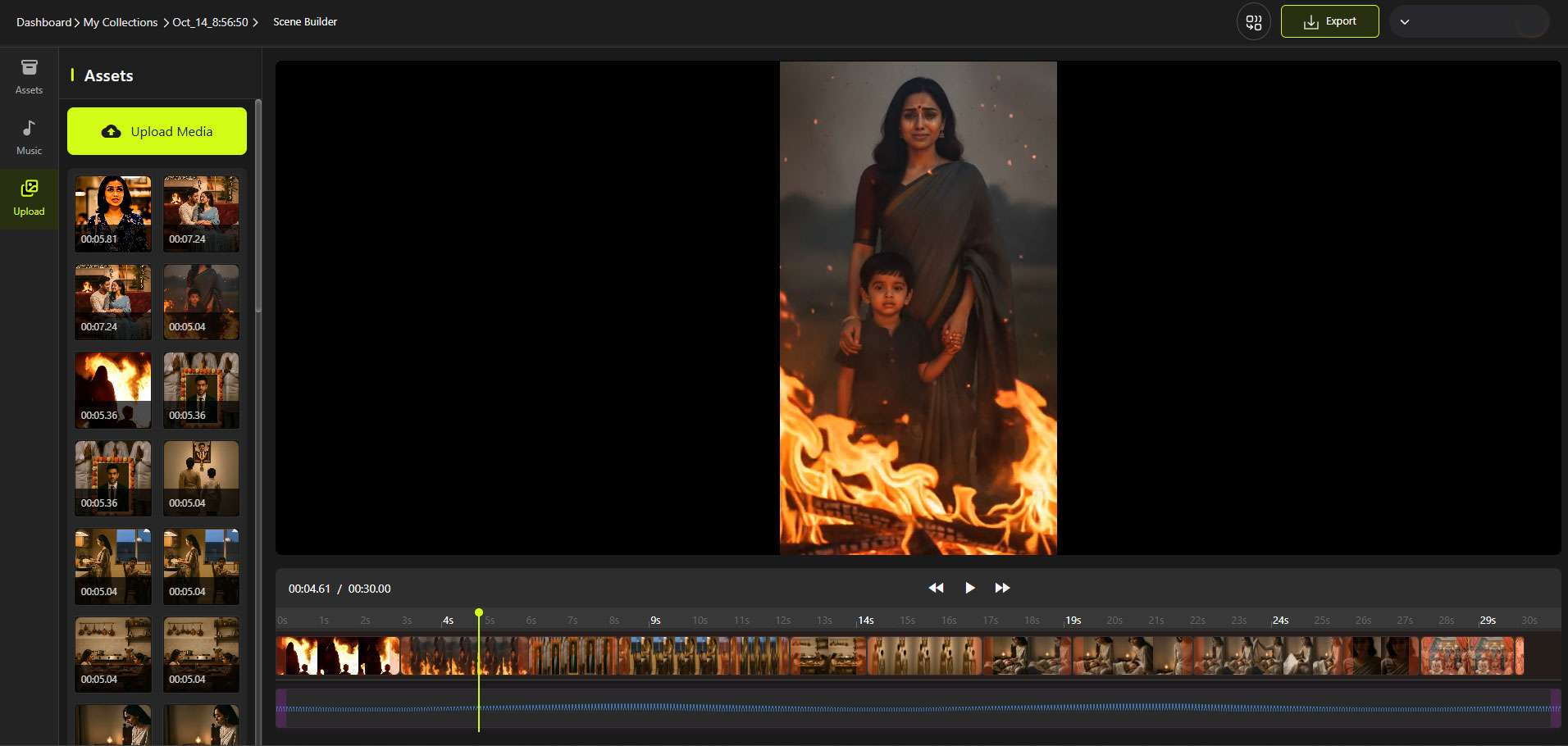
Once the video is generated, click on “Scene Builder” in the bottom-right corner. Then drag videos from the left hand bar and place them on the bar at the bottom. Drag them in the order you want the video to be in and you can trim any of the videos, if you don’t certain parts in the videos. Once you’ve combined all the videos you want, click on play to preview your full-length video.
Step 6: Export and Share Your Creation
Once your video is ready, export it in high quality. Your AI cat clip is instantly shareable on TikTok, Instagram Reels, YouTube Shorts, or anywhere else your audience loves quick, entertaining content.
Output Generated
Here is a complete guide on how to create animated videos using AI.
Suggested Read: How an AI-First YouTube Channel (Bandar Apna Dost) Built a $4.25 Million Media Business?
How Do You Develop a Script for an AI Short Drama?
Every memorable short drama begins with a focused story arc. Open with an engaging hook, build conflict, and close with emotional release. Keep your storyline simple yet layered, with a clear transformation or revelation. Since short dramas often last less than a minute, each frame must serve a purpose.
While writing, visualize your scenes. Mention emotional cues like “dimly lit room,” “suspenseful pause,” or “smiling through tears.” These descriptions guide AI tools like Pixazo in visualizing tone accurately, improving your workflow in the AI mini drama maker. A few well-crafted prompts can turn words into cinematic brilliance.
Also, remember brevity is power. Limit dialogues and rely on visuals to tell the story. Silence, background music, and expressions often convey more than long exchanges. The key is emotional precision — each line, sound, and frame should move the story forward.
id=”how-to-generate-visuals”>How Does Pixazo Generate Characters and Scenes with AI?
Pixazo simplifies character and environment creation through its AI image generator. Describe your characters’ personality traits, appearance, and mood. The system will then generate visuals matching your specifications — you can iterate until each element aligns with your artistic intent.
Next, build your settings. Whether it’s “a café under moonlight” or “a deserted subway,” Pixazo’s AI understands atmosphere. It blends lighting, motion, and textures to produce cinematic realism. This eliminates the need for expensive set designs or 3D rendering software.
Finally, enhance realism with lighting direction and camera movement. AI simulates zooms, pans, or handheld effects to create dynamic visuals that mirror film production quality. The platform’s intelligent rendering ensures that the transitions between scenes remain seamless and immersive.
How to Tailor Your Short Drama for YouTube Shorts & Instagram Reels?
Short-form content thrives on emotional immediacy. Begin your drama with a strong visual or sound hook that stops the scroll. Keep pacing tight — every second matters in capturing attention and delivering impact. When learning how to make YouTube Shorts using AI, remember that vertical framing and subtitles increase viewer retention.
Pixazo’s AI engine also assists in optimizing visuals for platform-specific requirements. Its AI YouTube Shorts generator and AI Instagram Reels generator features ensure that your short dramas meet format standards without losing cinematic quality. You can easily adjust dimensions, resolution, and tone for different audiences.
Additionally, experiment with narrative styles. Loop endings, visual metaphors, or time reversals are excellent for boosting replay rates. Creative variation keeps audiences intrigued and encourages shares, helping your AI short dramas reach wider audiences organically.
Suggested Read: How to Create Viral AI Cat Videos with Pixazo?
How to Promote and Evaluate Your AI Short Drama?
After publishing, share your videos across platforms and communities. Use storytelling-driven captions and hashtags to attract viewers who love short-form narratives. The virality of short dramas depends on emotional connection and relatability, both of which AI helps deliver through expressive rendering.
Monitor performance through analytics — engagement rate, watch duration, and audience retention. These insights reveal what elements resonate most. Experiment with new themes or genres based on data feedback. You can also draw inspiration from the best YouTube video content ideas to refine future storylines and formats.
For long-term success, maintain consistency. Build a series of interconnected short dramas to form a recognizable brand identity. Viewers who emotionally invest in your mini stories are more likely to follow, share, and anticipate your next release.
What Are the Key Takeaways?
AI short dramas are revolutionizing how stories are told in the digital era. They combine cinematic quality with quick emotional delivery, allowing creators to connect deeply with audiences in just seconds. Pixazo’s innovative tools simplify the process — from scriptwriting to production — empowering anyone to produce studio-quality short dramas that stand out across social media platforms.
By using an AI mini drama maker, AI image generator, and AI video generator, you can create engaging, visually dynamic micro-stories that resonate globally. Platforms like Pixazo exemplify the best AI video generators available today, offering the creative flexibility and speed needed for viral storytelling. Whether you’re crafting emotional narratives or experimenting with unique aesthetics, AI gives you complete control without the traditional production barriers.
Ultimately, the key takeaway is that technology is no longer a limitation — it’s an enabler. Understanding the foundations of AI video generators allow you to merge imagination with automation, bringing short dramas to life effortlessly. Start exploring Pixazo, experiment with creative ideas, and you may just produce the next viral AI short drama that captivates millions.
Frequently Asked Questions (FAQs)
1. What makes AI short dramas different from traditional short films?
AI short dramas are created using artificial intelligence instead of live actors or sets. They allow creators to generate visuals, voices, and animations automatically, making production faster, cheaper, and more accessible than traditional filmmaking.
Suggested Read: Pixazo Launches Wan 2.5 with Cinematic Quality and One-Prompt Audio-Video Sync
2. Can beginners use Pixazo to create AI short dramas?
Yes, Pixazo is designed for creators of all skill levels. Its user-friendly interface, powered by advanced AI, allows beginners to create high-quality short dramas without needing video editing or animation experience.
3. How can AI help in producing viral short dramas?
AI analyzes viewer engagement patterns, emotional tone, and visual appeal to optimize storytelling for social media. By using tools like Pixazo, creators can fine-tune pacing, music, and visuals to craft stories that resonate and go viral.
Suggested Read: From Viral Shorts to Funded Features: The AI Filmmakers Hollywood Is Actually Greenlighting
4. What platforms are best for publishing AI short dramas?
You can publish AI short dramas on platforms like YouTube Shorts, Instagram Reels, and TikTok. Each platform has unique features that favor short-form content, and Pixazo’s export settings help tailor your videos for optimal performance.
5. Why should I use Pixazo instead of other AI tools?
Pixazo stands out due to its advanced rendering engine, intuitive design, and cinematic-quality outputs. Unlike other platforms, it focuses on emotional realism and visual continuity, ensuring your AI short dramas look professional and captivating.
Suggested Read: How to Create Custom Cards With AI: Greeting Cards, Invitations, ID Badges & More
Deepak Joshi
Author · Pixazo
Deepak writes about generative AI models, APIs, and the workflows teams use to ship them. Reviewed by Abhinav Girdhar.