Introducing the Meshy 7 API on Pixazo API: Production-Grade Image to 3D


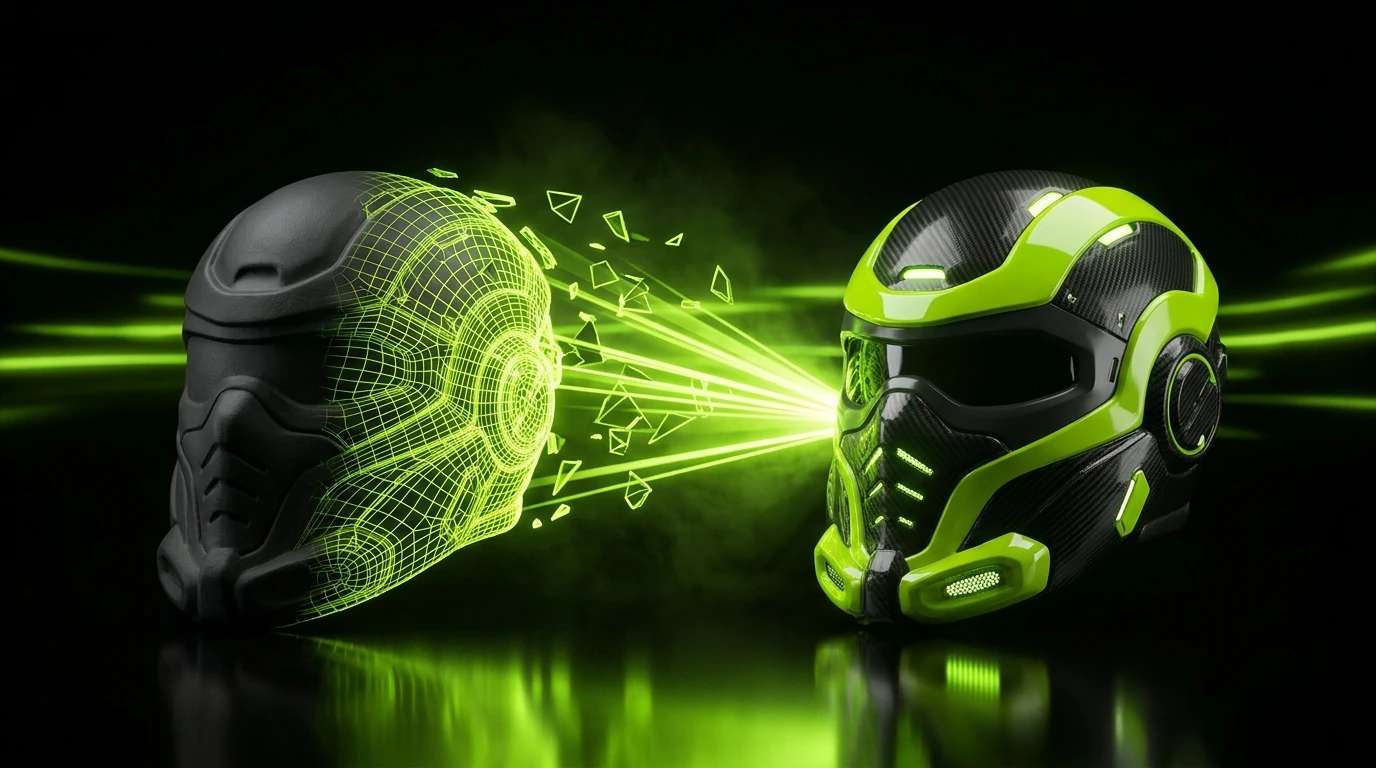
Point a camera at an object, or feed it four angles of the same thing, and get back a clean, textured 3D model you can drop straight into a game engine. That is the whole pitch of the Meshy 7 API, now live on Pixazo API. It is a professional grade image to 3D engine that turns ordinary photos into game ready GLB assets, complete with clean topology, PBR textures, and optional auto rigging. Why Pixazo API API is available if you want to try it.
This is a launch note and a working reference in one. Below you will find what the Meshy 7 API actually does, how its two modes differ, every knob worth turning, the exact asynchronous flow, real pricing, and where it fits in a production pipeline. Everything here maps to the live endpoint, so you can read a section and then go call it.
One source image resolves into a clean, closed mesh you can inspect from every angle. Meshy 7 handles hard surface edges and organic forms in the same pass.
New on Pixazo. The Meshy 7 API runs on the same unified endpoint and single key as every other model in the catalog. Grab a free API key → and you can call it in minutes, pay as you go, no per model contract.
01 / What the Meshy 7 API does
The Meshy 7 API is a 3D asset generation interface built for developers. You send it a picture of an object, and it returns a fully realized 3D model: geometry, materials, and textures baked into a single file. Under the hood it uses what Meshy describes as neural geometry reconstruction, which is what lets it deliver sculpting level detail: clean mesh topology, sharper hard surface details, and believable organic forms from a flat input.
It ships with two generation modes, and it is worth being precise about them because they define how you use the model:
- Image to 3D takes a single image and reconstructs a full 3D model from it. This is the fast path: one clear photo of an object, one GLB back.
- Multi image to 3D takes up to four images of the same object shot from different angles. More coverage means the reconstruction has to guess less, which pays off on asymmetric objects and complex backs that a single frontal photo cannot describe.
One clarification that saves confusion later: Meshy 7 is an image driven model. It does not take a text prompt as its primary input. If you want pure text to 3D, that lives on the sibling Meshy 6 API and on other 3D generators in the Pixazo catalog. Meshy 7 is the release to reach for when you already have a reference image, a product photo, or concept art, and you want it turned into geometry.
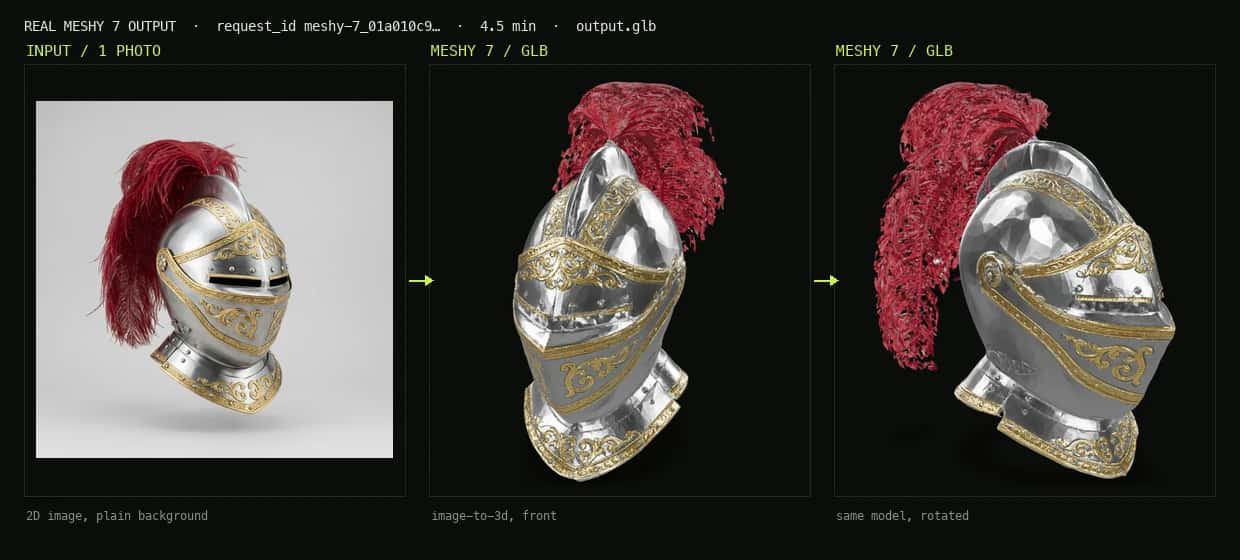
We actually ran this. One photo of an ornate knight helmet went through the image-to-3d endpoint and came back as a textured GLB in about four and a half minutes. Above: the input image next to the real Meshy 7 model, rotated to show it is fully three dimensional.
02 / What changed from Meshy 6
If you have used the Meshy 6 API on Pixazo API, three things jump out in this release. Meshy 7 adds a genuine multi image path, so you are no longer limited to reconstructing from a single viewpoint. It introduces an ultra_mode switch for higher fidelity geometry with finer surface detail. And it surfaces a deeper set of production controls on the image path itself: PBR maps, pose control, texture steering, auto rigging, and animation presets all live on the image to 3D endpoint rather than being reserved for a text path.
| FIELD | MESHY 6 | MESHY 7 |
|---|---|---|
| Input modes | Text to 3D, single image to 3D | Single image, multi image (up to 4) |
| Multi image input | No | Yes, up to 4 angles |
| Text to 3D | Yes | No, image only |
| Base price per model | $0.80 | $0.80 to $1.40 base, up to $1.72 rigged and animated |
03 / Two ways in: single image and multi image
Both modes are asynchronous POST endpoints that return a textured GLB. The only real decision is how much reference coverage you can give the model.
Reach for image to 3D when you have one clean, well lit shot of an object against a simple background. Reach for multi image to 3D when the object is asymmetric or has detail the front cannot show, and you can supply two to four angles of the exact same object. A note that matters in practice: all the images in a multi image request must be the same object, or the reconstruction degrades badly. Send more than four and only the first four are used.
Both endpoints accept JPG, JPEG, and PNG images, convert AVIF and HEIF automatically, and take either a hosted image URL or a base64 data URI. An enable_safety_checker flag, on by default, screens input images before processing.
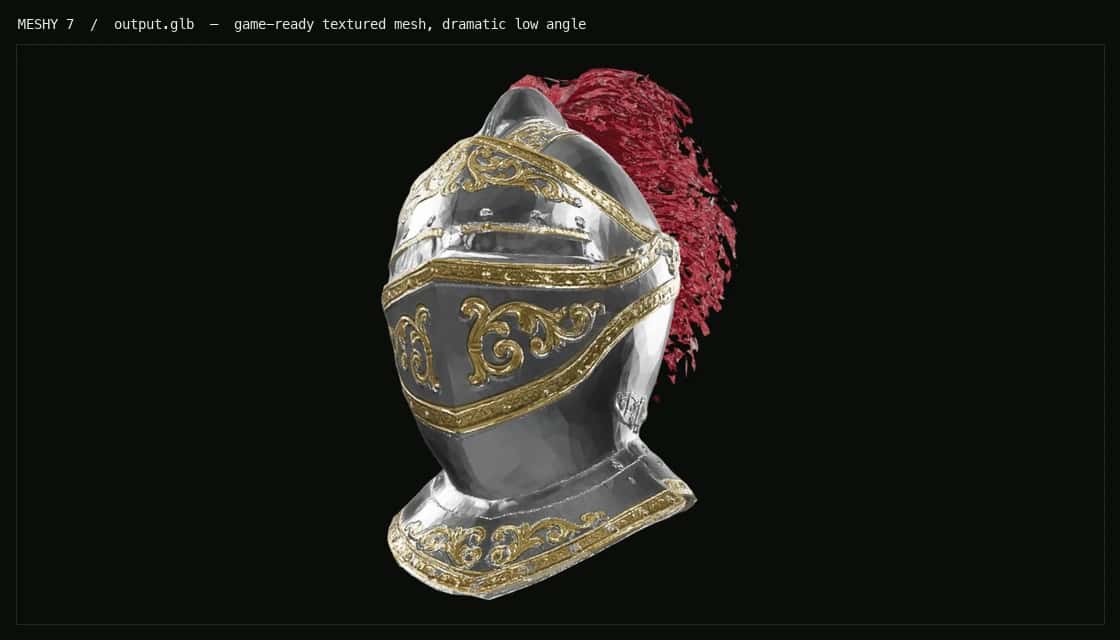
The single image mode output, textured and game ready. This is the real GLB from the helmet photo above, lit and framed from a low angle.
Suggested
04 / Inside the mesh: topology, remesh, and low poly
What separates a usable game asset from a blob you have to rebuild is topology, and Meshy 7 gives you direct control over it. By default the model runs a remesh phase (should_remesh is true) and returns a triangle mesh of around 30,000 polygons. You can steer all of that.
Set topology to quad when you want clean edge loops for smooth surfaces and downstream subdivision, or leave it on triangle for dense, detailed geometry. Dial target_polycount anywhere from 100 to 300,000 to hit an engine budget. Switch model_type to lowpoly and Meshy returns cleaner, lower polygon geometry tuned for real time engines, though note that low poly mode overrides topology, target polycount, and remesh. One caveat: model_type is a single image parameter, so the multi image endpoint ignores it. And symmetry_mode (off, auto, or on) decides whether the model enforces bilateral symmetry, which is a quiet lifesaver on characters and vehicles.
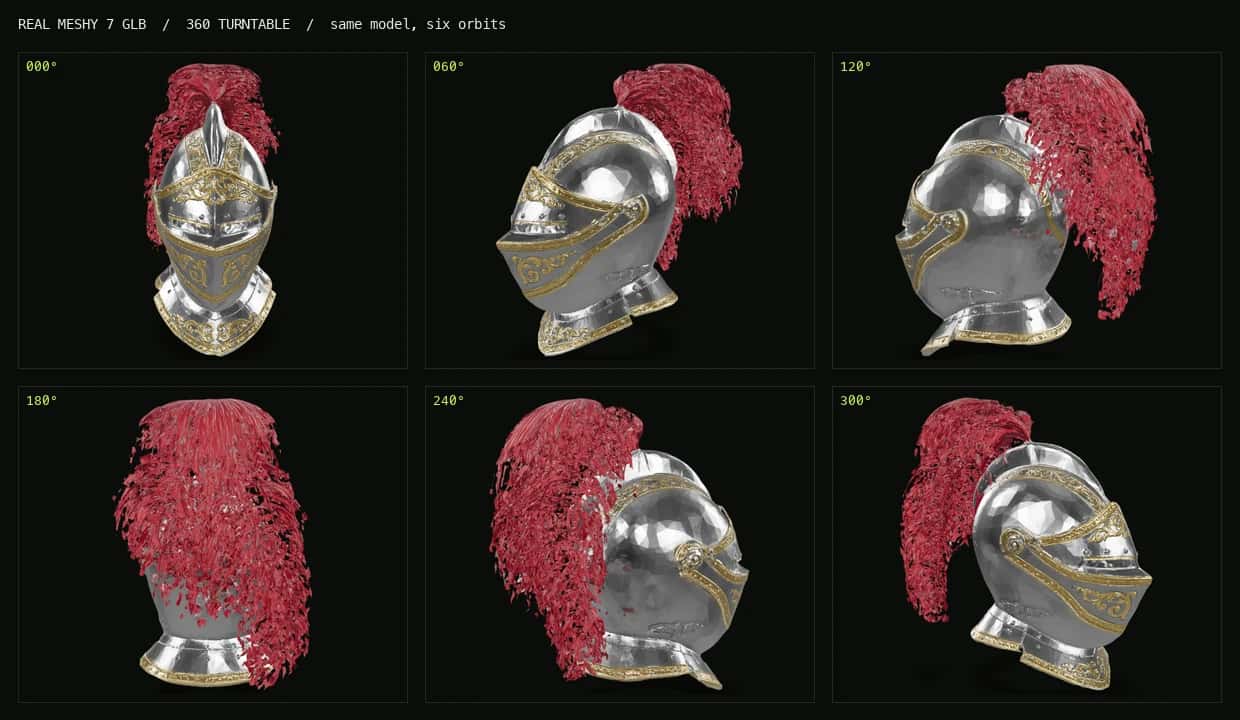
Six orbits of the same generated GLB. The mesh holds up all the way around, including the back of the plume that the single input photo never showed.
05 / Texturing, PBR, and ultra mode
Meshy 7 textures by default. Leave should_texture on and you get a color textured model; turn it off and you get a raw untextured mesh, which is what you want when a technical artist is going to author materials by hand. For anything headed into a modern renderer, set enable_pbr to true, which requires texturing to be on, and Meshy also generates the physically based maps (metallic, roughness, normal) alongside base color, so the asset reacts correctly to lighting in Unreal, Unity, or a WebGL viewer.
You can steer the texture pass, not just accept it. Pass a texture_prompt to describe the finish in words (for example, weathered bronze with green patina), or a texture_image_url to drive it from a reference. When you need the sharpest result the model can produce, flip ultra_mode on for higher fidelity geometry with finer surface detail. It is one of the two levers that changes price, which we get to below.
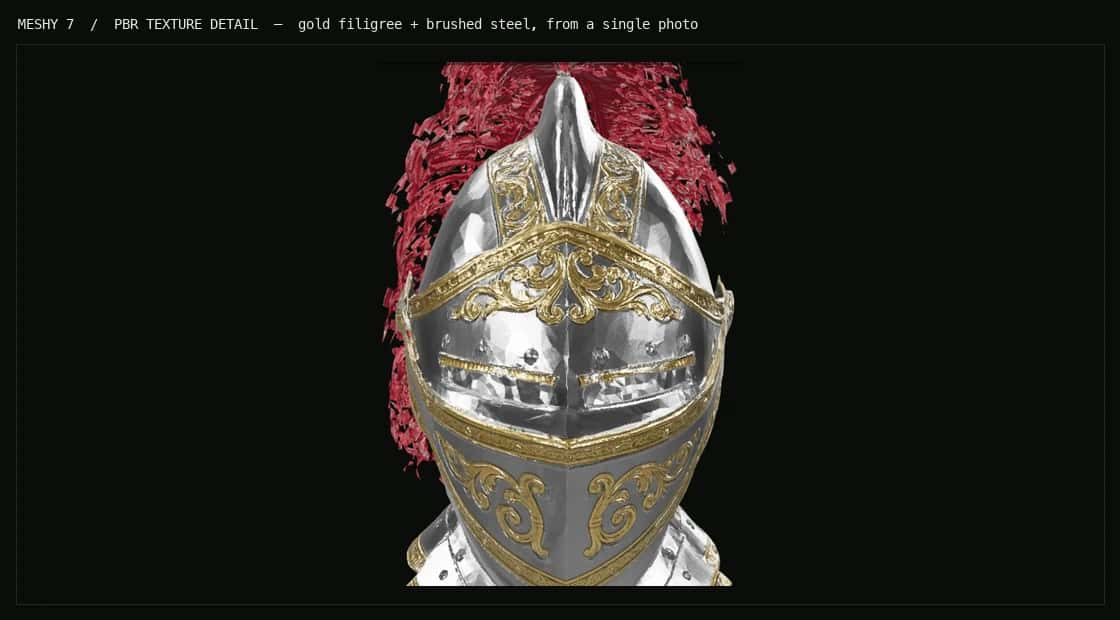
A close crop of the generated textures. The gold filigree and brushed steel were reconstructed from one 2D reference, with PBR maps so the surface reacts to light in an engine.
Suggested Read: Best AI 3D Model Generators in 2026: A Comparison Guide
06 / Auto rigging and animation
This is where Meshy 7 stops being a mesh generator and starts being a character pipeline. Set enable_rigging to true and, on a humanoid subject, Meshy auto rigs the result as a character with basic walk and run animations built in. Give it a realistic rigging_height_meters (default 1.7) so the skeleton scales correctly, and use pose_mode to force an A pose or T pose, the neutral stances that downstream rigging and retargeting expect.
With a rig in place, set enable_animation to true and pick an animation_action_id (0 to 696, where 0 is Idle and the default is 92) to bake a preset motion into the export. One rule to remember: animation requires rigging. Sending enable_animation on its own does nothing and is not billed. Rigging and animation both add time, so a rigged, animated character takes noticeably longer than a plain mesh.
07 / Output: one GLB, everything inside
The Meshy 7 API returns a single GLB. In the completed response, output.media_url is an array with one URL pointing at the .glb file and output.media_type is model/gltf-binary. GLB is the right default because it is self contained: mesh, materials, and textures travel together in one binary that Unreal, Unity, Blender, three.js, and native AR viewers all read directly.
The Meshy 7 API standardizes on the GLB because it is the one file that carries mesh, materials, and textures together and renders directly in the console preview. Meshy supports common interchange formats such as OBJ and FBX, so if your pipeline needs FBX for a DCC tool or USDZ for Apple Quick Look, convert from the returned GLB on your side.
Suggested Read: How AI 3D Model Generation Models Are Ranked: Inside the Pixazo Leaderboard
08 / The asynchronous workflow
3D generation takes minutes, not milliseconds, so the Meshy 7 API is asynchronous by design. You submit a job, get an ID back immediately, and then either poll for status or receive a webhook when it finishes. The flow is the same for both modes.
Concretely: you POST to the endpoint with your key in the Ocp-Apim-Subscription-Key header. You get back 202 Accepted with a request_id, a status of QUEUED, and a polling_url. You then poll that status endpoint until the status is COMPLETED, at which point output.media_url holds your GLB. A job can also end as ERROR, so poll for either terminal state and read the error field if it fails. If you would rather not poll, set an X-Webhook-URL header (with an optional X-Webhook-Mode of terminal or sync) and Meshy calls you back. Here is the minimal single image version:
## 1. Submit an image-to-3D job
curl -X POST https://gateway.pixazo.ai/meshy-7/v1/image-to-3d \
  -H "Content-Type: application/json" \
  -H "Ocp-Apim-Subscription-Key: YOUR_API_KEY" \
  -d '{
        "image_url": "https://example.com/sneaker.png",
        "should_texture": true,
        "enable_pbr": true,
        "topology": "quad",
        "target_polycount": 40000,
        "ultra_mode": false
      }'

## Response 202: { "request_id": "meshy-7_01a010c9-c51b-7ab2-1664-050d2496f8722",
##                 "status": "QUEUED",
##                 "polling_url": "https://gateway.pixazo.ai/v2/requests/status/meshy-7_01a010c9-..." }

## 2. Poll until COMPLETED (or ERROR)
curl https://gateway.pixazo.ai/v2/requests/status/meshy-7_019d... \
  -H "Ocp-Apim-Subscription-Key: YOUR_API_KEY"

## Response: { "status": "COMPLETED",
##             "output": { "media_url": ["https://pub-582b...r2.dev/v1/meshy-7_01a010c9-.../output.glb"],
##                         "media_type": "model/gltf-binary" } }
The multi image call is identical except you POST to /meshy-7/v1/multi-image-to-3d and send image_urls as an array of one to four URLs. Status codes are the usual suspects: 400 for a bad parameter, 401 for a missing key, 402 for insufficient balance, 422 when a value is out of range (for example an animation id above 696), 429 for rate limits, and 500 for a server error. Failed requests are not billed.
Open the Meshy 7 API →
Suggested Read: How to Create Roblox 3D Models with Pixazo: A Step-by-Step Guide
09 / Pricing
Meshy 7 bills per generation, and only for successful jobs. Two options move the base price (texturing and ultra mode), and two add ons stack on top (rigging and animation). Everything else, including PBR maps, topology, and polycount, is free to change.
| CONFIGURATION | PRICE (USD) |
|---|---|
Single image, untextured mesh (should_texture:false) | $0.80 |
| Single or multi image, textured (default) | $1.20 |
Ultra mode (ultra_mode:true) | $1.40 |
| Auto rigging add on | + $0.20 |
| Animation add on (needs rigging) | + $0.12 |
So a plain textured asset is $1.20, an untextured base mesh for a technical artist is $0.80, and a full ultra quality, rigged, animated character lands at $1.40 plus $0.32, or $1.72. One quirk worth knowing on the multi image endpoint: an untextured model there is still billed at the textured rate of $1.20, so if you want the cheaper untextured price, use the single image path.
10 / Where an image to 3D API earns its place
Game asset pipelines. Studios turn concept art and product shots into first pass 3D blocks. Fire a batch of props overnight, poll the job IDs, and pull finished GLBs into Unity or Unreal by morning. It does not replace a hero asset artist, but it removes the grind of hand modeling greybox filler so artists spend their hours on what players actually look at.
Character base meshes. Feed a turnaround or a single front render and get a proportioned base mesh to import into ZBrush or Blender for retopology and detailing. Enable rigging and pose control and you get a T posed, walk ready draft, which is a real head start on a crowd of secondary characters.
E commerce and product 3D. Take the flat photos a catalog already ships with, run image to 3D, and serve the GLB through a web model viewer for view in your room AR. At thousands of SKUs, manual capture does not pencil out, but an async pipeline that chews through a product feed and writes GLBs to a CDN does.
AR, VR, and virtual production. On device AR needs lightweight GLB and USDZ assets, and previz teams need quick set dressing. Wire the endpoint behind a generate object feature, show a placeholder, and swap in the finished mesh on the completion callback so the session never freezes.
3D printing and prototyping. Turn a reference photo into a printable starting shape without opening CAD. Convert the GLB to STL, check watertightness and wall thickness in a slicer, and print. It will not produce tolerance critical engineering parts, but for figurines, miniatures, and concept props it collapses hours into a background request.
Suggested Read: Introducing the Meshy 7.1 API on Pixazo API: Text and Image to Production-Grade 3D
11 / Meshy 7 among Pixazo’s 3D models
Meshy 7 is one of several 3D generators on Pixazo, and they all sit behind the same request shape. Switching models is a parameter change, not a re integration, which makes it easy to benchmark them on your own inputs or fall back between them in production. If you need pure text to 3D or a different quality and cost tradeoff, these are one call away with the same key:
- Hunyuan for Tencent’s text and image to 3D asset creation.
- Tripo3D for fast 3D generation from text and images.
- Hyper3D for detailed 3D from images and text.
- Pixal3D for another take on advanced 3D asset generation.
Because every model shares one endpoint, one key, and one billing account, you can route a job to Meshy 7 for a rigged character and to a sibling model for a quick text prompt draft in the same pipeline, without touching your integration.
12 / Get started
Create a key, send one image, and read back a GLB. That is the entire first run.
- Sign up and create a free key at the Pixazo API console.
- POST a single image to
https://gateway.pixazo.ai/meshy-7/v1/image-to-3dwith your key in theOcp-Apim-Subscription-Keyheader. - Poll the returned
polling_urluntilCOMPLETED, then downloadoutput.media_url.
Start building with the Meshy 7 API → Get a free API key →
13 / Frequently asked questions
Does the Meshy 7 API do text to 3D?
No, it exposes no text to 3D endpoint. Its inputs are images, single or multi image. It can still take a text description to steer the texturing pass through texture_prompt. For true text to 3D, use the Meshy 6 API or another text capable 3D model in the Pixazo catalog, all reachable with the same key.
What file format do I get back?
A single GLB, returned as output.media_url with media type model/gltf-binary. GLB packs mesh, materials, and textures into one file that loads directly in game engines, Blender, three.js, and AR viewers. Convert to FBX, OBJ, or USDZ on your side if a tool needs it.
Suggested Read: Best 3D Models APIs in 2026
How long does a generation take?
Usually a few minutes. Enabling rigging or animation makes a job take considerably longer, which is exactly why the API is asynchronous with polling and webhook options.
How much does one model cost?
An untextured single image mesh is $0.80, a textured model is $1.20, and ultra mode is $1.40. Rigging adds $0.20 and animation adds $0.12. You are billed per successful generation only.
How many images can I send in multi image mode?
One to four images of the same object from different angles. Beyond four, only the first four are used, and mixing different objects degrades the reconstruction.
Can I control polygon count and topology?
Yes. Set topology to quad or triangle and target_polycount from 100 to 300,000, or switch model_type to lowpoly for real time budgets. Low poly mode overrides topology and polycount.
Written by Deepak Joshi, reviewed by Abhinav Girdhar. Specifications sourced from the live Pixazo Meshy 7 API model page. Published August 2026.
Suggested Read: Best 3D Model Generation APIs in 2026: Full Comparison
Deepak Joshi
Author · Pixazo
Deepak writes about generative AI models, APIs, and the workflows teams use to ship them. Reviewed by Abhinav Girdhar.