10 Best AI App Splash Screen Maker Tools in 2026

Table of Contents
- What Are AI App Splash Screen Makers?
- How AI App Splash Screen Maker Tools Are Helpful to Developers?
- Which Are the Best AI App Splash Screen Maker Tools in 2026?
- 1. Pixazo
- 2. Hotpot
- 3. Progressier
- 4. React Native Pro
- 5. Kloudbean
- 6. Semantic Pen
- 7. Expo SplashScreen Generator
- 8. CapCut
- 9. Vondy
- 10. Ape Tools
- How Do the Best AI App Splash Screen Makers Compare in 2026?
- Why AI App Splash Screens Matter for App Growth?
- Which AI App Splash Screen Maker Tool Should You Choose?
- FAQs
AI app splash screen makers are online tools that help developers, designers, and startups instantly generate polished, device-ready splash screens without advanced design skills. These platforms use artificial intelligence to craft on-brand, scalable visuals—often combining your logo, color palette, and typography—optimized for different screen sizes and operating systems. By automating layout, composition, and export presets, AI-powered splash screen generators save hours of manual work while maintaining brand consistency across iOS, Android, and web. They’re especially popular with indie teams and product studios that want a professional first impression the moment an app launches. One of the most accessible options is this AI app splash screen maker that lets you produce clean, on-brand screens in a few clicks. You can also explore a broader set of AI design tools to accelerate your entire asset pipeline—from icons and mockups to marketing visuals.What Are AI App Splash Screen Makers?
How AI App Splash Screen Maker Tools Are Helpful to Developers?
AI splash screen maker tools simplify one of the most important aspects of app design—creating a strong first impression. Instead of spending days designing and resizing assets, developers can quickly generate splash screens that are optimized for iOS, Android, and web platforms. This speed and efficiency are especially valuable for indie developers and startups that need to launch apps quickly without sacrificing design quality.
Customization is another big advantage. Most tools allow developers to add their logo, brand colors, and typography to craft a splash screen that reflects their identity. If you’re new to this, learning what a splash screen is and why it matters will help you understand how it influences user experience and sets the tone for your app.
AI-powered platforms also ensure design consistency across multiple projects. For example, the AI app icon maker ensures your app icons match the visual identity of your splash screens, keeping your branding cohesive from the first interaction. This seamless approach to design saves time while creating a professional and memorable app presence.
How We Select the Best AI Design Generator Platforms at Pixazo
At Pixazo, we carefully evaluate AI design generator platforms to help users skip the overwhelming trial-and-error process. Our experts, with extensive experience in AI-powered design tools, assess each platform based on creativity, ease of use, customization options, and overall performance. We put these tools to the test by creating designs across different categories to ensure they deliver high-quality results effortlessly. Every recommendation is based on thorough research and real-world testing, with no paid placements or outside influence. Want to know how we pick the best AI design platforms? Explore our detailed evaluation process.
Disclaimer - Portions of this article were drafted with AI and reviewed by Jayesh Chaubey
Which Are the Best AI App Splash Screen Maker Tools in 2026?
The best AI app splash screen makers in 2026 are Pixazo, Hotpot, Progressier, React Native Pro, Kloudbean, Semantic Pen, Expo SplashScreen Generator, CapCut, Vondy, and Ape Tools. These platforms empower developers and designers to instantly create professional, device-ready splash screens that set the tone for the app experience. Whether you’re launching a startup or polishing a large-scale app, these tools save time while ensuring a visually striking first impression. Looking to go beyond splash screens? Check out these free tools to create app graphics and elevate your entire design workflow.
- Pixazo: Best overall for quick, AI-powered splash screens tailored for multiple platforms.
- Hotpot: Best for AI-driven creative splash screen templates with easy customization.
- Progressier: Best for progressive web apps, offering fast and lightweight splash screen generation.
- React Native Pro: Best for developers building cross-platform apps with React Native.
- Kloudbean: Best for startups looking for scalable, AI-enhanced splash screen solutions.
- Semantic Pen: Best for AI-assisted branding and polished splash screen design.
- Expo SplashScreen Generator: Best for seamless integration with Expo-based projects.
- CapCut: Best for creating animated and video-based splash screens effortlessly.
- Vondy: Best for AI-powered creative visuals with modern design aesthetics.
- Ape Tools: Best for lightweight, straightforward splash screen generation.
1. Pixazo

Pixazo’s AI App Splash Screen Maker is a prompt-based tool that enables developers, startups, and businesses to generate professional splash screens in just minutes. It leverages AI to transform text prompts and reference images into polished, device-ready splash screens that work across iOS, Android, and web platforms. The built-in AI editor makes it easy to refine layouts, styles, and details with simple command-based inputs.
The platform is designed for speed, ease of use, and branding consistency. Whether you’re building a new app or rebranding an existing one, Pixazo ensures your splash screen matches your brand identity while creating a strong first impression for users.
Key Features
- AI-Powered Generation: Create splash screens instantly using prompts and reference images.
- AI Editor: Refine layout, text, and styles with easy command-based edits.
- Prompt-Based Design: Simply describe your idea, and the AI builds a splash screen around it.
- Web-Based & Accessible: No installation required—works seamlessly in any browser.
Pros
- Quick and beginner-friendly splash screen creation process.
- AI editor allows real-time customization and refinement.
- Generates professional, platform-ready splash screens for multiple devices.
Cons
- Requires account sign-up to save and download outputs.
- Advanced design flexibility may be limited to AI editor commands.
How to Use
- Go to the Pixazo AI App Splash Screen Maker page.
- Upload a reference image and enter a prompt describing your splash screen idea.
- Sign up or log in to Pixazo.
- Preview the AI-generated splash screen and customize it with the AI editor if needed.
- Download your finished splash screen and integrate it into your app.
2. Hotpot

Hotpot is a versatile AI design platform that offers an intuitive splash screen generator alongside its suite of creative tools. It provides pre-built templates powered by AI, allowing developers to design splash screens quickly without extensive design experience. Users can customize layouts, apply color palettes, and insert logos to ensure branding consistency across their app assets.
The platform is especially popular among indie developers and small teams, as it combines affordability with high-quality results. Hotpot’s AI tools cover not only splash screens but also app icons, social media graphics, and marketing visuals, making it a complete design companion.
Key Features
- AI Templates: Ready-to-use splash screen templates with customization options.
- Cross-Platform Support: Designs optimized for iOS, Android, and web apps.
- Multi-Use Platform: Offers additional tools for icons, marketing creatives, and UI assets.
Pros
- Wide variety of creative templates.
- Budget-friendly for startups and indie developers.
- Supports multiple app asset formats beyond splash screens.
Cons
- Free plan includes watermarks.
- Advanced customizations may require premium access.
How to Use
- Go to the Hotpot AI design platform.
- Select the splash screen maker from the available tools.
- Choose a template or start from scratch.
- Upload your logo, pick brand colors, and adjust text or layout.
- Preview your splash screen, then download it in your preferred format.
3. Progressier
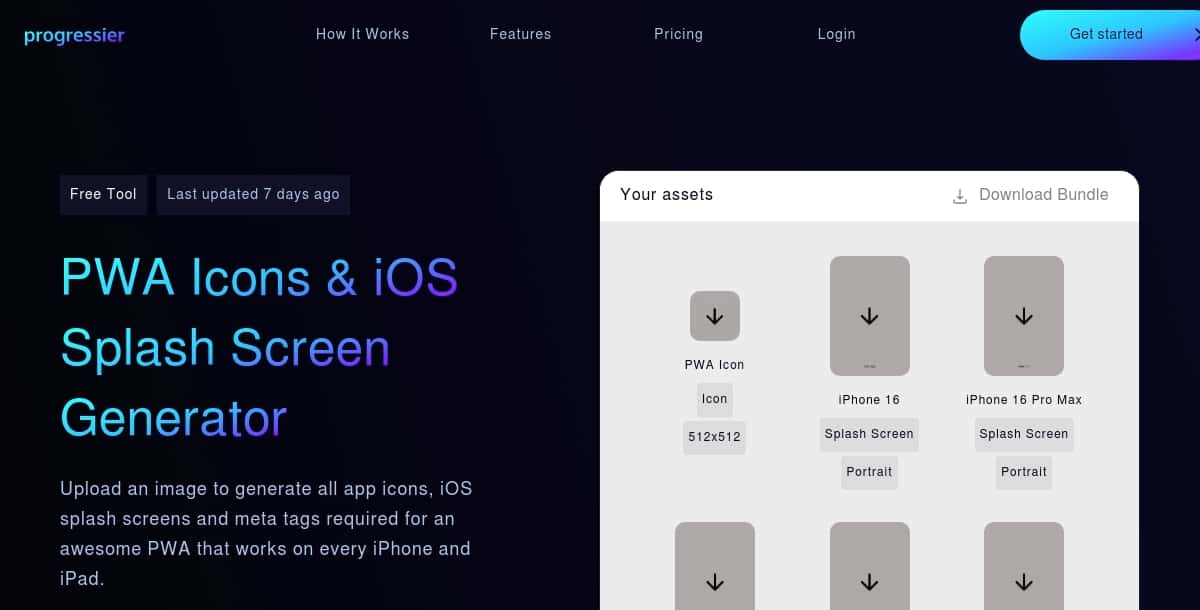
Progressier specializes in splash screen generation for progressive web apps (PWAs). It provides developers with a fast and lightweight way to create splash screens, icons, and manifests that integrate directly into web apps. By automating the process, it reduces the need for manual coding and ensures compliance with PWA best practices.
Its streamlined approach makes it a go-to for developers targeting web-first experiences. Progressier not only handles splash screens but also generates app manifests, favicons, and installation prompts, making deployment smoother and faster.
Key Features
- PWA-Focused: Tailored specifically for progressive web app splash screens.
- Automation: Automatically generates icons, manifests, and install banners.
- Lightweight & Fast: Designed for quick integration with minimal setup.
Pros
- Perfect fit for PWA developers.
- Automates several repetitive design and coding tasks.
- Lightweight solution requiring minimal effort.
Cons
- Not as flexible for mobile-native apps.
- Limited design variety compared to dedicated graphic tools.
How to Use
- Sign up for a Progressier account.
- Connect your PWA project or enter your app’s details.
- Automatically generate splash screens, icons, and manifests.
- Copy the provided code snippets into your project.
- Deploy your updated PWA with ready-to-use splash screens.
4. React Native Pro

React Native Pro is a developer-focused tool designed for creating splash screens within React Native projects. It integrates seamlessly with React Native frameworks, offering a smoother workflow for cross-platform app development. Developers can configure splash screens with brand colors, logos, and animation effects directly in their app code.
This tool stands out because of its developer-first approach, allowing technical teams to generate and customize splash screens without needing separate design software. It is especially valuable for teams working on hybrid mobile apps.
Key Features
- React Native Integration: Built specifically for React Native apps.
- Customizable Splash Screens: Add logos, animations, and brand elements.
- Cross-Platform: Supports both iOS and Android builds.
Pros
- Direct integration with React Native projects.
- Supports code-based customization and animations.
- Developer-friendly setup and documentation.
Cons
- Requires technical knowledge of React Native.
- Not ideal for non-developers or beginners.
How to Use
- Install the React Native Pro splash screen package into your project.
- Configure the package by adding your logo, background color, and styles.
- Set platform-specific options for iOS and Android builds.
- Add optional animations or transitions for a polished effect.
- Build and run your app to preview the new splash screen.
5. Kloudbean

Kloudbean is an AI-powered branding and design platform tailored for startups and app creators who need scalable design solutions. Its splash screen generator uses AI to blend logos, typography, and brand colors into polished, platform-ready designs. The tool is designed to help small businesses and indie developers establish professional-grade visuals quickly without needing a dedicated design team.
What sets Kloudbean apart is its focus on consistency across multiple brand assets. In addition to splash screens, the platform provides AI-assisted tools for app icons, mockups, and UI branding, ensuring cohesive design across every touchpoint.
Key Features
- AI-Powered Branding: Generates splash screens aligned with your app’s identity.
- Multi-Asset Creation: Create splash screens, app icons, and UI elements in one place.
- Scalable: Perfect for startups aiming to expand their app ecosystem.
Pros
- All-in-one AI branding tool for app creators.
- Easy to use with minimal design experience required.
- Focuses on cohesive branding across multiple assets.
Cons
- Some advanced design edits may be locked behind premium plans.
- Less flexible for highly customized splash screens compared to design software.
How to Use
- Log in or sign up for a Kloudbean account.
- Choose the splash screen maker from the dashboard.
- Upload your logo and input brand colors or typography preferences.
- Preview the AI-generated splash screen and adjust settings if needed.
- Download the final design and integrate it into your app.
6. Semantic Pen

Semantic Pen is an AI design assistant that focuses on context-driven branding. Its splash screen generator interprets text prompts semantically to produce designs that capture the app’s theme and user experience goals. Unlike simple template-based tools, it adapts visuals to your brand narrative and ensures a polished, modern look.
The platform is popular among businesses looking for AI-enhanced creativity, offering both automation and human-like design choices that feel less generic. It also integrates with other branding tools for logos and marketing assets, making it versatile for digital teams.
Key Features
- Semantic AI Engine: Generates splash screens that align with the app’s theme and tone.
- Prompt-Based Customization: Enter descriptions to create unique, on-brand visuals.
- Brand Alignment: Designed to maintain consistent branding across all outputs.
Pros
- Context-aware designs that feel tailored, not generic.
- Great for startups seeking unique visual branding.
- Supports broader branding beyond splash screens.
Cons
- May have a learning curve for best prompt usage.
- Still developing compared to more established design tools.
How to Use
- Create an account on Semantic Pen’s platform.
- Select the splash screen generator tool.
- Enter a detailed text prompt describing your app’s theme and branding goals.
- Review AI-generated splash screens and refine with prompt adjustments.
- Export the final version for your app’s launch screen.
7. Expo SplashScreen Generator

The Expo SplashScreen Generator is a dedicated tool for developers using the Expo framework for React Native apps. It automates the process of creating and integrating splash screens directly into Expo projects. With built-in compatibility, developers don’t need third-party software or manual coding to implement their splash screens.
This tool is widely trusted among cross-platform developers, as it eliminates setup complexity and ensures app splash screens display seamlessly across both iOS and Android devices.
Key Features
- Expo Integration: Built specifically for Expo and React Native projects.
- Automation: Generates code and assets automatically for easy setup.
- Cross-Platform Support: Works with iOS and Android simultaneously.
Pros
- Perfect fit for developers building with Expo.
- Saves time by automating splash screen integration.
- Reliable, lightweight, and developer-friendly.
Cons
- Usable only within Expo projects (not standalone).
- Limited visual customization compared to design-first tools.
How to Use
- Open your React Native project using the Expo framework.
- Use the Expo SplashScreen Generator to upload your logo and brand details.
- The tool automatically generates the required splash screen assets.
- Copy the configuration code into your
app.jsonfile. - Run your project to preview the new splash screen on both iOS and Android.
8. CapCut

CapCut, widely known as a video editing tool, has expanded its AI-powered features to include animated and video-based splash screens. This makes it a standout choice for developers and brands that want to go beyond static designs and impress users with dynamic, motion-driven app launch screens.
The platform is ideal for creative teams and marketers, as it blends professional video editing with AI automation. With pre-built templates, customizable animations, and cross-platform export options, CapCut makes animated splash screens accessible even to beginners.
Key Features
- AI Animation Tools: Add motion effects and transitions to splash screens.
- Pre-Built Templates: Choose from modern, stylish video splash screen layouts.
- Cross-Platform Export: Export assets for iOS, Android, and web apps.
Pros
- Unique option for animated splash screens.
- User-friendly interface with drag-and-drop editing.
- Includes professional video editing capabilities.
Cons
- Static splash screens require additional manual setup.
- May feel heavy for developers who only need simple splash designs.
How to Use
- Download or open CapCut on desktop or mobile.
- Choose a splash screen video template or start from scratch.
- Upload your logo, adjust colors, and add animations.
- Preview your animated splash screen and refine transitions.
- Export the video in a compatible format and integrate it into your app.
9. Vondy

Vondy is an AI-powered creative design assistant that helps developers and entrepreneurs generate modern, visually appealing splash screens. With prompt-based AI generation, Vondy adapts designs to fit your brand guidelines while offering sleek, trendy layouts suitable for consumer-facing apps.
The platform’s strength lies in its modern aesthetics, giving startups and indie developers a way to make their apps feel premium from the very first screen. Beyond splash screens, Vondy can also generate logos, marketing visuals, and other branded assets.
Key Features
- Prompt-Based AI: Enter text descriptions to generate unique splash screens.
- Trendy Templates: Access a library of modern and stylish layouts.
- Multi-Asset Support: Generate splash screens, logos, and marketing creatives.
Pros
- Modern design language suited for startups.
- Simple prompt-based interface for quick results.
- Extends beyond splash screens to broader branding.
Cons
- Template variety may be limited for niche industries.
- Best results require detailed prompts.
How to Use
- Sign up for a Vondy account.
- Choose the splash screen generator tool from the dashboard.
- Enter a text prompt describing your app’s brand style and theme.
- Review AI-generated splash screens and make adjustments as needed.
- Download your preferred splash screen design for app integration.
10. Ape Tools

Ape Tools is a lightweight, no-frills solution for generating splash screens quickly. Unlike more complex design platforms, it focuses on speed and simplicity, offering developers a straightforward way to create static splash screens that are ready to use across different devices.
This makes it a practical choice for developers who want functionality without extra features, especially for MVPs (minimum viable products) or apps that need a splash screen without heavy design requirements.
Key Features
- Straightforward Workflow: Generate splash screens in just a few steps.
- Cross-Device Support: Assets optimized for multiple resolutions.
- No Extra Complexity: Simple tool focused only on splash screen creation.
Pros
- Extremely easy to use with minimal setup.
- Fast generation process for developers in a hurry.
- No design expertise required.
Cons
- Lacks advanced customization options.
- No support for animations or interactive splash screens.
How to Use
- Visit the Ape Tools website.
- Select the splash screen generator option.
- Upload your logo and choose background colors or images.
- Preview the generated splash screen in different resolutions.
- Download the final version and apply it to your app project.
How Do the Best AI App Splash Screen Makers Compare in 2026?
Each AI app splash screen tool brings something different to the table—some specialize in quick, developer-friendly integration for frameworks like React Native or Expo, while others focus on AI-powered creativity, branding consistency, or even animated splash experiences. The best choice depends on whether you need fast automation for PWAs, stylish prompt-based designs, or dynamic video splash screens that leave a lasting first impression.
| Tool | Best for | Key Features |
|---|---|---|
| Pixazo | AI-powered, customizable splash screens | Prompt-based generation, AI editor, reference image support, platform-ready exports |
| Hotpot | AI-powered creativity suite | Template-based splash screens, brand customization, export flexibility, part of larger AI toolkit |
| Progressier | PWA (Progressive Web Apps) | Generates splash screens, app manifests, icons, lightweight integration, automated code snippets |
| React Native Pro | Cross-platform React Native apps | Direct integration with React Native, customizable code-based splash screens, supports animations |
| Kloudbean | Startups and brand consistency | AI splash screen creation, branding tools, multi-asset generation, cloud-based workflow |
| Semantic Pen | Context-driven, branded splash screens | Semantic AI engine, prompt-based design, brand alignment, modern visuals |
| Expo SplashScreen Generator | Expo-based React Native projects | Automated splash screen generation, Expo integration, iOS & Android support, simple setup |
| CapCut | Animated & video splash screens | AI-powered animations, pre-built templates, video editing tools, cross-platform export |
| Vondy | Modern and stylish splash screens | Prompt-based AI design, trendy templates, multi-asset branding, beginner-friendly |
| Ape Tools | Lightweight, no-frills splash screens | Simple upload process, cross-device optimization, fast downloads, minimal setup |
Why AI App Splash Screens Matter for App Growth?
AI splash screens are more than just placeholders—they shape the first impression, enhance brand identity, and create a smoother onboarding experience for users. In 2026’s competitive app ecosystem, AI splash screen makers save valuable time while delivering polished, consistent, and engaging visuals that align with your brand.
- Enhance First Impressions: A well-designed splash screen sets the tone for your app, just as choosing from the best AI app icon makers ensures your icons match your branding.
- Save Development Time: AI generators create device-ready splash screens in minutes, freeing teams to focus on app performance and user features.
- Ensure Brand Consistency: Keep splash screens aligned with logos, icons, and other assets—similar to how creators rely on an AI image generator for uniform brand visuals.
- Boost Engagement: Animated or interactive splash screens improve user experience, much like when you learn how to use green screen to create professional, immersive effects.
- Increase User Trust: Professionally designed splash screens project credibility, reassuring users that they’re engaging with a high-quality, reliable app.
Which AI App Splash Screen Maker Tool Should You Choose?
The best AI splash screen maker for you depends on your app’s goals, branding needs, and whether you prefer simplicity or deeper customization.
If you want the fastest and most beginner-friendly option, choose Pixazo’s AI App Splash Screen Maker. It transforms prompts and reference images into polished splash screens, offers real-time refinements with the AI editor, and produces ready-to-use files for iOS, Android, and web apps.
Tools like Progressier and Expo SplashScreen Generator are perfect for developers, since they integrate directly with PWAs and React Native projects, automating technical setup. Meanwhile, Hotpot, Vondy, and Semantic Pen are best for AI-driven creativity, giving startups stylish, modern visuals tailored to their brand identity.
Kloudbean and Ape Tools shine for startups and indie developers who want speed and consistency, while CapCut is ideal if you’re looking to add animations or video-based splash screens for a more dynamic first impression.
To build a strong, cohesive brand identity, pair your splash screen with other AI-powered design tools. For instance, you can explore how companies are leveraging AI to create logos, or use an AI Image Generator to produce consistent visuals across your app and marketing channels.
Frequently Asked Questions (FAQs)
What is an AI app splash screen maker and why use one?
An AI app splash screen maker is a tool that automatically generates professional splash screens using artificial intelligence. These tools let you create branded, polished visuals from prompts, logos, or templates. They save time and ensure your app makes a strong first impression when users launch it.
Are AI-generated splash screens ready to use in apps?
Yes, most AI splash screen makers export files in the correct sizes and formats for iOS, Android, and web apps. Developers can integrate them directly into their projects without needing extra adjustments.
How do AI splash screen makers save time for developers?
They automate design tasks that usually take hours of manual work. Instead of creating multiple resolutions, layouts, and formats by hand, developers can generate complete splash screen sets in minutes with consistent branding.
Do I need design skills to use an AI splash screen maker?
No, these tools are built for beginners and professionals alike. With templates, prompt-based generation, and simple editors, anyone can create a splash screen without advanced design knowledge.
Which AI app splash screen maker is best in 2026?
The best tool depends on your needs. Some platforms focus on speed and ease of use, others provide developer integrations, while a few specialize in creative or animated splash screens. Choosing the right one depends on your app type, design goals, and workflow.
Related Articles
- 10 Best AI Menu Maker Tools in 2026
- 11 Best AI Voice Cloning Tools in 2026
- 10 Best AI Storyboard Maker Tools in 2026
- 10 Best AI Letterhead Generator Tools in 2026
- 10 Best AI Certificate Generator Tools in 2026 (Free & Paid Options)
- 15 Best AI Avatar Generators in 2026 : Create Your Perfect Virtual Self
- Best 8 AI Meme Generator Tools in 2026
- Top 10 AI Photo Frame Generators in 2026
- 10 Best AI Illustration Maker Tools in 2026
- Ethical concerns related to voice cloning & misuse of AI-generated Voiceovers
- 8 Best AI ID Card Generator Tools in 2026
- Top 10 AI Clipart Tools in 2026: Simplifying Your Graphic Design Journey
- 10 Best AI Favicon Generator Tools in 2026
- 10 Best AI Flyer Generator Tools in 2026
- 10 Best AI Face Swap Generators in 2026 (Free & Paid)
Most Popular Posts
- Best AI Image and Video Generators in 2026
- Best AI 3D Model Generators in 2026
- Best AI Image Generation Models in 2026
- Best AI Video Generation Models in 2026
- Best Open Source Image Generation Models in 2026
- Best Open Source Video Generation Models in 2026
- Best Prompts to Create Amazing Videos using AI