Introducing Pixazo’s AI Infographic Generator: Instantly Turn Ideas Into Stunning Visuals



In today’s fast-paced digital world, attention spans are shrinking while content overload is growing. Whether you’re a teacher, marketer, student, or business professional, making your message stand out is harder than ever. That’s where visual content comes in. Infographics are proven to boost engagement, simplify complex ideas, and improve retention. But traditionally, creating them takes time, design skills, and the right tools. If you want to try it, use Pixazo.
Suggested Read: Pixazo Blog Editorial Policy
Pixazo’s AI Infographic Generator solves this problem instantly. Powered by artificial intelligence, it transforms a simple text prompt into a professional, ready-to-share infographic—no design experience required. This tool is built for anyone who needs to explain, educate, or engage quickly and visually.
What Is Pixazo’s AI Infographic Generator
Pixazo’s AI Infographic Generator is an intelligent design tool that turns plain text into polished infographics within seconds. You don’t need design experience or advanced software. Just enter a topic or question, and the tool handles the rest, from research and layout to icons and color schemes.
It’s built to help users save time, improve communication, and create visuals that look professional and perform well across digital channels. Whether you’re summarizing data, explaining a trend, or visualizing a lesson, Pixazo’s AI Statistic Infographic Maker delivers fast, reliable results that match your message.
Why Visual Content Matters More Than Ever
Today, people face a constant flood of information. Lengthy paragraphs can quickly lose their attention and make understanding difficult. AI Educational Infographic Maker solves this by turning detailed content into clear, visual stories.
- Simplify complex ideas: They break down difficult topics into easy-to-digest visuals, helping audiences grasp important information without confusion.
- Improve recall: Images stay in the mind longer than words. Infographics help your message stay memorable well beyond the first glance.
- Bring data to life: Raw numbers often feel boring. When paired with graphics, data becomes compelling and easier to interpret.
- Support visual learning: Many people understand concepts best through pictures. Infographics meet this need by presenting information in a naturally intuitive way.
- Increase social interaction: Posts with visuals get more attention and sharing. Infographics catch the eye and encourage viewers to engage and spread your content.
How Pixazo’s AI Infographic Generator Tool Works
Pixazo’s AI Infographic Generator streamlines the entire creation process in just a few steps.
Step 1: Enter Your Topic
Type a question or topic related to your content. For example, “Why is the Taj Mahal turning yellow” or “Benefits of renewable energy.” The AI begins by understanding your input.
Step 2: AI Researches and Summarizes
The tool automatically gathers relevant information, identifies key points, and organizes the data into a clear, logical structure for your infographic.
Suggested Read: Best AI Banner Generator Tools in 2026
Step 3: Automatic Design Generation
Based on the topic, the AI selects matching icons, illustrations, and color schemes to create a visually appealing layout that highlights important information.
Step 4: Customize Your Design
Use the drag-and-drop editor to adjust fonts, colors, icons, and layout elements. Add your logo or brand colors to make the infographic uniquely yours.
Step 5: Download and Share
Export your infographic in high-resolution formats suitable for web, social media, or print. Your visual is now ready to engage your audience instantly.
Real-World Examples Created Using Pixazo’s AI Infographic Generator
Pixazo’s AI Infographic Generator isn’t just built for speed, it’s built for clarity, accuracy, and real-world impact. From educational topics to current affairs, the tool delivers sharp, well-structured visuals that simplify complex subjects. Below are four infographic examples that highlight its versatility across different domains:
- Why the Indian Economy Is Growing
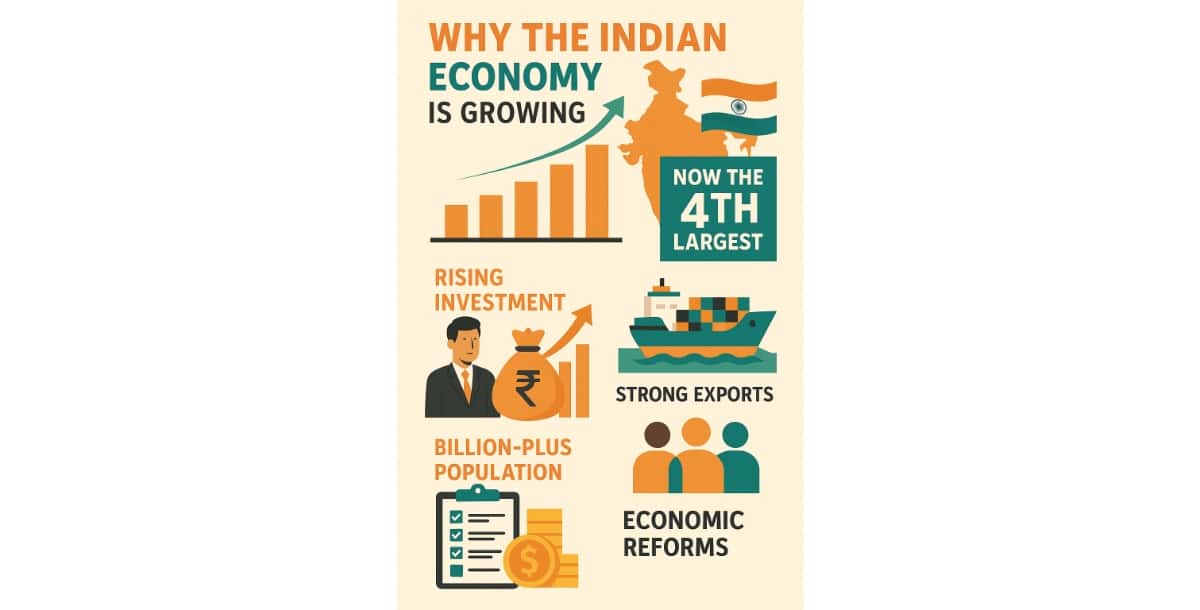
The AI Process Infographic Maker helps you explain the key drivers behind India’s economic growth, including rising foreign investment, a large working-age population, and recent policy reforms. The design uses a clean layout with intuitive icons, making economic data easy to follow for readers in business, academia, and general news audiences.
Suggested Read: Introducing Kling AI Avatar v2 Pro API on Pixazo: Ultra-Realistic Talking Avatars from a Single Image
- Why the Leaning Tower of Pisa Tilts
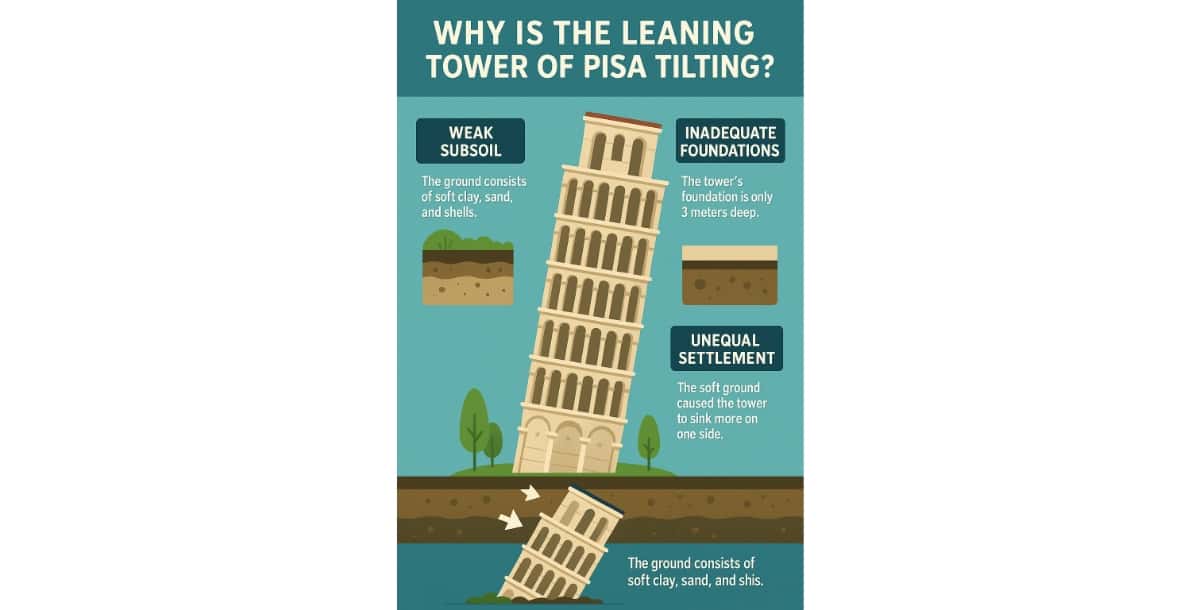
Perfect for science and history learners, this visual breaks down the geological and architectural reasons behind the tower’s tilt. AI Geographical Infographic Maker of Pixazo features cross-sectional views of soil layers, foundation depth, and historical restoration efforts, presented in a format that supports quick understanding.
- Why Antarctica Is Turning Green
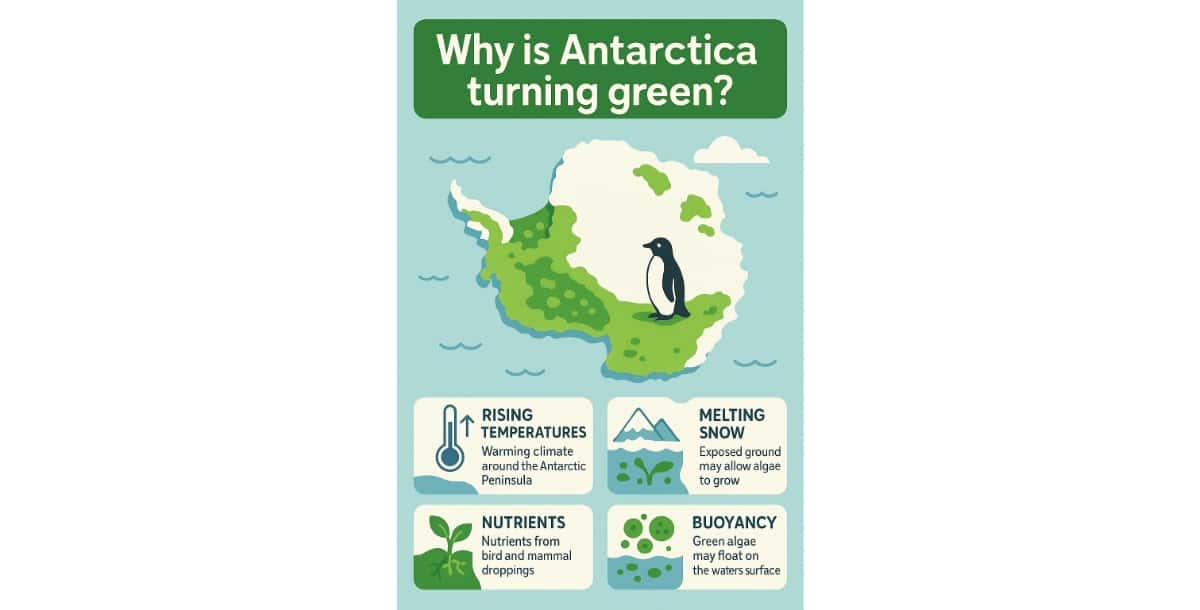
AI Informational Infographic Maker lets you explore a growing environmental concern: the spread of algae in Antarctic snow. It highlights climate data, changing temperatures, and the role of penguin waste in nutrient cycles. Clear visuals and simple labels help environmental educators and students grasp the link between warming trends and ecosystem changes.
Suggested Read: Best AI Cartoon Generator Tools in 2026: A Clear Overview
- Why the Taj Mahal Is Turning Yellow
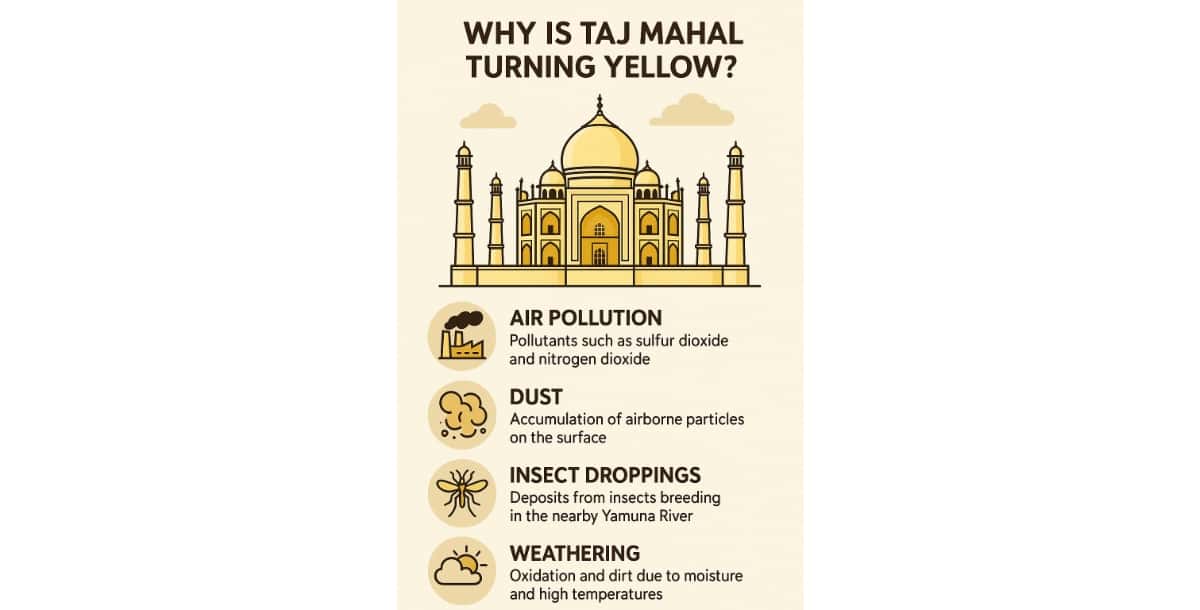
An AI Timeline Infographic Maker outlines the factors contributing to the discoloration of this iconic monument. From air pollutants to insect activity and natural weathering, this infographic delivers a straightforward explanation ideal for history classes, tourism blogs, and cultural awareness content.
Key Features That Set This AI Infographic Generator Apart
Pixazo’s AI Infographic Generator is designed for users who need speed, simplicity, and quality, all without compromising creativity.
AI-Powered Visual Creation
You don’t need to spend hours researching or designing. Simply enter a topic, and the AI handles the rest, from content structure to layout. This is ideal for users who want a streamlined way to turn ideas into visuals quickly.
Topic-Relevant Illustrations and Icons
The generator intelligently selects icons and illustrations that match your subject. This removes the need to browse asset libraries or outsource design work, keeping your workflow fast and focused.
Multilingual Content Support
Reach global audiences by creating infographics in multiple languages. This feature is especially useful for educators, publishers, and brands targeting diverse regions.
Branding Flexibility
Easily integrate your own brand elements such as logos, fonts, and color schemes in your infographic to ensure consistent branding across the design that helps maintain a professional look and supports recognition across channels.
High-Quality Downloads
Export your completed infographic in high-resolution formats suitable for social media, blog posts, printed materials, or presentations. You get polished results that are ready to use anywhere, anytime.
Suggested Read: 41+ Best Infographic Examples Depicting Raw Data Into Graphics
Who Can Benefit from the AI Infographic Generator
This tool is designed for anyone who needs to simplify information and communicate it visually, without spending hours on design. It supports a wide range of use cases across education, marketing, business, and digital content creation.
Teachers and Students
Use AI Education Infographic Maker to turn complex lessons into easy-to-understand visuals. Whether it’s explaining historical events, scientific theories, or exam prep content, visual aids improve learning outcomes and classroom engagement.
Marketing Professionals
Create high-converting visuals for social media, email campaigns, or reports. The AI Marketing Infographic Maker helps marketers highlight stats, trends, and strategies in a format that’s both scroll-stopping and brand-ready.
Content Creators and Bloggers
Boost audience retention by embedding eye-catching infographics in blog posts, newsletters, or LinkedIn articles. Visual storytelling helps break up text, deliver value faster, and drive more shares across platforms.
Corporate Trainers and Internal Teams
Simplify company policies, workflows, or product guides using AI SWOT Infographic Maker. It ensures the infographic has clear visual communication that saves time during onboarding, enhances internal learning, and supports better understanding across teams.
Suggested Read: AI Music Generation Models: The Future of Sound and the Role of Meta’s AudioCraft
The Vision Behind Pixazo’s AI Infographic Generator
The AI Infographic Generator was developed with a clear goal in mind, to remove barriers between ideas and impactful visual communication. As the demand for quick, digestible, and visually compelling content grows, so does the need for tools that support non-designers in creating professional-quality visuals.
Abhinav Girdhar, CEO of Pixazo, explains:
“We built the AI Infographic Generator to make knowledge more accessible and communication more visual. Our mission has always been to eliminate complexity from creation, and this launch marks another big leap toward that goal.”
By combining automation, design intelligence, and ease of use, the tool empowers individuals and teams to explain, educate, and engage through visuals, without needing specialized skills or software. It reflects Pixazo’s broader vision of democratizing content creation across industries, from education and marketing to business and media.
Conclusion
In a world where attention is short and content is abundant, visuals are no longer optional, they’re essential. Pixazo’s AI Infographic Generator brings the power of design and automation together, making it easier than ever to turn complex information into clear, engaging infographics.
Whether you’re explaining a business concept, educating students, or building shareable content for your audience, this tool helps you communicate with clarity and speed. No design background needed and no complicated software required.
Start with a single idea and let the AI do the heavy lifting, from content structure to visual layout. Customize the final result to match your brand, publish across any platform, and deliver value that’s easy to absorb and hard to ignore.
Deepak Joshi
Author · Pixazo
Deepak writes about generative AI models, APIs, and the workflows teams use to ship them. Reviewed by Abhinav Girdhar.